The Claude Code PDF skill turns a messy pile of PDFs into something you can finish in one chat. You ask in plain English, and Claude merges files, pulls tables into a spreadsheet, or fills in a form for you. We tested it on three invoices and a fillable form, and the results were exact.
This guide is part of our Claude Code tutorials. Find more add-ons in our skills directory.
Tested with Claude Code v2.1.318 on 2026-11-05 (macOS). The skill came from Anthropic’s skills repository, commit ca45fc4 from 2026-10-28. We tested on a Mac, and the Windows and Linux steps follow Anthropic’s official instructions.
Quick Summary
| Question | Answer |
|---|---|
| What is it? | The official pdf skill from Anthropic, a folder with a SKILL.md guide, helper scripts and reference notes |
| What did we test? | Merging three PDFs, extracting tables to CSV, and filling a form with four fields |
| Did it work? | Yes. The merged file had 3 pages, the CSV had 9 item rows, and all 4 form fields read back correctly |
| What do you need? | Claude Code plus the Python libraries pypdf, pdfplumber and reportlab |
| Who should use it? | Anyone who handles invoices, forms or reports as PDFs every week |
What Is the Claude Code PDF Skill?
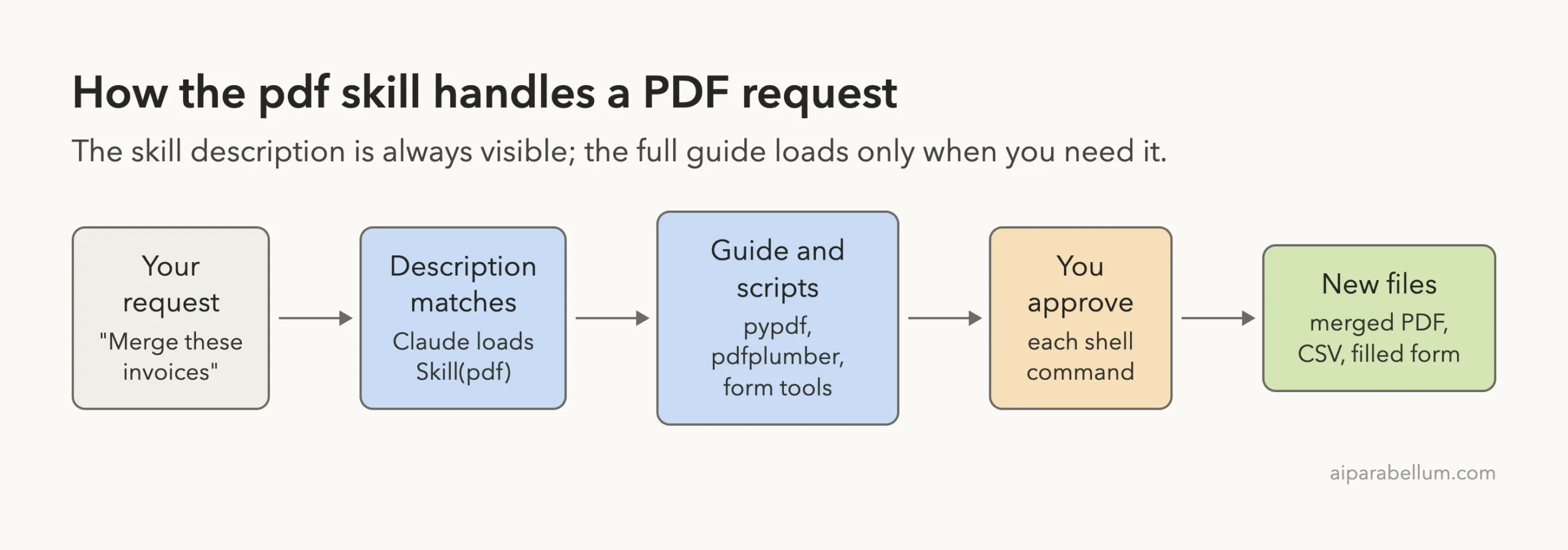
A skill is a small folder of instructions that Claude loads when your request matches it. The official skills guide describes it as a SKILL.md file that Claude adds to its toolkit. Claude uses a skill when it is relevant, or you can call one directly with /skill-name.
The pdf skill covers the jobs people actually do with PDFs. Its description lists reading text and tables, merging, splitting, rotating pages, adding watermarks, creating new PDFs, filling forms, encrypting, extracting images and OCR on scanned files.
The skill does not ship its own PDF engine. It teaches Claude which Python libraries to use and how to use them, and it adds a few scripts for forms. Claude then writes and runs the code for your specific files.
If you are new to the idea, read our guide to Claude Code skills first. It explains where skill folders live and how Claude picks one.
How We Set Up the PDF Skill Safely
We never installed anything into our normal Claude Code setup. We cloned Anthropic’s skills repository into a throwaway sandbox, then copied only the pdf folder into a demo project at .claude/skills/pdf. We started Claude Code with --setting-sources project, so only that project’s settings were loaded.
Before running anything, we read the skill’s scripts. They only read and write PDF files, so nothing looked unsafe. The skill’s license is listed as proprietary, so check LICENSE.txt before you reuse it in a product.
The official install route
The skill is also part of the document-skills plugin in the anthropic-agent-skills marketplace. The commands for that route are below. We did not run them, because we wanted to keep our own setup untouched, so treat them as the documented route and not as something we verified.
/plugin marketplace add anthropics/skills
/plugin install document-skills@anthropic-agent-skills
Our guide to official skills repo shows that marketplace route in a real test. For plugins in general, see the official plugin guide.
The Python libraries you need
The skill’s guide uses pypdf for merging and form fields, pdfplumber for text and tables, and reportlab for creating PDFs. We put them in a virtual environment and started Claude Code with that environment first on the path. Without these libraries, Claude will either install them or tell you they are missing.
python3 -m venv venv
venv/bin/pip install pypdf reportlab pdfplumber pandas
Step 1: Check That the Skill Is Loaded
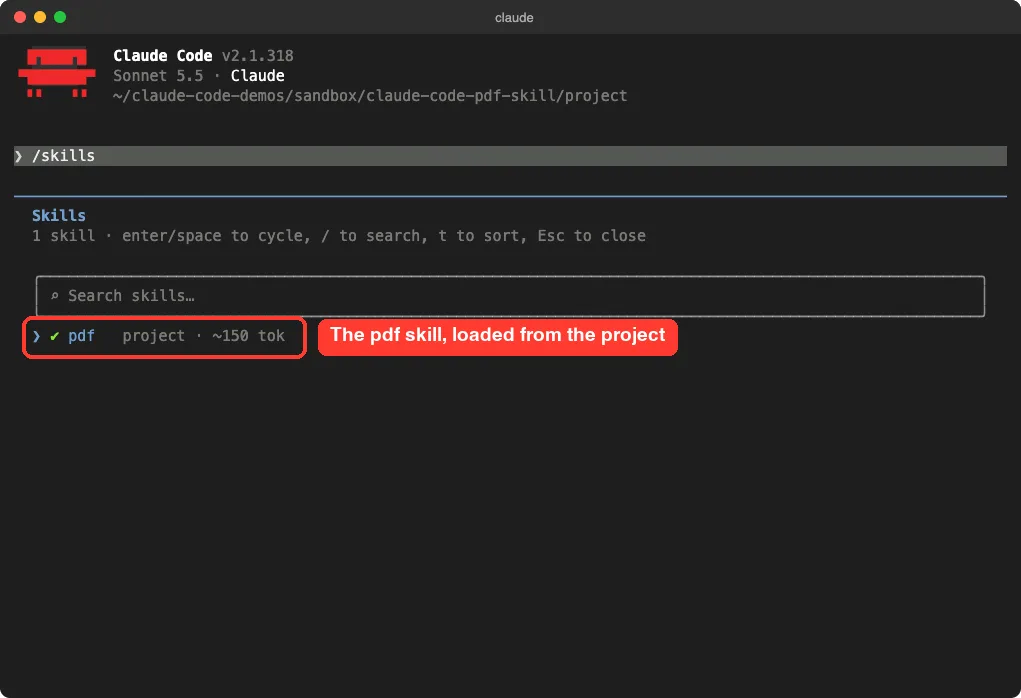
Open Claude Code in your project folder and type /skills. A list opens with every skill Claude can see. In our demo project there was exactly one entry, pdf, marked as a project skill with about 150 tokens of context cost.
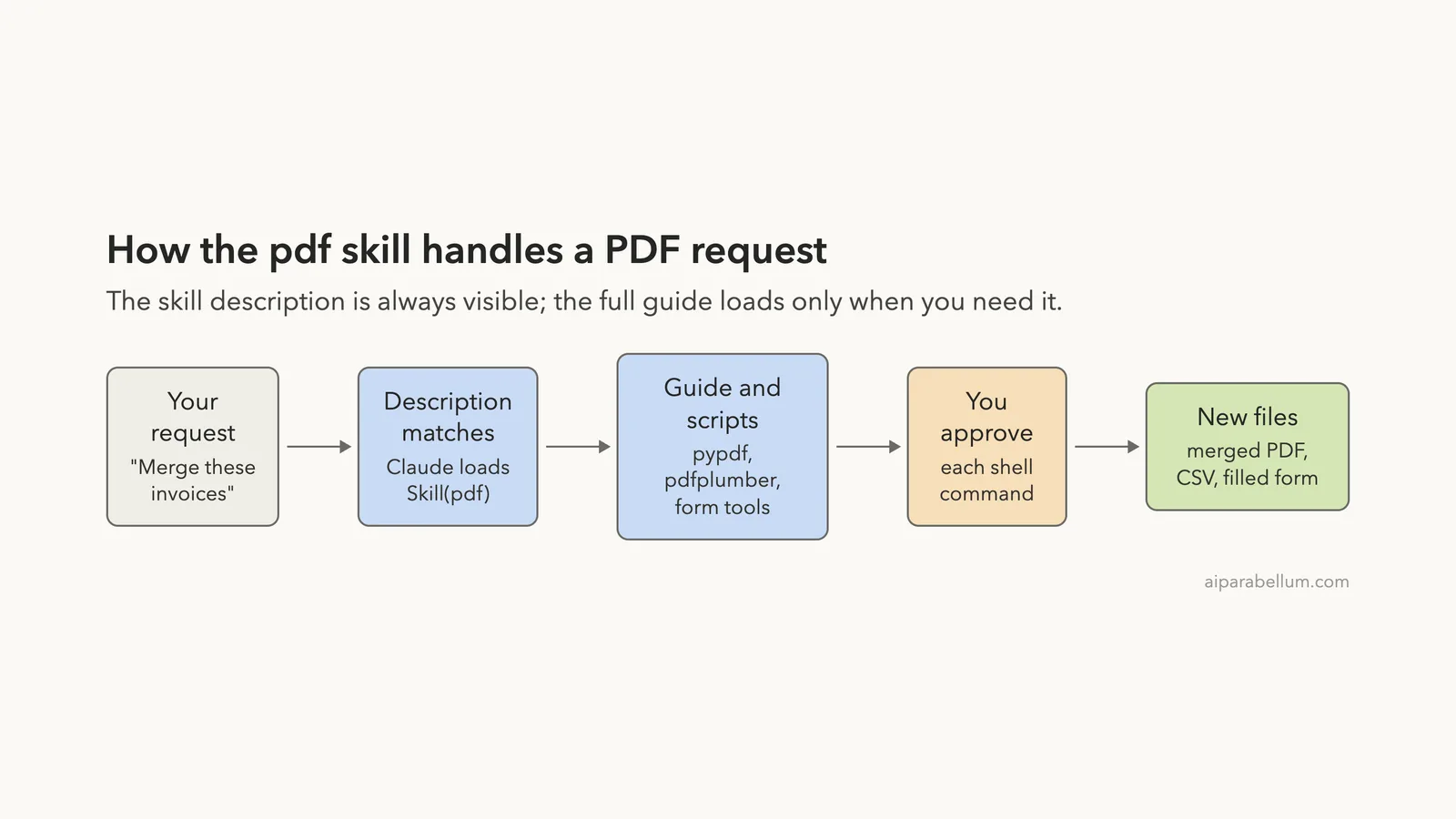
That small number matters. Only the short description sits in Claude’s context all the time. The long guide loads only when a PDF job comes up.
Step 2: Merge PDFs and Extract Tables
Our demo folder had three one-page invoices from a made-up cafe supplier, one for each month. Each had a small table with items, quantities and unit prices. We typed one prompt that asked for two jobs at once.
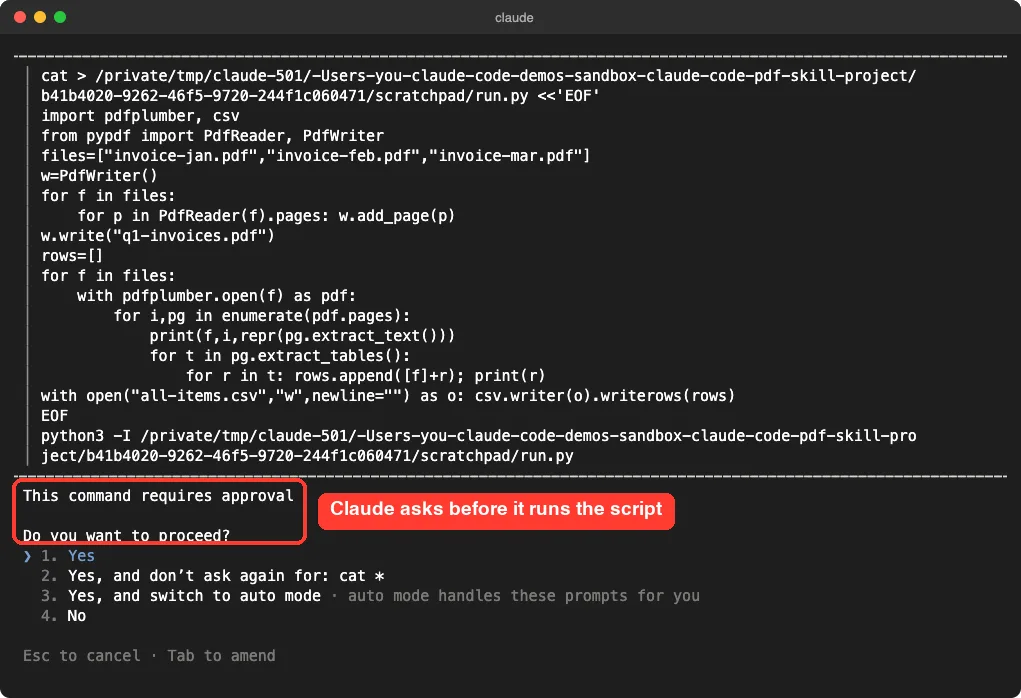
Merge invoice-jan.pdf, invoice-feb.pdf and invoice-mar.pdf into q1-invoices.pdf, then pull every table into one file called all-items.csv and tell me the grand total (qty x unit price).Claude wrote one short Python script that merged the files with pypdf and read the tables with pdfplumber. Before it ran, Claude asked for approval, and we chose Yes.
What came out
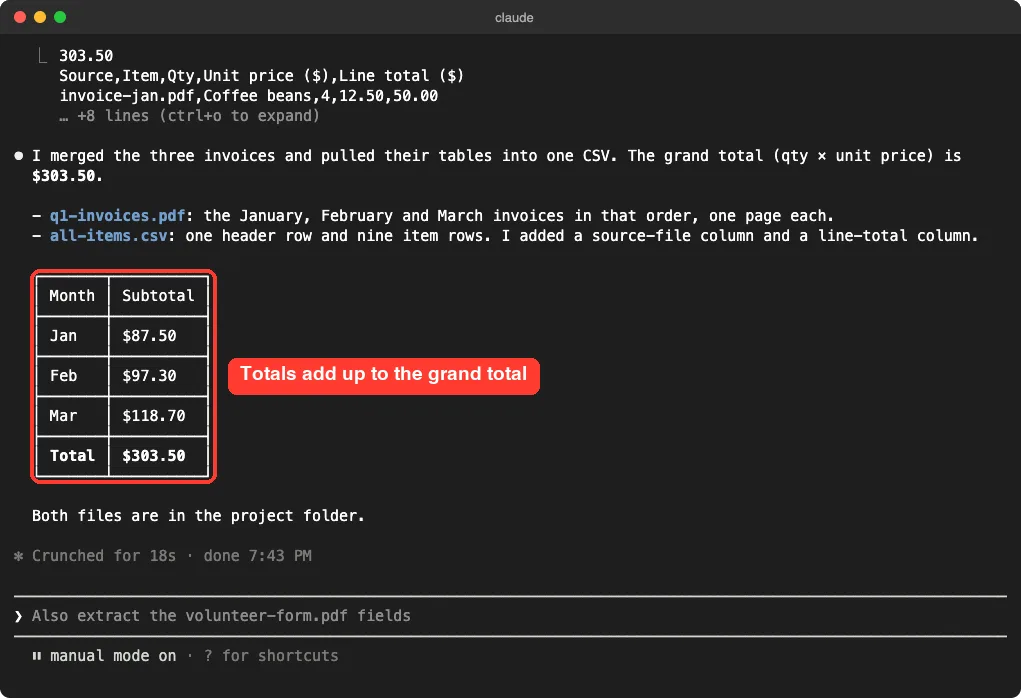
The merged q1-invoices.pdf had 3 pages, in January, February, March order. The all-items.csv file had one header row and nine item rows, plus a source-file column and a line-total column that Claude added on its own.
Claude reported a grand total of $303.50, with monthly subtotals of $87.50, $97.30 and $118.70. We added the nine lines by hand and got the same numbers.
One honest note: our invoices had clean table borders. Tables without lines, or scanned pages, are harder, and we did not test those. The skill’s guide points to OCR for scans, but we did not run that part.
If merging and splitting is your main need, our post on how to combine and split goes deeper on that one job.
Step 3: Fill a PDF Form With the Skill
Form filling is where the skill adds the most. We made a small fillable form with three text fields (name, email, favorite vegetable) and one checkbox for Saturdays. This time we named the skill in the prompt, so we could see it load.
Use the pdf skill to fill volunteer-form.pdf with name Sam Rivera, email [email protected], favorite vegetable tomato, and tick the Saturdays box. Save it as volunteer-form-filled.pdf and tell me which fields you filled.The screen showed Skill(pdf) with the message that it loaded. Claude then ran the skill’s check_fillable_fields.py script to see whether the form has real fields, and again asked for approval.
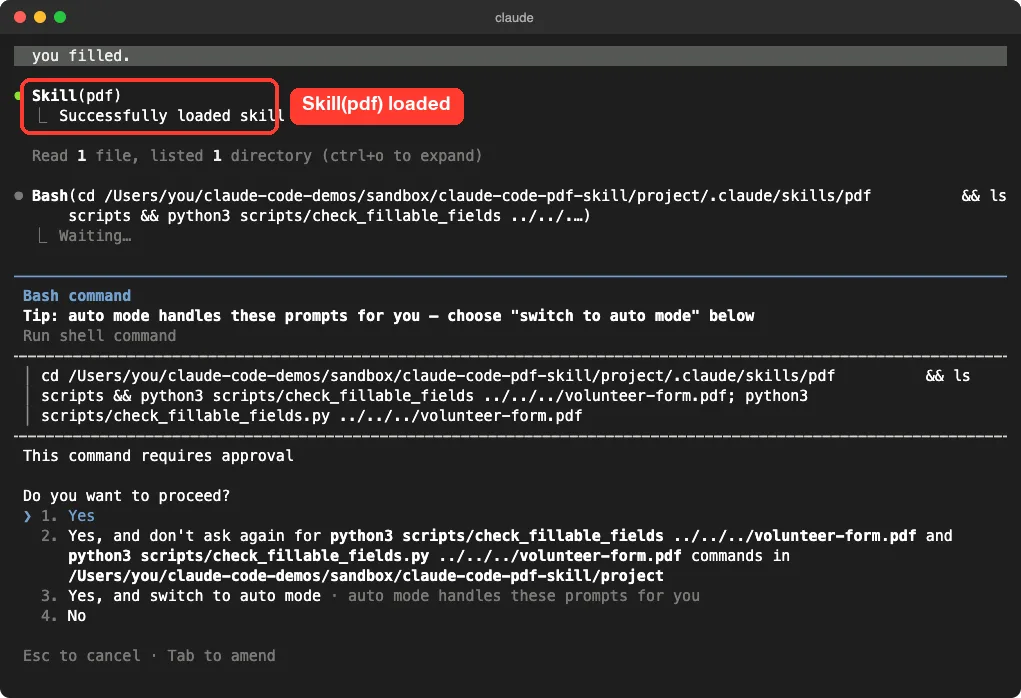
Checking the filled form
Claude saved volunteer-form-filled.pdf and read the values back from the saved file. It showed all four fields with the values we asked for. We then read the file ourselves with pypdf: the three text fields matched, and the checkbox value was set to yes.
Claude also told us what it did not do. It did not render the page to an image to check the layout, because the image script needs the pdf2image package, which was not installed. That is the kind of plain reporting you want from a tool that edits your documents.
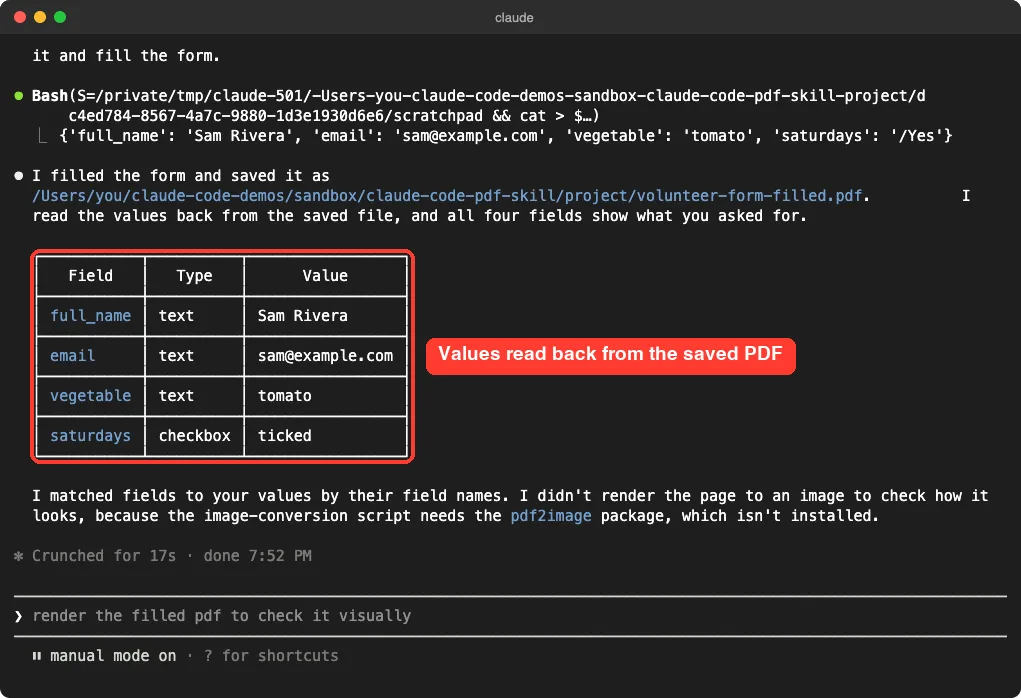
Fillable and non-fillable forms
Our form had real form fields, which is the easy case. The skill’s guide has a second path for forms without fields, where Claude finds where text should go and places it with annotations. We did not test that path, so we cannot say how well it works on your scanned paperwork.
What the Skill Folder Contains
Knowing what is inside helps you trust it. The folder holds a main guide, a form guide, a reference file, a license and a scripts folder.
| File | What it does |
|---|---|
SKILL.md | The main guide with merge, split, text and table recipes |
forms.md | Steps for filling forms, loaded only for form jobs |
reference.md | Advanced features and extra libraries |
scripts/check_fillable_fields.py | Tells you if a PDF has real form fields |
scripts/fill_fillable_fields.py | Writes values into form fields |
scripts/convert_pdf_to_images.py | Turns pages into images so Claude can look at them |
The skills guide notes that a skill body loads only when it is used. That is why long reference material costs almost nothing until you need it.
Is the Skill Worth Installing?
Here is our honest verdict from this one test. It did what we asked, showed its work, and reported what it skipped.
| Job | Result in our test |
|---|---|
| Merge three PDFs | Worked, 3 pages in the right order |
| Extract tables to CSV | Worked, 9 rows and a correct total |
| Fill a fillable form | Worked, 4 of 4 fields correct |
| Fill a non-fillable form | Not tested |
| OCR on scanned pages | Not tested |
| Split, rotate, watermark, encrypt | Not tested |
The skill is a good fit if you handle PDFs weekly and want repeatable results. It is overkill if you merge one file a year, because a free desktop tool does that in seconds. If you only need Claude to read a PDF, see Claude reading PDFs, since reading works without any skill.
Ask for new file names and read the saved values back, and the skill never puts your originals at risk.
Try It Yourself
Make a practice folder with two or three PDFs you do not mind sharing with Claude. Start Claude Code there, confirm /skills lists pdf, and paste this prompt.
Use the pdf skill. Merge the PDFs in this folder into combined.pdf, list the page count of each file, and extract any tables you find into tables.csv. Do not change the original files.Open combined.pdf and check the page order. Then open tables.csv and compare two or three rows against the originals before you trust it.
Common Mistakes
- Skipping the Python libraries, which makes Claude stop to install them or fail.
- Pointing the skill at a form with no real fields and expecting a perfect result.
- Trusting extracted numbers without checking a few rows against the source PDF.
- Working on your only copy of a file instead of asking Claude to save a new one.
- Approving every command without reading it, which defeats the safety prompt.
Pro Tips
- Name the skill in your prompt, for example “Use the pdf skill”, so you can see
Skill(pdf)load. - Ask Claude to save to a new file name, such as
-filled.pdf, so the original stays safe. - Ask Claude to read the saved values back, as we did, to catch mistakes.
- Keep the skill in
.claude/skillsinside a project, so only that project uses it. - Read our tips on Claude Code permissions if the approval prompts feel noisy.
Cheat Sheet
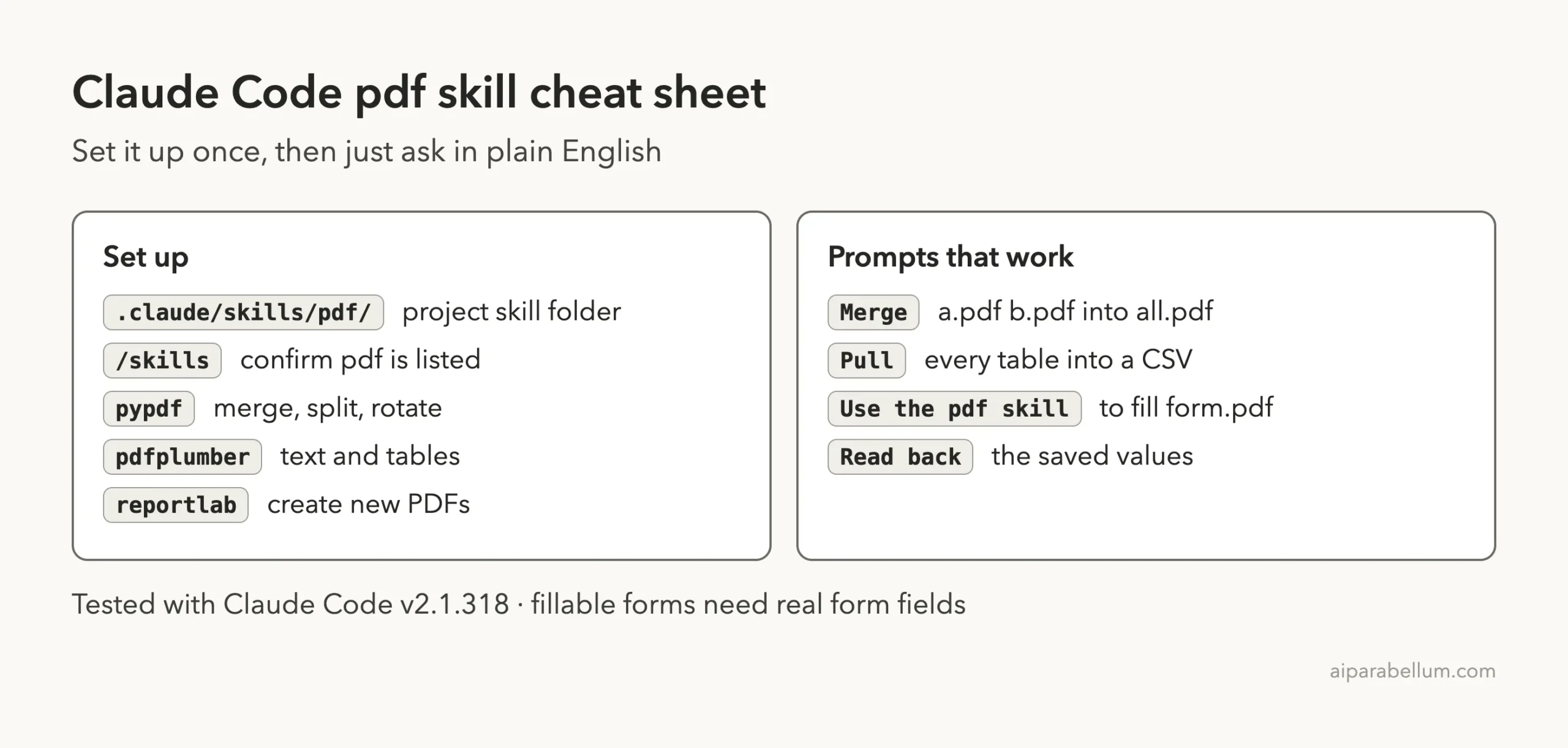
Where the Official Docs Fit
Everything about where skills load and how they trigger is covered in the official guide. We used it to check the folder rules before we built the demo.
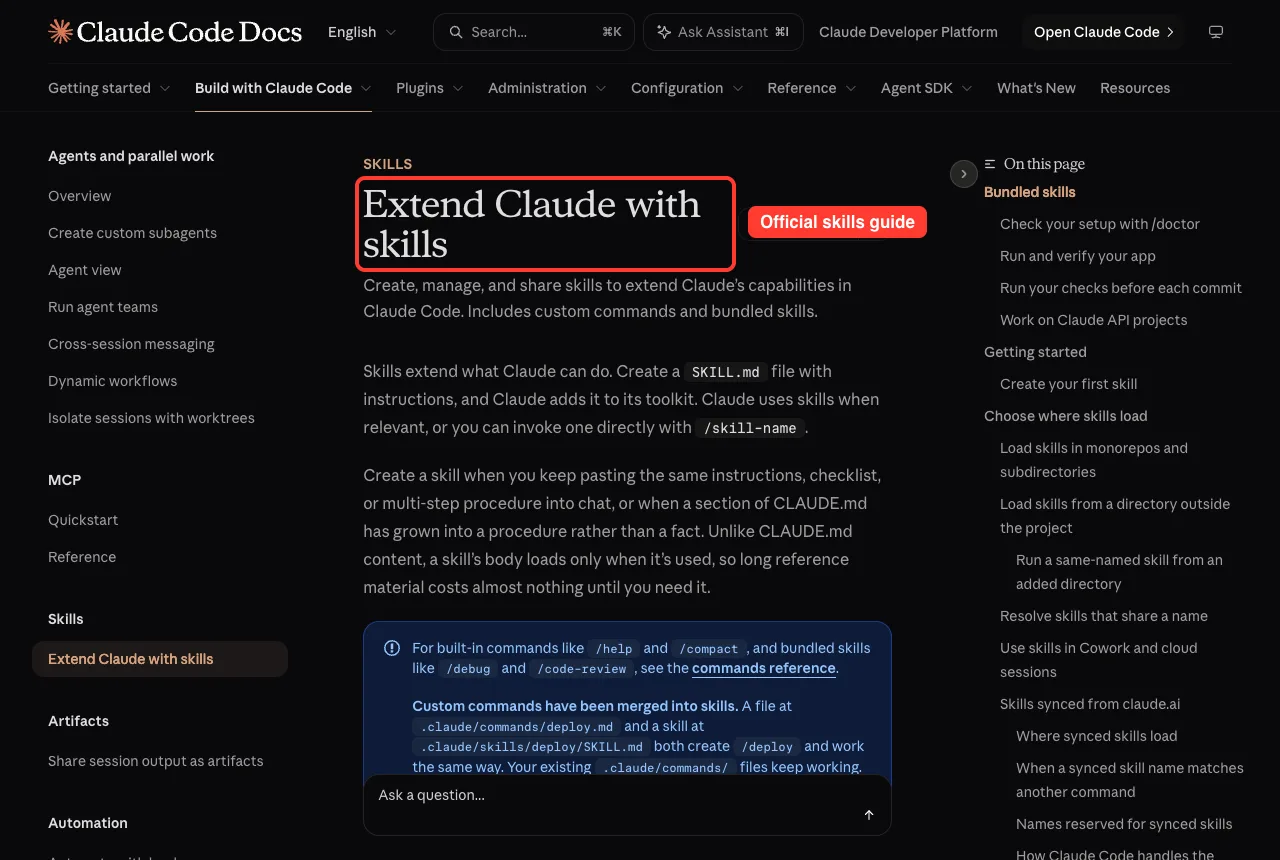
Skills and plugins overlap, and our comparison of skills versus plugins helps you choose between them. You can also run the same work with Claude in other apps, but the Claude Code route gives you files you can script and repeat.
Frequently Asked Questions
Is the Claude Code PDF skill free?
The skill folder itself is published by Anthropic and costs nothing to copy. Using it still spends your normal Claude Code usage. Check its license file before using it in a product.
Do I need to install Python libraries?
Yes. The guide relies on pypdf, pdfplumber and reportlab. We installed them in a virtual environment, and one image script also needs pdf2image.
Can it fill any PDF form?
We only tested a form with real fillable fields, and it worked on all four. The skill describes a separate path for forms without fields, but we did not test it.
Does Claude change my original PDF?
Not in our test. Claude wrote new files and left the three invoices and the blank form as they were. You can make that a rule by asking for new file names in every prompt.
Does it work on Windows and Linux?
We tested on macOS only. The skill is Python based, so the idea carries over, but follow Anthropic’s official instructions for your system.
Conclusion
The Claude Code PDF skill is a practical add-on for anyone who lives in PDFs. In our test it merged three invoices, pulled nine rows into a CSV with a correct $303.50 total, and filled a four-field form with every value correct. Set it up in a project folder, ask for new file names, check a few results by hand, and you have a repeatable way to finish PDF chores in one chat. Browse all our Claude Code tutorials for more add-ons to try.