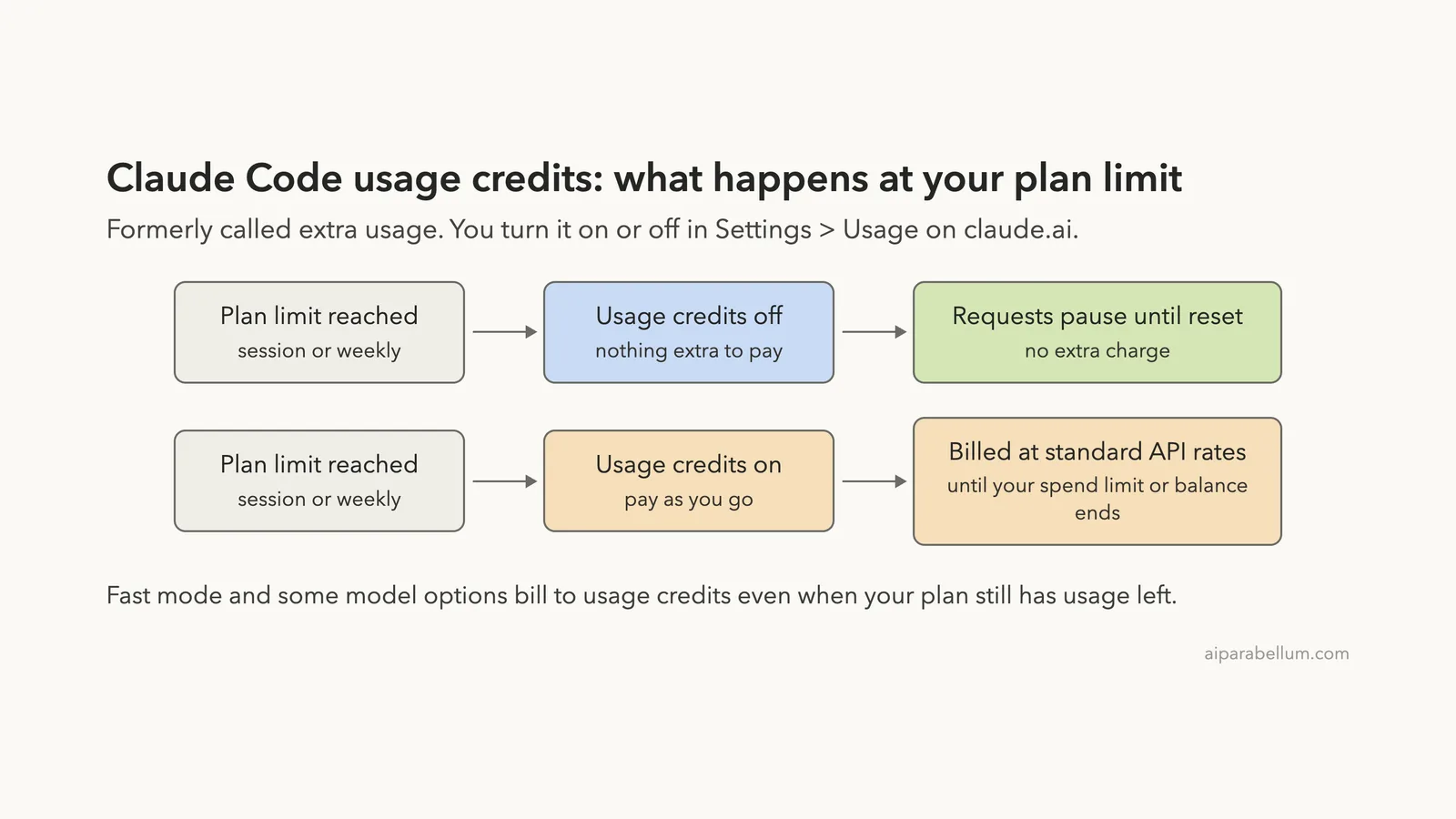
Claude Code extra usage is the pay-as-you-go option that lets you keep working after you hit your plan’s limit, and Anthropic now calls it usage credits. You turn it on or off in Settings > Usage on claude.ai, in the section named Usage credits. From the terminal, /usage-credits opens that same page, and /usage tells you whether it is on.
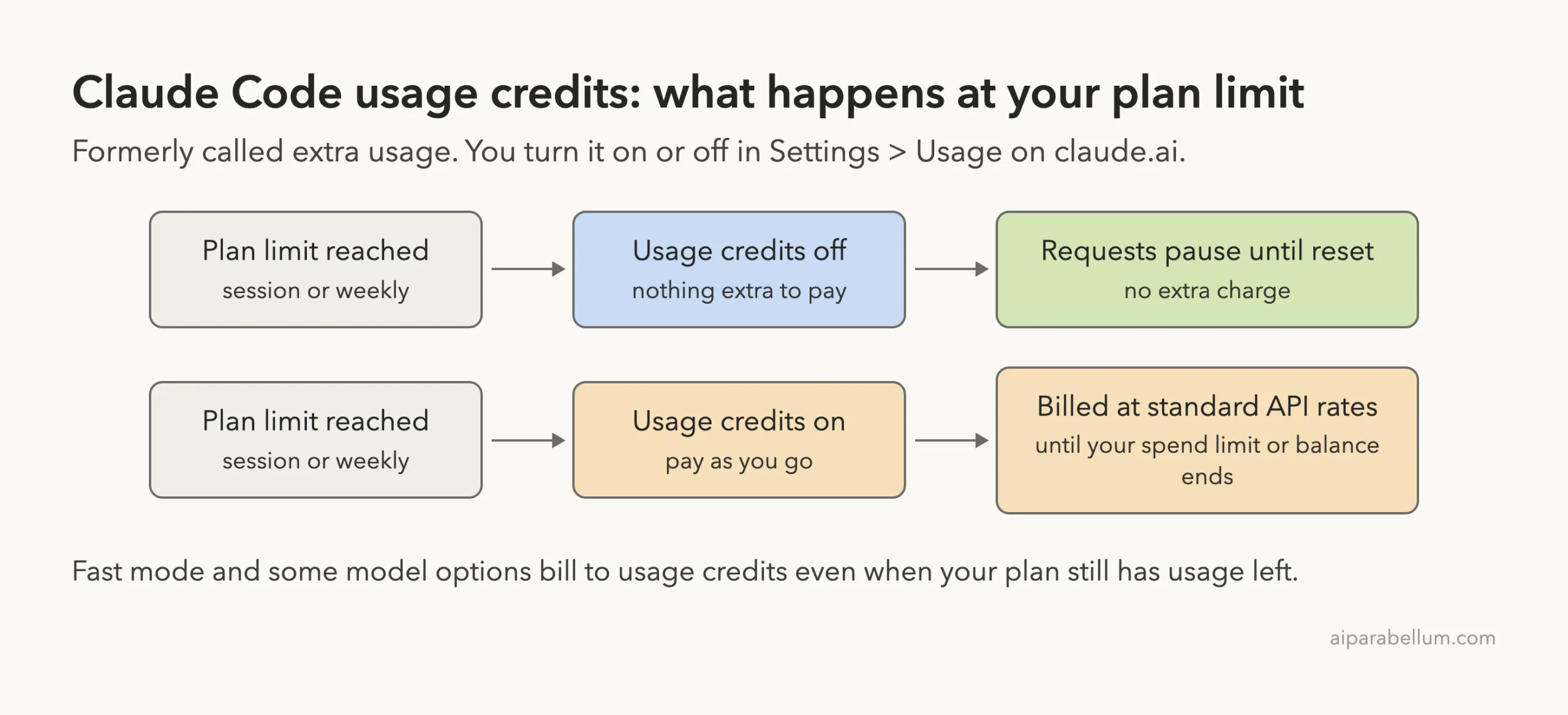
If it is off, you can’t be billed past your subscription: Claude Code simply pauses until your limit resets. If it is on, requests past your limit are billed at standard API rates, on top of your subscription, until you reach your monthly spend limit or your credit balance runs out.
So the way to avoid a surprise charge is short. Check the Usage credits row in /usage, set a monthly spend limit if you keep credits on, leave auto-reload off, and remember that a few features, such as fast mode, always bill to credits.
This guide is part of our help series. Browse all our Claude Code tutorials for more fixes and how-tos.
Tested with Claude Code v2.1.325 on macOS on November 16, 2026. We ran /usage and the command menu in a throwaway demo folder, and those two terminal captures are real.
We did not change any billing setting or buy credits for this guide. The on and off steps, the billing rules and the limit messages come from Anthropic’s official docs and Help Center, and each section says which is which.
Claude Code Extra Usage: Quick Summary
| Question | Short answer |
|---|---|
| What is it called now? | Usage credits. The old name was extra usage |
| Where is the switch? | Settings > Usage on claude.ai, in the Usage credits section |
| Terminal shortcut | /usage-credits opens that page in your browser |
| How do I check it? | Run /usage and read the Usage credits row |
| What does it cost? | Standard API rates, charged separately from your subscription |
| How do I cap it? | Set a monthly spend limit and keep auto-reload off |
| Can I turn it off later? | Yes, at any time, on the same page |
| Is it the same as API billing? | No. An API key bills a Claude Console account instead |
What Extra Usage Is, and Why It Is Now Called Usage Credits
Paid Claude plans come with included usage. Most have a session limit that resets every five hours and a weekly limit, as Anthropic’s Help Center explains. When you run out, Claude Code stops and shows a message like You've hit your session limit.
Usage credits are the way past that wall. Instead of waiting, you pay for the extra requests as you go. The Help Center describes it as switching to consumption-based pricing at standard API rates so your work continues without a break.
The name changed along the way. The Claude Code changelog notes that “extra usage” was renamed to “usage credits” across the CLI, and that /extra-usage became /usage-credits, with the old name still working. That is why older guides, and the address of Anthropic’s own help article, still say extra usage.
In v2.1.325, typing /usage-cr at the prompt lists the command under its new name. Its description reads “Configure usage credits or request them from your admin when you hit a limit.”
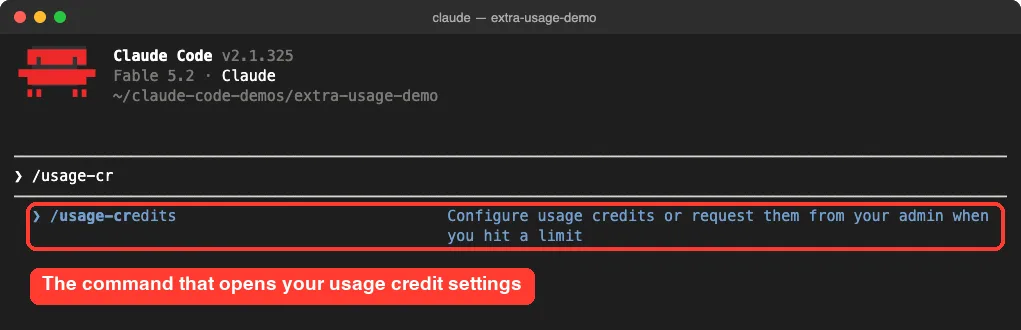
/usage-credits. We did not run it, since it opens account billing settings.Who can use it
Usage credits belong to subscription plans. The Help Center article covers Pro, Max and Ultra, and the Claude Code docs describe a Team and Enterprise version that an admin controls.
The docs are also clear on one limit: /usage-credits works after you sign in with a claude.ai subscription through /login, and it isn’t available with API key authentication. If you are not sure which sign-in you have, our guide to plans and login walks through the options.
How to Check Whether Usage Credits Are On
Start here, because it takes ten seconds and changes nothing. Open Claude Code in any folder and run:
/usageScroll to the bottom of the screen. On our test account the last block read “Usage credits” with the line Usage credits are off · /usage-credits to turn them on. That is the answer you want if your goal is zero extra charges.
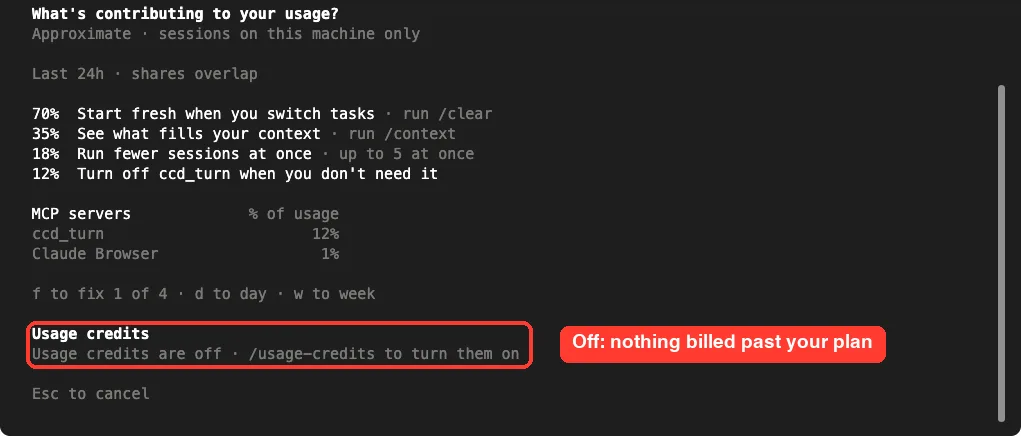
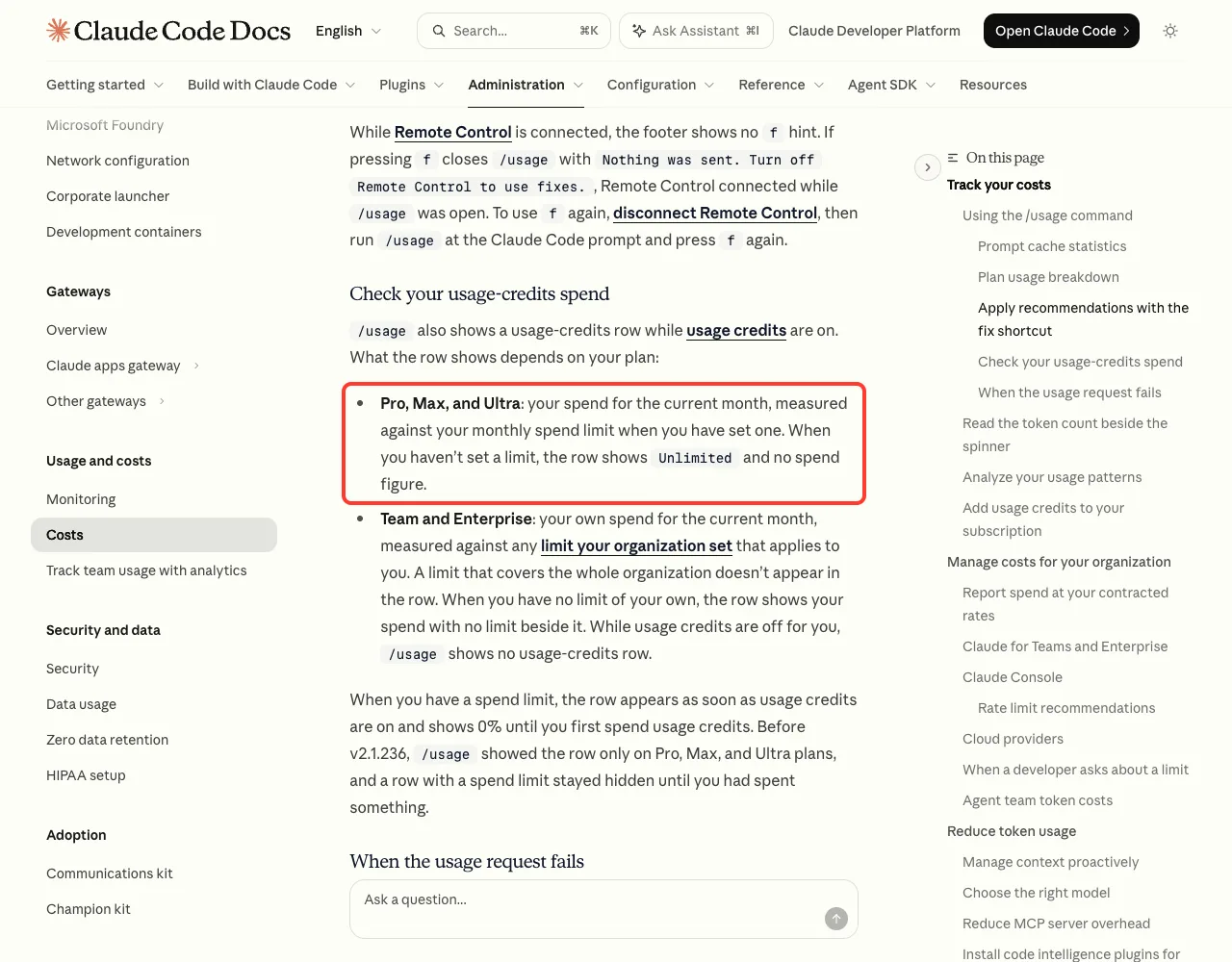
/usage in v2.1.325. The Usage credits block at the bottom shows the current state.When credits are on, the docs say the row changes. On Pro, Max and Ultra it shows your spend for the current month measured against your monthly spend limit, if you have set one.
There is one detail worth knowing. With no limit set, the docs say the row shows Unlimited and no spend figure. If you see that word, treat it as a prompt to set a limit.
The same /usage screen also shows your plan bars and a breakdown of what is using your allowance. We cover that part in our walkthrough on how to see token usage.
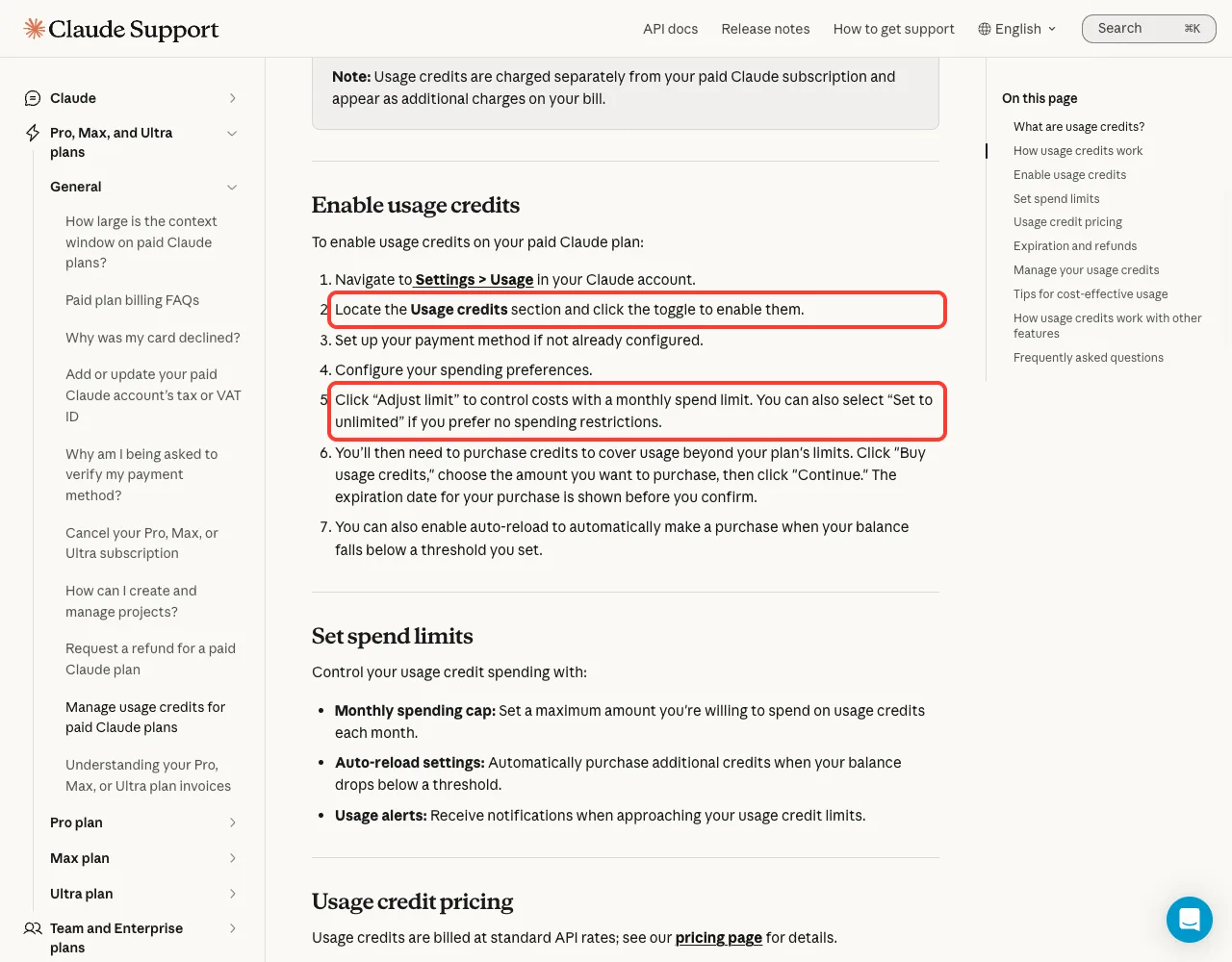
How to Turn Claude Code Extra Usage On
These steps come from Anthropic’s Help Center article on usage credits. We did not run them, because they change billing on a real account.
- Go to Settings > Usage in your Claude account, or run
/usage-creditsin Claude Code to open that page. - Find the Usage credits section and click the toggle to enable it.
- Set up a payment method if you don’t have one on file.
- Click “Adjust limit” and set a monthly spend limit. The page also offers “Set to unlimited”.
- Click “Buy usage credits”, choose an amount, and click “Continue”. The expiration date is shown before you confirm.
- Optionally enable auto-reload, which buys more credits when your balance drops below a threshold you set.
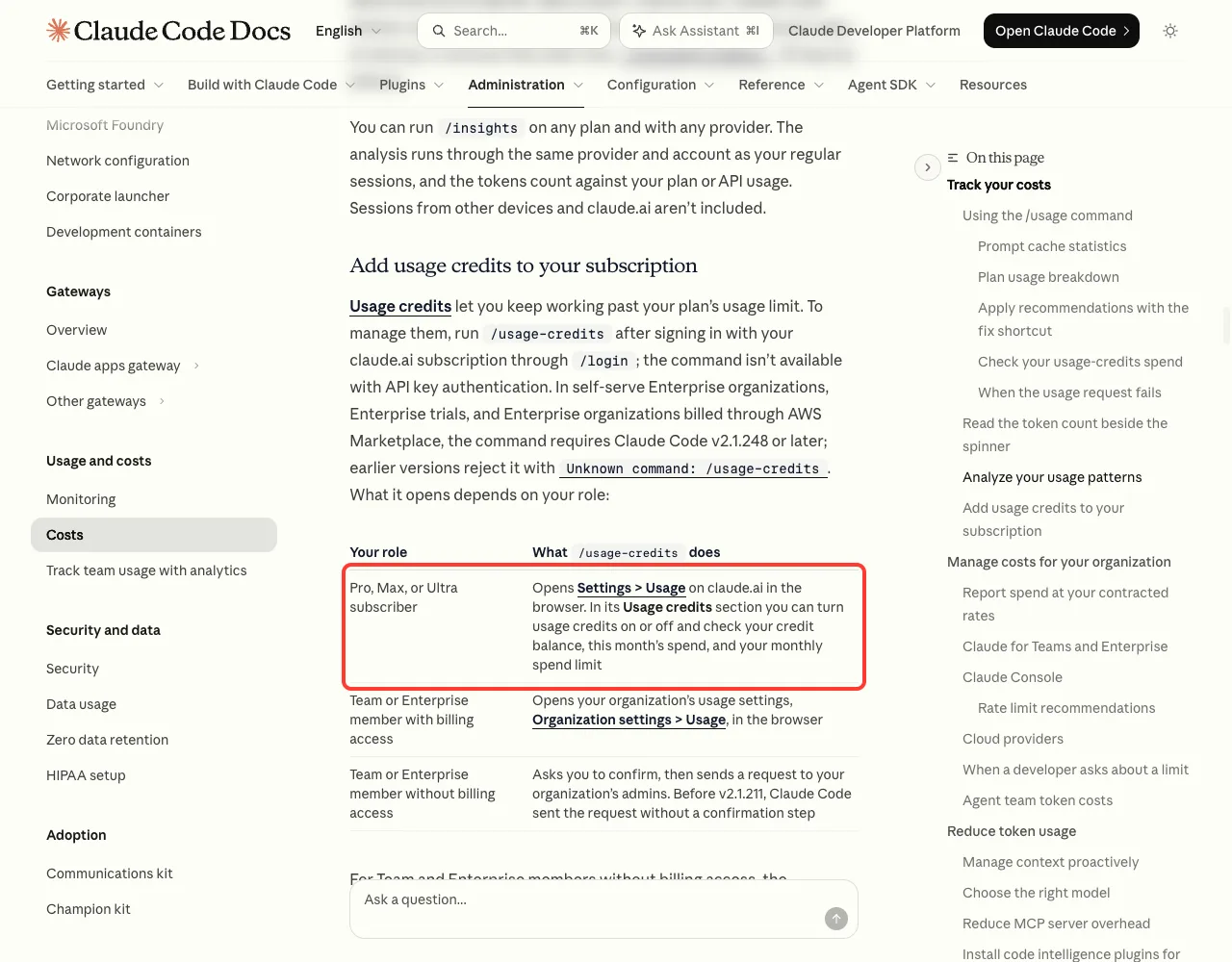
What /usage-credits does depends on your role. The Claude Code docs list three cases.
| Your role | What /usage-credits does |
|---|---|
| Pro, Max or Ultra subscriber | Opens Settings > Usage on claude.ai, where you turn credits on or off and see balance, spend and limit |
| Team or Enterprise member with billing access | Opens Organization settings > Usage in the browser |
| Team or Enterprise member without billing access | Asks you to confirm, then sends a request to your organization’s admins |
One more note from the error reference. If you turn credits on to use a 1M context model, the change takes effect after you restart Claude Code or start a new session.
How to Turn Claude Code Extra Usage Off
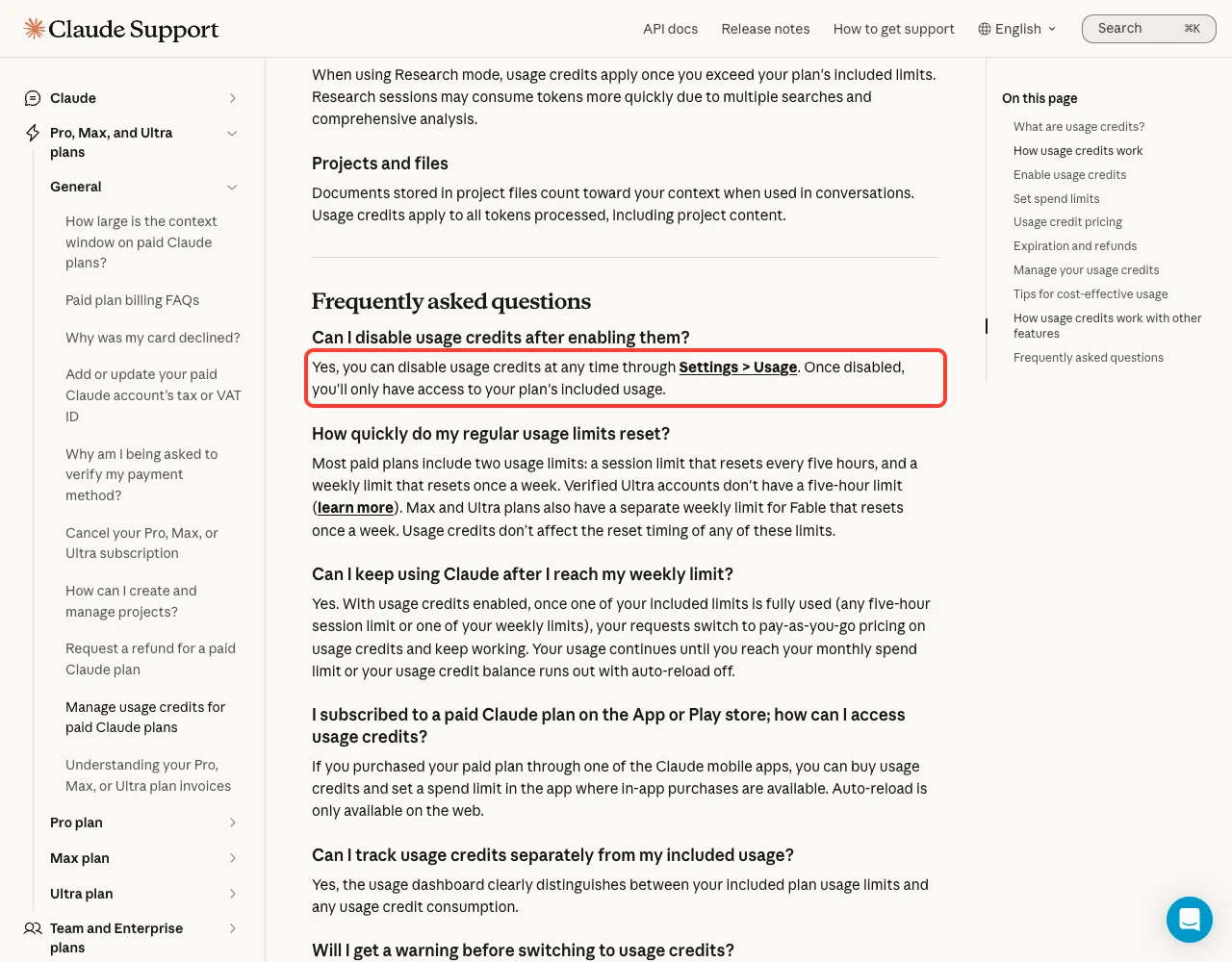
Turning it off uses the same page. Go to Settings > Usage on claude.ai, find the Usage credits section, and switch the toggle off.
The Help Center answers this directly: you can disable usage credits at any time, and once disabled you only have access to your plan’s included usage. In Claude Code terms, you go back to waiting for the reset when you hit a limit.
After you switch it off, run /usage again. The docs say that while usage credits are off, the row no longer shows spend. On our account it showed the plain “Usage credits are off” line from the earlier screenshot.
Off is the only setting that makes an extra charge impossible. Everything else is a cap.
Any credits you already bought stay on your account. The Help Center says purchases are non-refundable, and that credits can only be used with an active paid plan.
How Usage Credits Are Billed
This is the part that surprises people, so it is worth reading slowly. All of it comes from the Help Center article.
- Credits are billed at standard API rates, not at a subscription discount.
- They are charged separately from your plan and appear as additional charges on your bill.
- Claude conversations and Claude Code in the terminal draw on the same limits and the same credits.
- Spending continues until you reach your monthly spend limit, or your balance runs out with auto-reload off.
- Your session and weekly limits still reset on their normal schedule.
Expiry is new. Credits bought on or after December 7, 2026 generally expire 12 months after purchase, while credits bought before that date don’t expire. The exact dates are shown on the Usage page, and they can differ by country.
You do get a warning before the switch. The Help Center says a notification appears as you approach a limit, and once a request goes through on credits it changes to “Now using credits.”
Features that use credits even when your plan has room
Most surprise charges come from here. With credits on, some features bill to them straight away, without waiting for you to hit a limit.
| Feature | What the docs say |
|---|---|
| Fast mode | On subscription plans it is available through usage credits only, and draws from them even if you have plan usage left |
| Sonnet 4.6 with 1M context | Requires usage credits on every subscription plan |
| Opus 4.6 with 1M context | Requires usage credits on Pro; included on Max, Ultra, Team and Enterprise |
| Fable models | Depending on plan and seat tier, can bill to credits; /model then shows “Requires usage credits” |
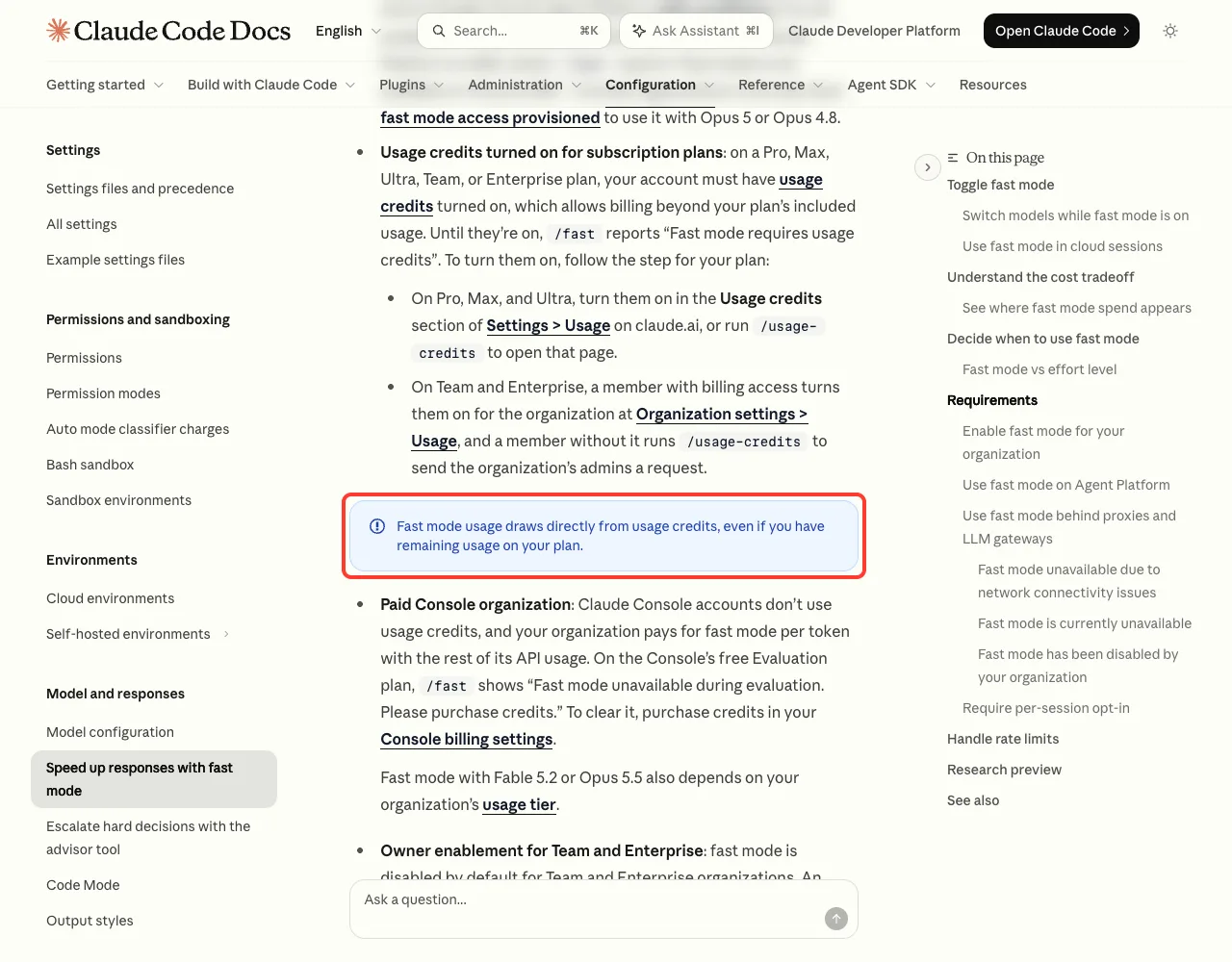
Fast mode is the big one, because it is a single toggle. Our guide to fast mode covers its pricing and when it is worth paying for.
There is a quieter case too. The model docs say that in non-interactive mode with the -p flag, Claude Code never shows the consent prompt for a Fable request that would bill to credits. It bills it without asking, so check your model before you script a long run.
What You See When Credits Hit a Limit
We can’t trigger these safely, so the text below is taken from the official error reference. If you keep credits on with a spend limit, this is the message that tells you the cap did its job:
You've hit your monthly spend limit · raise it at https://claude.ai/settings/usage?from=cc_cli_limit_messageIt means your plan’s included usage can’t cover the request, and the credits that would pay for it have reached the limit you set. Nothing more is charged. You can raise the limit in Settings > Usage, run /usage-credits, or wait if the message names a reset time.
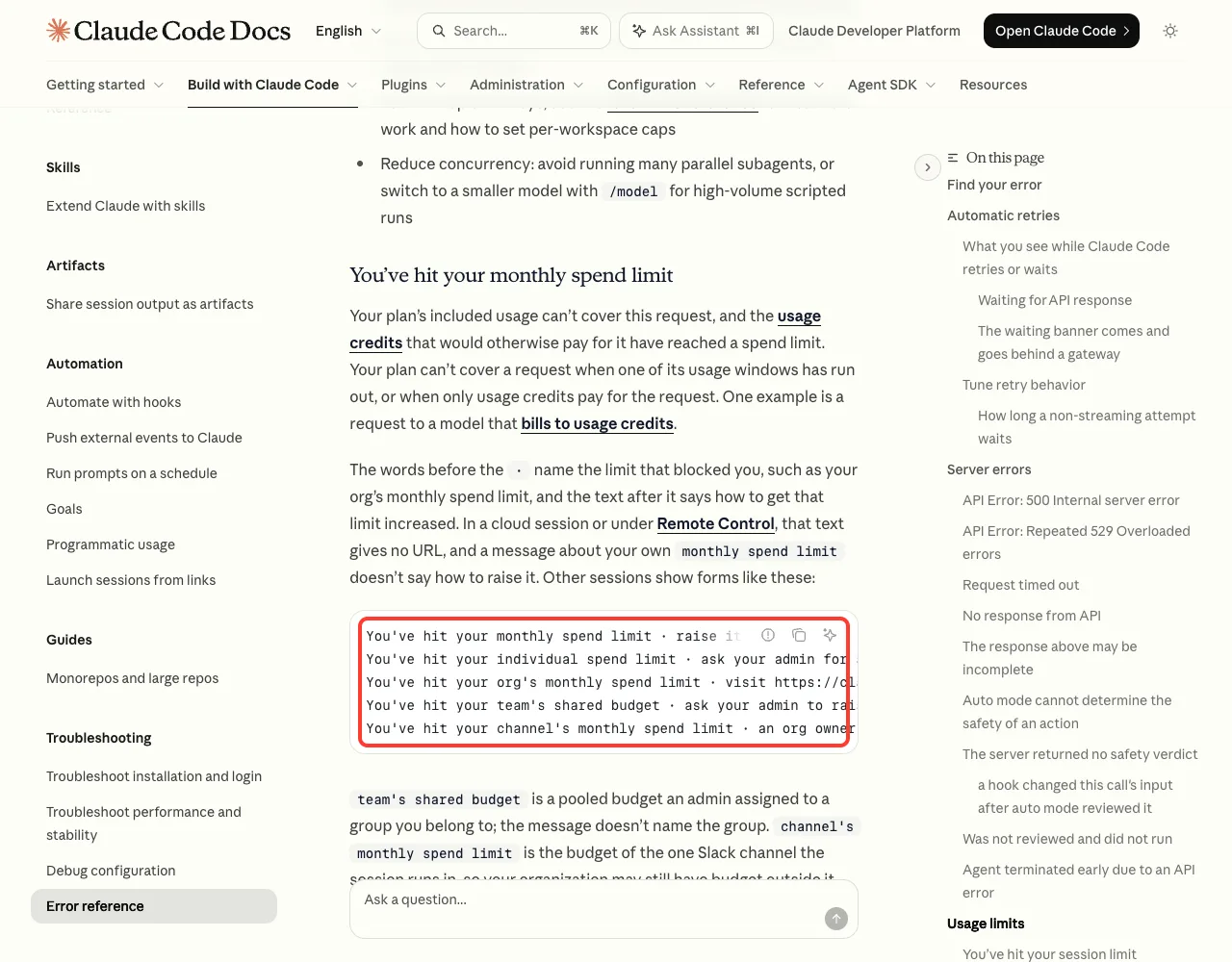
Two related messages are worth recognizing.
Usage credits required for 1M context: you picked a 1M model your plan only includes through credits. Run/modeland choose the standard variant, and no credits are needed.Fast mode disabled · Out of usage credits: your balance ran out mid-session. Claude Code retries at standard speed and pricing, so you keep working.
If credits are off and you hit a plan limit, you see the regular limit message instead. Our guide to the usage limit message explains the reset times and the automatic wait, and the full list of messages lives in our common errors guide.
Usage Credits vs API Billing: Not the Same Thing
It is easy to mix these up, because both are pay-as-you-go and both use API rates. They bill different accounts.
| Usage credits | API key billing | |
|---|---|---|
| Sign-in | claude.ai subscription through /login | ANTHROPIC_API_KEY or a Console login |
| When you pay | Only past your plan limit, or for credit-only features | For every request |
| Where you manage it | Settings > Usage on claude.ai | Claude Console billing and workspace limits |
| Spending cap | Monthly spend limit | Workspace spend limits |
/usage-credits | Available | Not available |
The trap is a stray key. The authentication docs say that if you have a subscription but also have ANTHROPIC_API_KEY set, Claude Code uses the key once you approve it. From then on your work bills to the Console account, and your subscription sits unused.
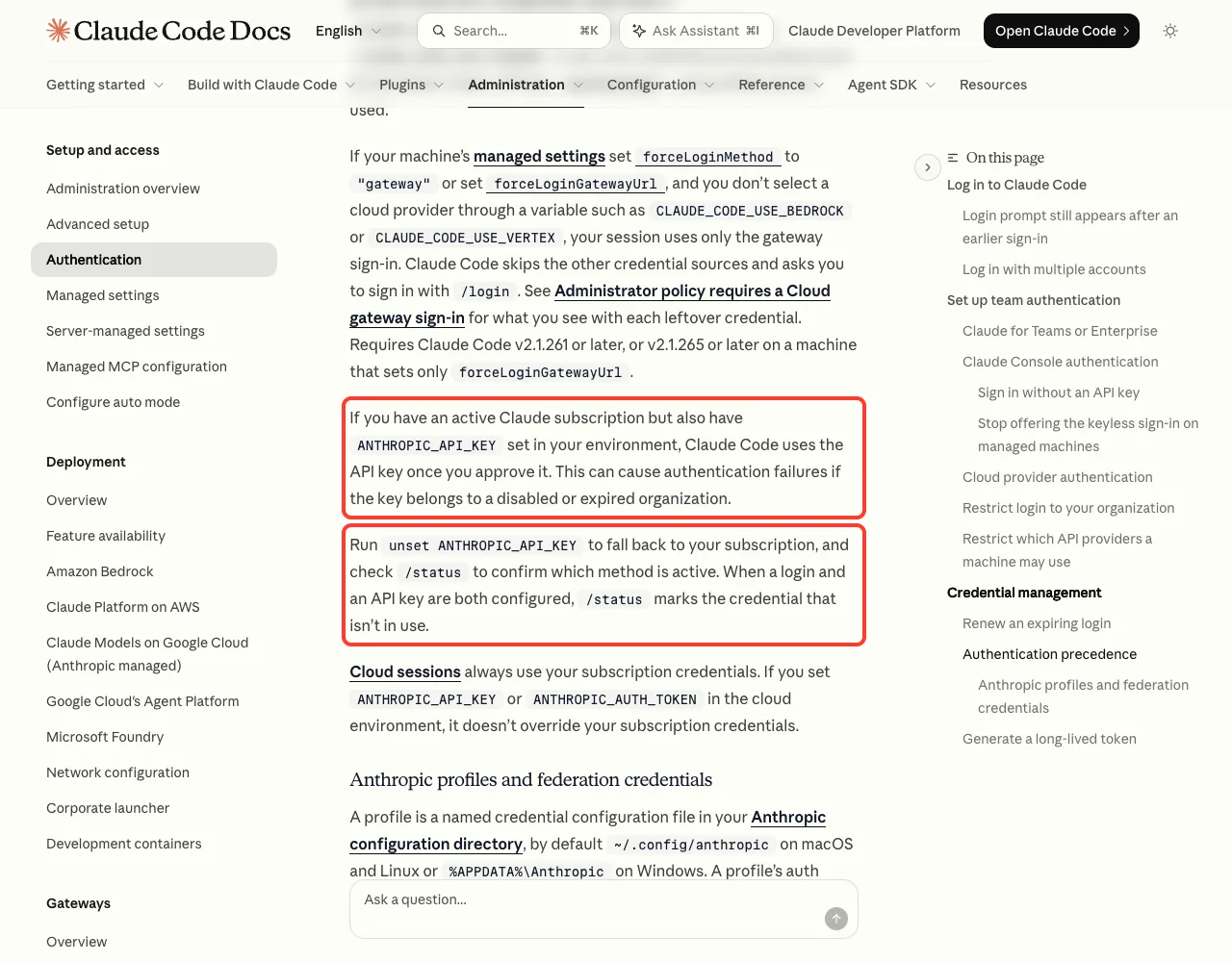
The fix from the docs is two commands. Run this in your shell, then check /status inside Claude Code to confirm which method is active:
unset ANTHROPIC_API_KEYThe Help Center adds one more distinction. Usage credits are separate from the monthly API credits included with Max and Ultra plans, and those API credits don’t pay for usage credits in Claude or Claude Code. For scripts and CI, our guide on headless auth shows how to pick the right credential on purpose.
How to Avoid Surprise Charges
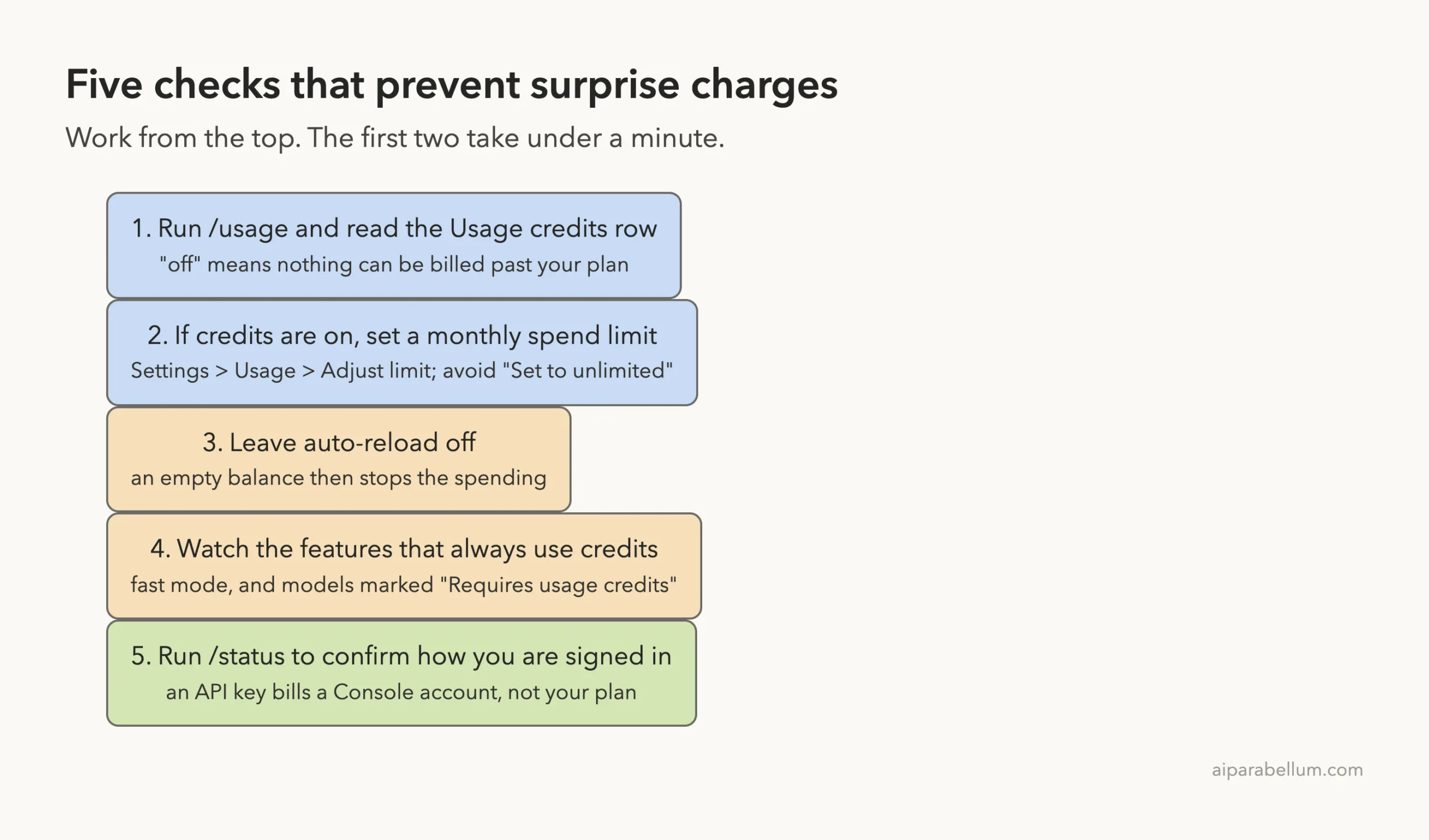
- Run
/usageand read the Usage credits row. If it says off, you are done. - If you want credits on, set a monthly spend limit first. Anthropic’s own tip is to start with a conservative cap and adjust later.
- Leave auto-reload off. With it off, an empty balance stops the spending; with it on, a new purchase happens automatically.
- Keep an eye on the credit-only features. Turn fast mode off with
/fastwhen you don’t need it, and avoid models that/modelmarks “Requires usage credits”. - Run
/statusto confirm you are on your subscription and not on an API key.
The cheapest protection is using less of your plan in the first place. Clearing the conversation between tasks and picking a smaller model both stretch your included usage, and our list of ways to reduce token usage has more.
Try It Yourself
Open Claude Code in a scratch folder and run the three read-only checks below, one at a time. None of them changes a setting or costs a prompt.
/usage
/status
/model
Write down three things: what the Usage credits row says, which sign-in method /status reports, and whether any model in /model is marked “Requires usage credits”. With those three answers you know exactly where an extra charge could come from.
Common Mistakes
- Choosing “Set to unlimited” and forgetting about it. With no limit,
/usageshowsUnlimitedand no spend figure. - Turning on auto-reload for convenience. It removes the natural stop that an empty balance gives you.
- Assuming fast mode uses your plan. On a subscription it always draws from credits.
- Expecting a refund for unused credits. The Help Center says purchases are non-refundable, with narrow exceptions.
- Leaving an old
ANTHROPIC_API_KEYin your shell profile, then wondering why a Console account is being charged. - Looking for the old
/extra-usagename in the docs. Search for usage credits instead.
Pro Tips
- Check
/usageat the start of a long session. It is faster than opening the browser, and it shows your plan bars on the same screen. - If you hit a limit and don’t want to pay, let Claude Code wait. In interactive sessions on a subscription it can continue the task on its own after the reset.
- Run
/rate-limit-optionsto see your choices at a limit: wait, add usage credits, or upgrade. - Admins can hide the command for a whole team. The docs list the
DISABLE_EXTRA_USAGE_COMMANDenvironment variable, set to1, for that. - If you are on Team or Enterprise, the limit that matters is your organization’s. Ask your admin what applies to you before a heavy week.
For the bigger picture on tracking spend across plans and teams, see our guide to managing costs. And if you are new to the product itself, our Claude overview covers the plans.
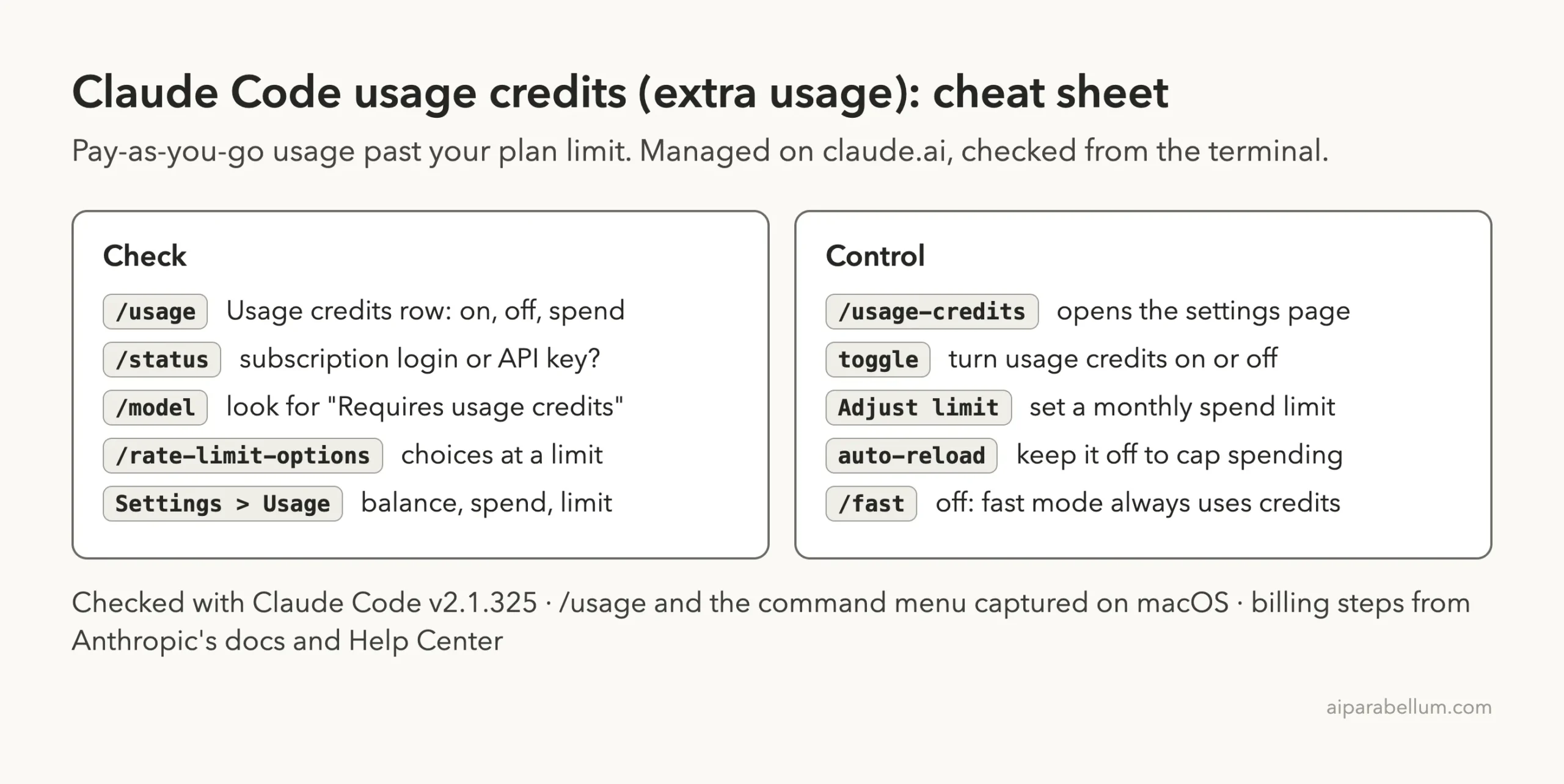
Cheat Sheet
Frequently Asked Questions
Is Claude Code extra usage on by default?
Anthropic’s docs describe it as something you enable with a toggle, and on our test account /usage reported “Usage credits are off”. The reliable answer for your own account is to run /usage and read the row yourself.
How do I disable extra usage in Claude Code?
Go to Settings > Usage on claude.ai and switch off the toggle in the Usage credits section. Running /usage-credits in Claude Code opens that page for Pro, Max and Ultra subscribers. The Help Center confirms you can disable it at any time.
How much does extra usage cost?
Usage credits are billed at standard API rates, so the cost depends on the model and how many tokens you use. Anthropic’s pricing page has the current rates. The charge is separate from your subscription.
Will I be charged if I hit my limit with usage credits off?
No. With credits off you only have your plan’s included usage. Claude Code blocks further requests until the reset time shown in the message, and nothing is billed on top of your plan.
Why does Claude Code say /extra-usage is now /usage-credits?
Anthropic renamed the feature. The changelog says “extra usage” became “usage credits” across the CLI and the command became /usage-credits, with the old name still accepted. It is the same feature under a new label.
Conclusion
Claude Code extra usage, now called usage credits, is one switch with real money behind it: off means you wait at your plan limit and pay nothing more, on means requests continue at standard API rates until a spend limit or an empty balance stops them. Check the state with /usage, change it in Settings > Usage on claude.ai or through /usage-credits, set a monthly spend limit, keep auto-reload off, and watch fast mode and credit-only models. For the exact wording behind every step, read the official costs page, the error reference and Anthropic’s usage credits article.