The Claude Code working directory no longer exists error means the folder your session is using was deleted, renamed or moved while Claude Code was open. Claude Code stops the command before it runs and moves its shell to a folder that still exists. Your conversation is safe.
To fix it in a running session, type /cd followed by the folder you want, such as /cd ~/projects/my-app. That moves the session and keeps the conversation. If only a subfolder vanished, you can skip that and ask Claude to run the command again.
If claude won’t start at all, your terminal is sitting in a deleted folder. Run cd ~/projects/my-app, or cd "$PWD" if the folder was recreated at the same path, then start Claude Code again.
Browse all our Claude Code tutorials for more fixes and how-tos.
Tested with Claude Code v2.1.330 on macOS on November 22, 2026. We moved and deleted throwaway folders under live sessions, renamed a project, removed worktrees and tried each fix. Points we didn’t run ourselves come from Anthropic’s docs and are marked that way.
Quick Summary
| What you see | What happened | Fix |
|---|---|---|
Working directory "..." no longer exists, so this command was not run | A folder disappeared during the session | Run it again, or use /cd |
The current directory no longer exists (it was deleted or moved) | You started claude in a dead folder | cd to a real folder |
No conversation found to continue | The project was renamed | claude --resume with the session ID |
Your worktree ... no longer exists | A worktree was removed | Keep working, then prune |
Couldn't start a background session (working directory no longer exists ...) | The folder went away while it started | Recreate it or pick another folder |
What “Working Directory No Longer Exists” Means in Claude Code
A working directory is the folder where commands run. Claude Code remembers it between commands, so when Claude runs cd build, the next command starts inside build.
Something outside the session can then take that folder away. Common causes are a build script that clears dist, a branch switch that drops a folder, a project you renamed in Finder, or a git worktree removed from another terminal.
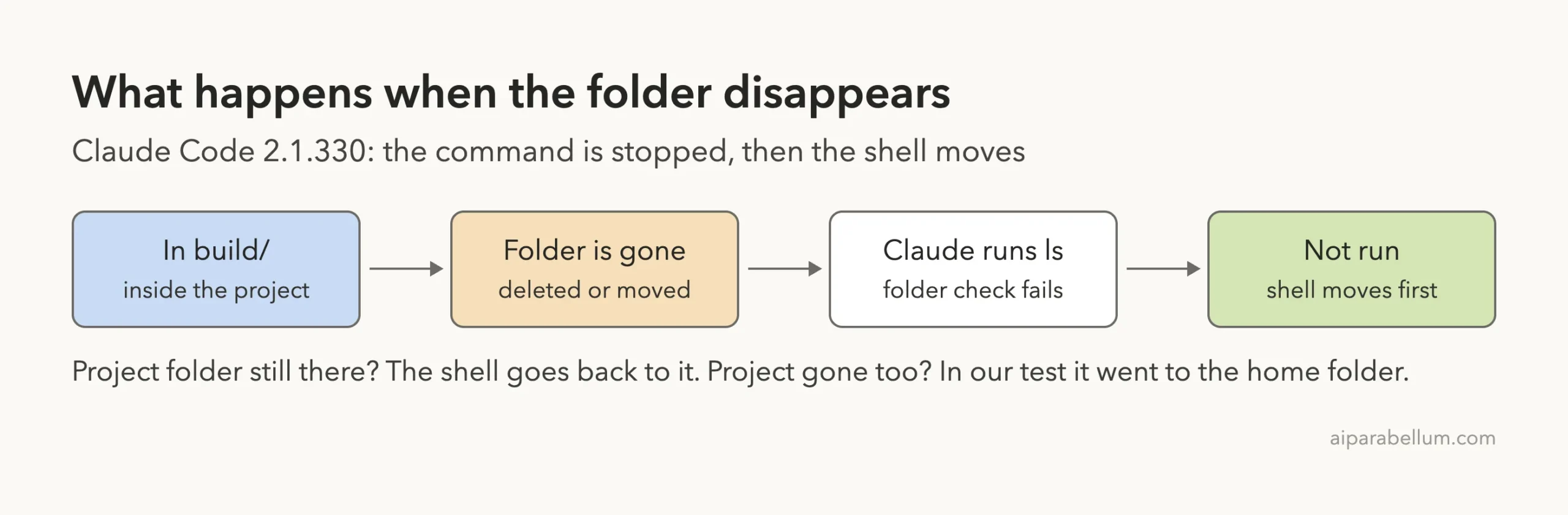
Why Claude Code stops the command
Picture a command like rm -r * that was meant for build. Running it one level up would be a disaster, so Claude Code refuses to guess.
That protection is recent. According to Anthropic’s changelog, version 2.1.325 fixed shell commands running in the launch directory after the working directory was deleted. Run claude update if you’re on an older version.
We Reproduced the Error in a Live Session
We asked Claude to create a build folder, move into it and print the path. Then we moved build away from a second terminal and asked for ls -a:
Error: Working directory "/Users/you/claude-code-demos/wd-gone/app/build" no longer exists, so this command was not run. Shell cwd recovered to "/Users/you/claude-code-demos/wd-gone/app": re-issue the command if it still makes sense there.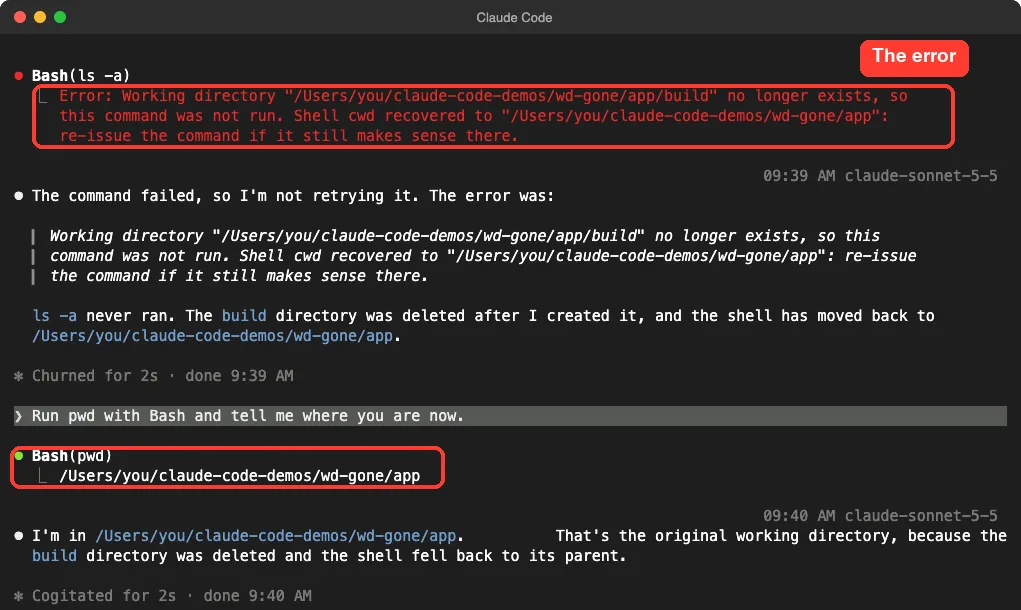
The words after “recovered to” matter most. They tell you where Claude’s next command will run. In the normal view the failure may be a short “1 failed” line, so press Ctrl+O to see the whole message.
When the whole project is renamed
Next we renamed the project folder itself, from app to app-renamed. This time there was no project folder to return to, and the shell went to the home folder.
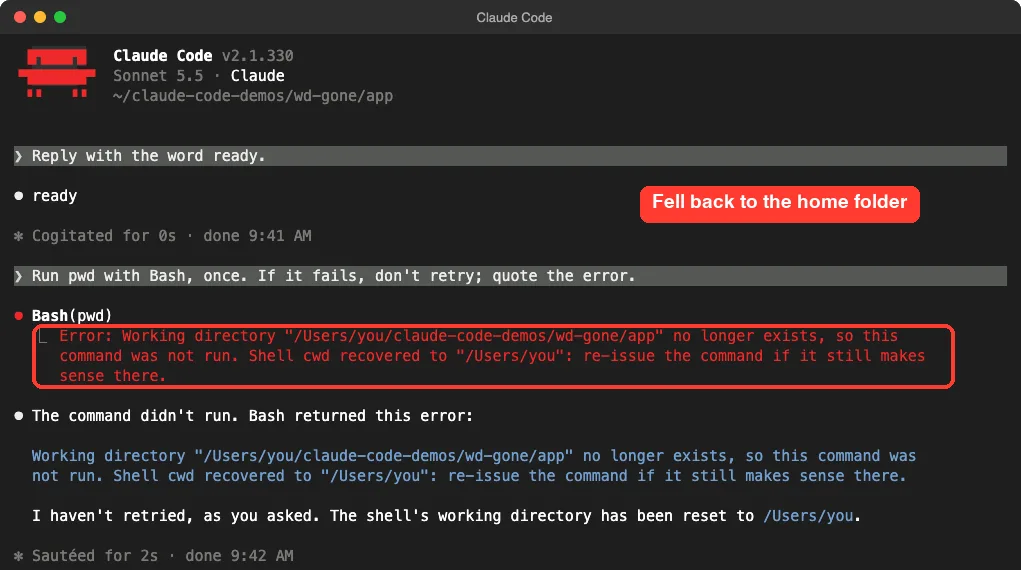
We asked for pwd once more, and it really did run in the home folder. Claude didn’t go looking for the renamed project.
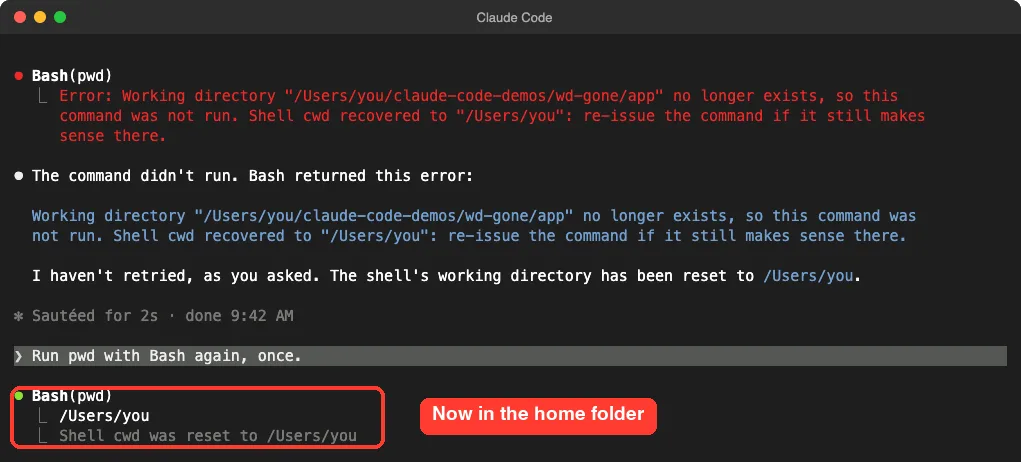
So don’t just tell Claude to try again here. A search or a cleanup command would run against your entire home folder.
Read the path after “recovered to” before you say “try again.”
How to Fix “Working Directory No Longer Exists”
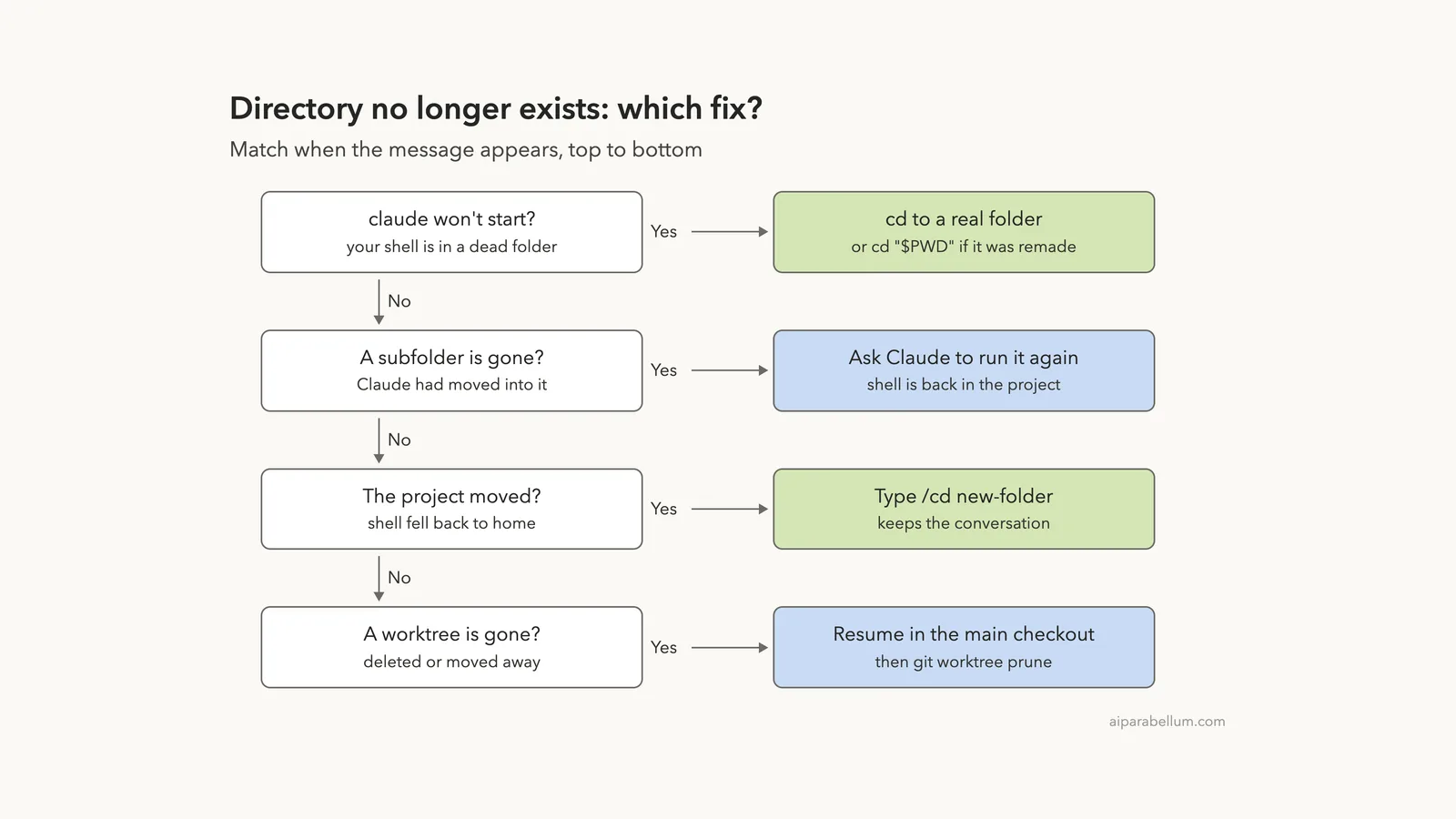
Start with when the message appeared, then follow the first row that matches.
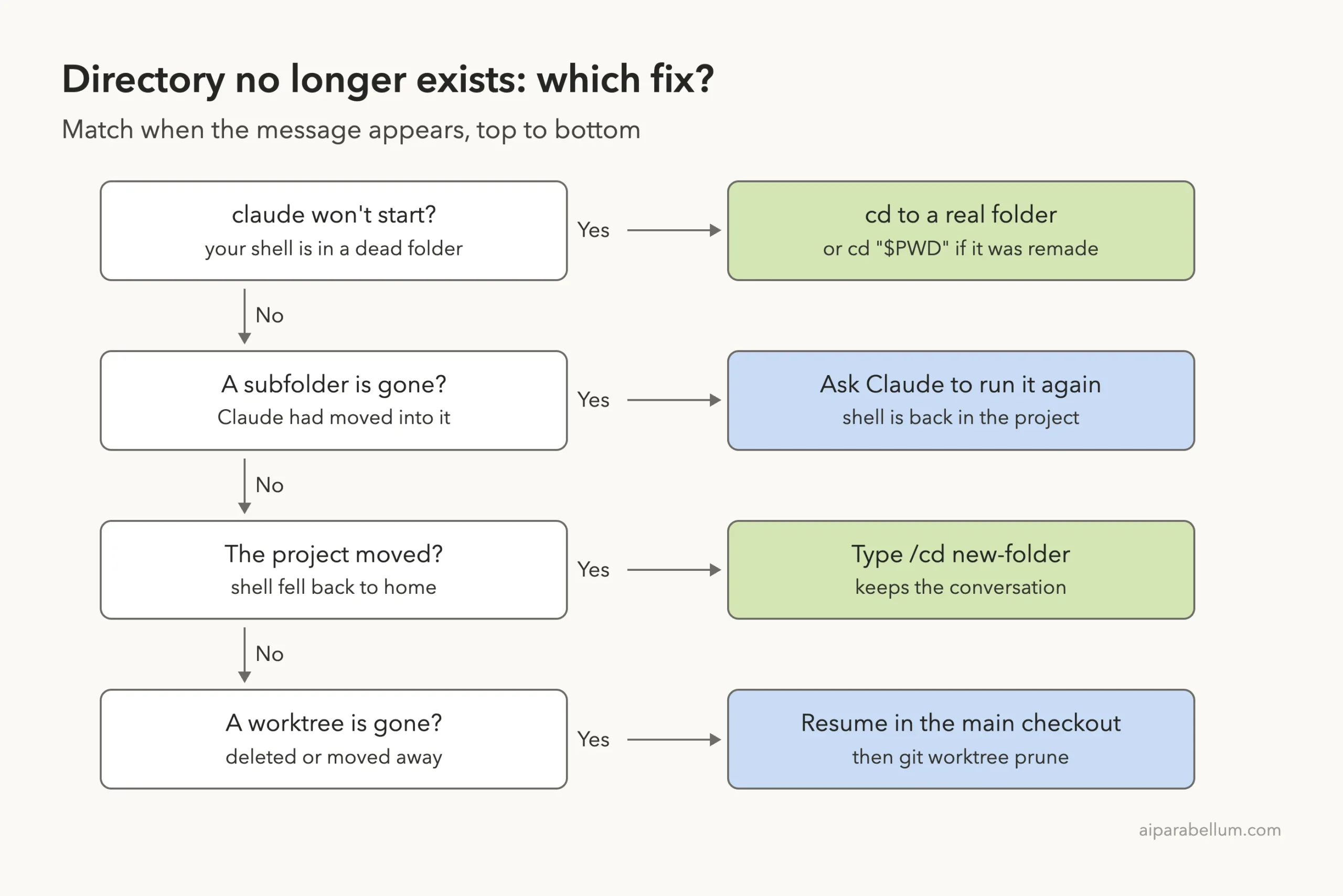
Fix 1: A subfolder is gone, so run the command again
If the recovered path is your project folder, you’re already in a good place. Ask Claude to recreate the folder or run the command from the project:
The build folder was deleted. You're in the project root now. Recreate build, then run the last command again from the root.If this keeps happening with one folder, ask Claude to stay in the project root and use paths such as ls build. You can also set CLAUDE_BASH_MAINTAIN_PROJECT_WORKING_DIR=1 before launch. The tools reference says every Bash command then starts in the project directory.
Fix 2: The project moved, so use /cd
This is the best fix for a renamed or moved project. Type /cd and the new path in the same session:
/cd ~/claude-code-demos/wd-gone/app-renamed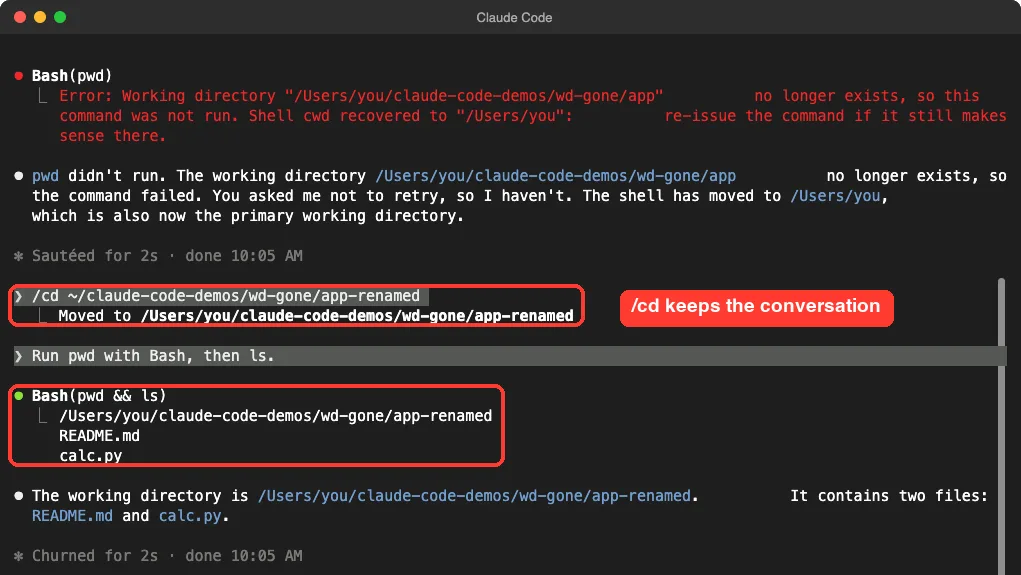
Claude answered from the right folder and still had the earlier conversation. Per the permissions docs, /cd also loads the new folder’s CLAUDE.md, settings, hooks and skills. If the folder isn’t trusted yet, you get the trust prompt first.
Don’t mix it up with /add-dir. That command gives Claude access to a second folder, but it doesn’t change the main one.
Fix 3: claude won’t start, so leave the dead folder
Your terminal can sit in a deleted folder without any warning. In our test, claude and claude -p both refused to start, and claude --bg gave the same message with exit code 1.
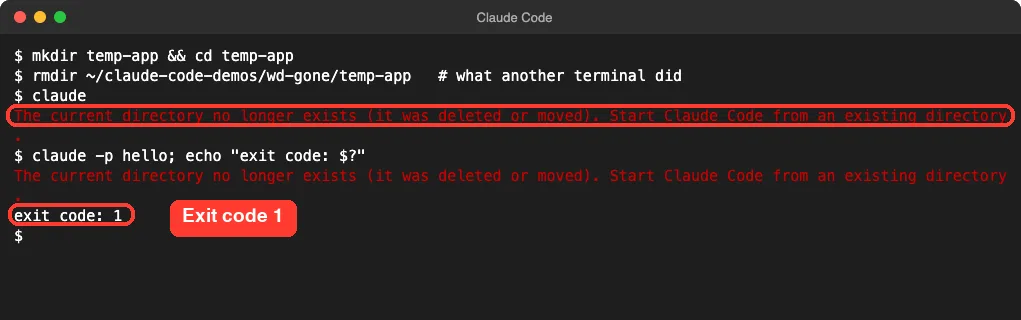
The simple fix is to move somewhere that exists:
cd ~/projects/my-app
claude
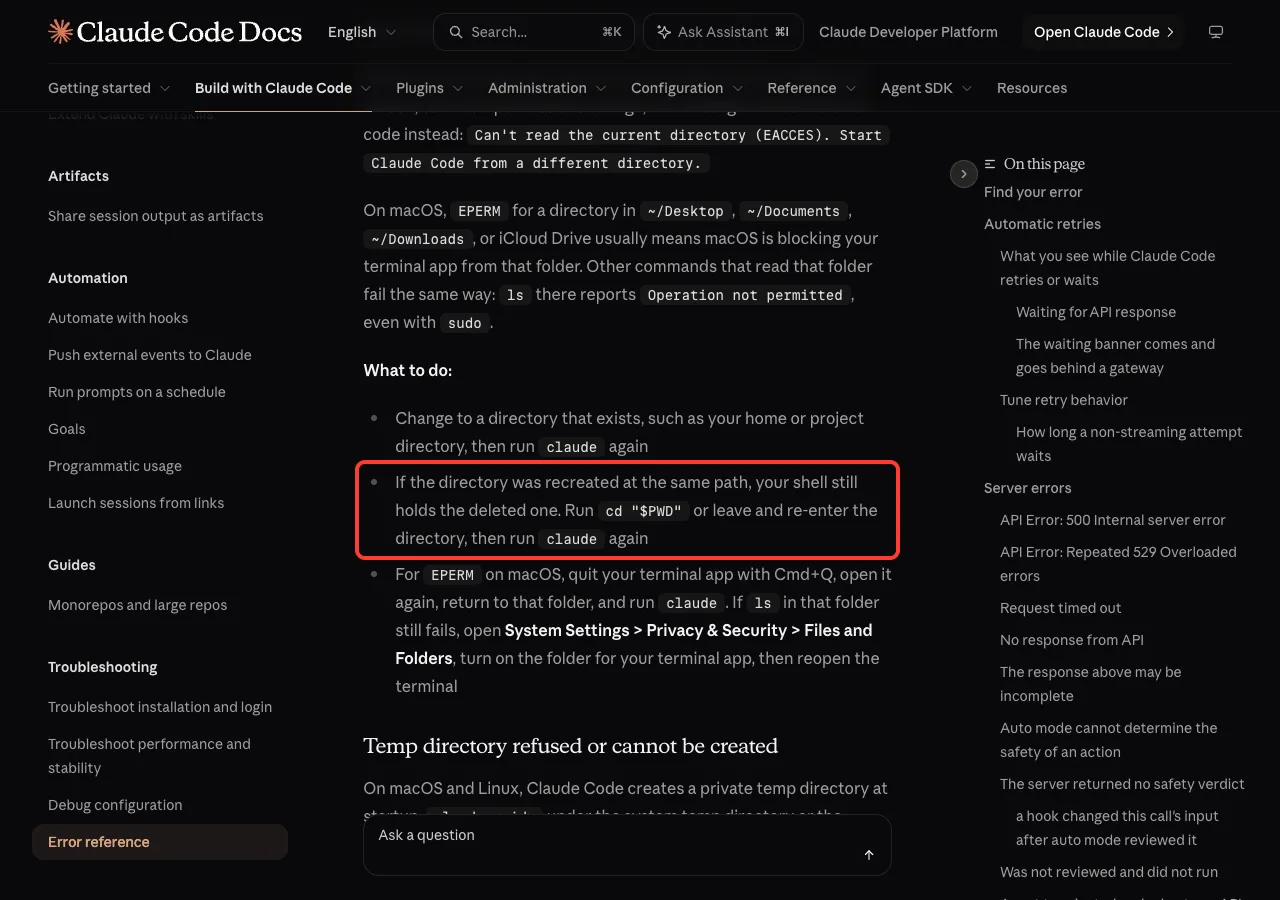
There’s one trap. We recreated the folder at the same path, and Claude Code still refused, because the terminal was holding on to the old deleted folder. Running cd "$PWD" solved it.
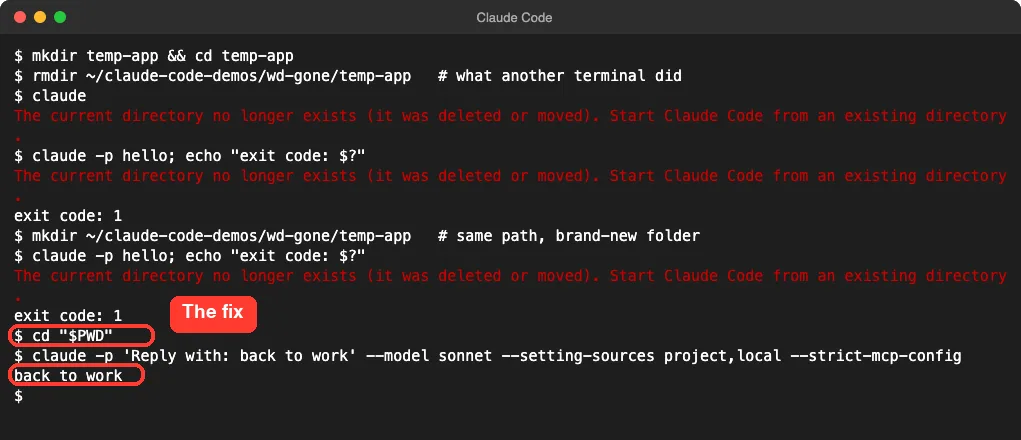
Anthropic’s error reference gives the same advice. It also says versions before 2.1.239 crashed with a raw ENOENT ... uv_cwd stack instead, so that old crash is the same problem.
Fix 4: Get your conversation back after a rename
Say you closed the session before renaming the project. Claude Code files conversations under the folder path, so a new name looks like a new project. We opened the renamed folder and ran claude --continue:
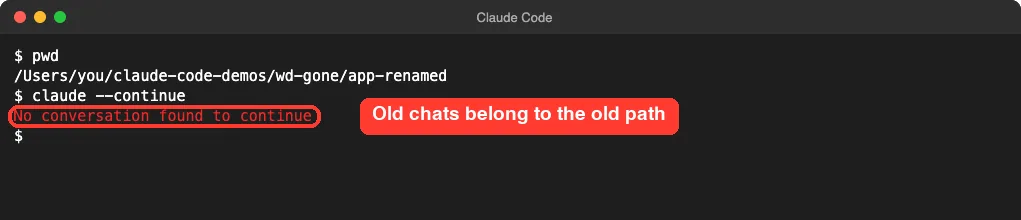
Nothing is lost. Resuming by session ID worked from the renamed folder and brought back the whole conversation:
claude --resume <session-id>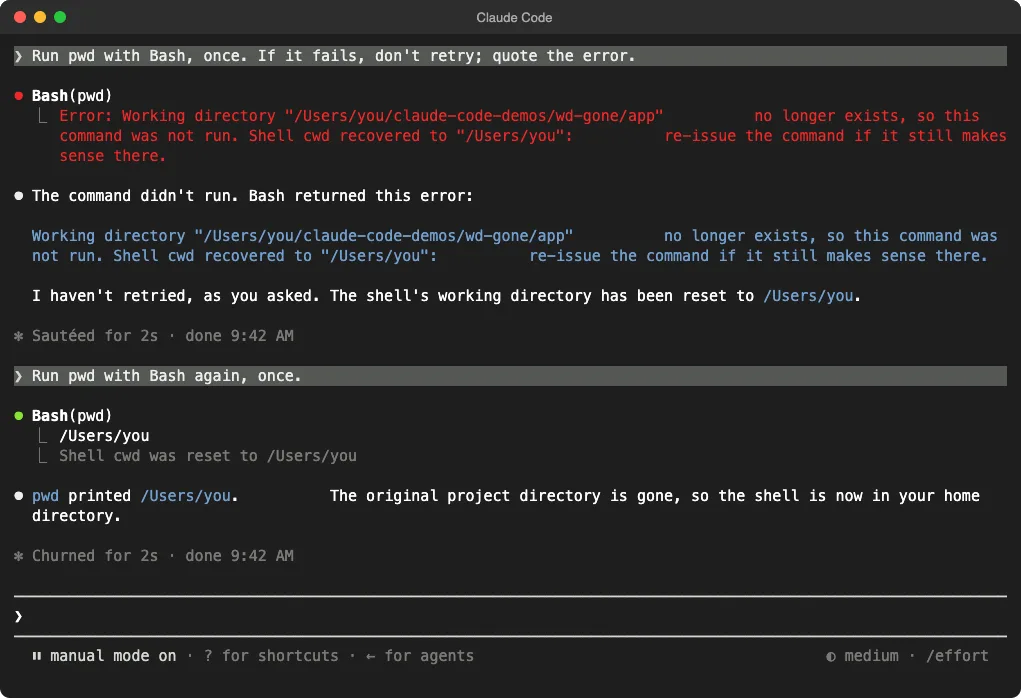
Claude Code prints the ID when you exit. If you don’t have it, run claude --resume and press Ctrl+A to list every project. The sessions docs say a session whose folder is gone resumes in your current directory.
Once it’s open, ask Claude to use the new path, since the old one is all over the conversation. Our sessions guide explains naming, so you can resume by name instead of an ID.
Fix 5: A worktree was removed
Worktrees are easy to delete by mistake, because they look like spare copies. We moved one away under a live session, and the same error appeared. The shell went to the home folder here too.
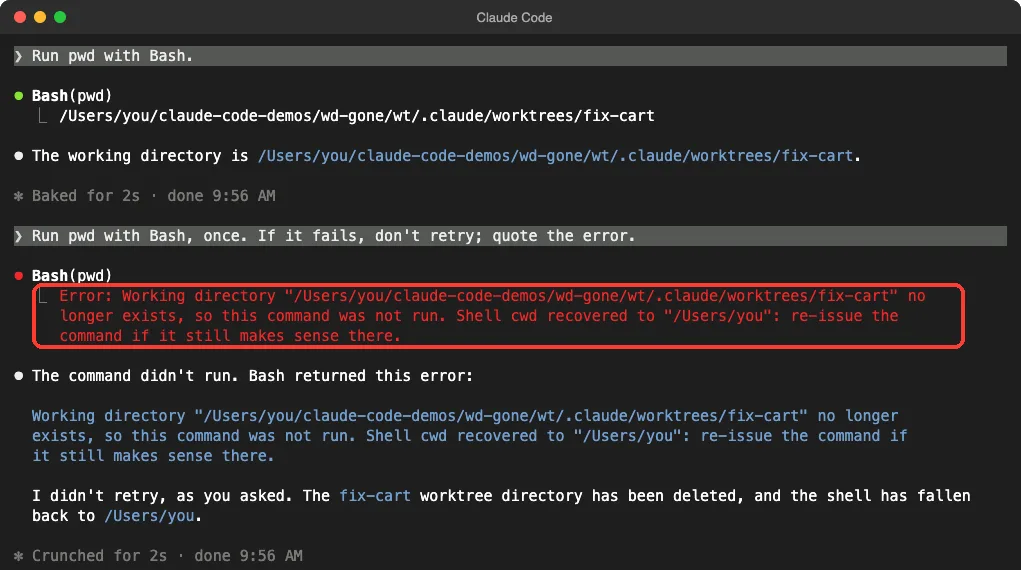
We then force-closed another worktree session, moved its folder and resumed it from the main checkout. Claude Code opened it there with a clear notice:
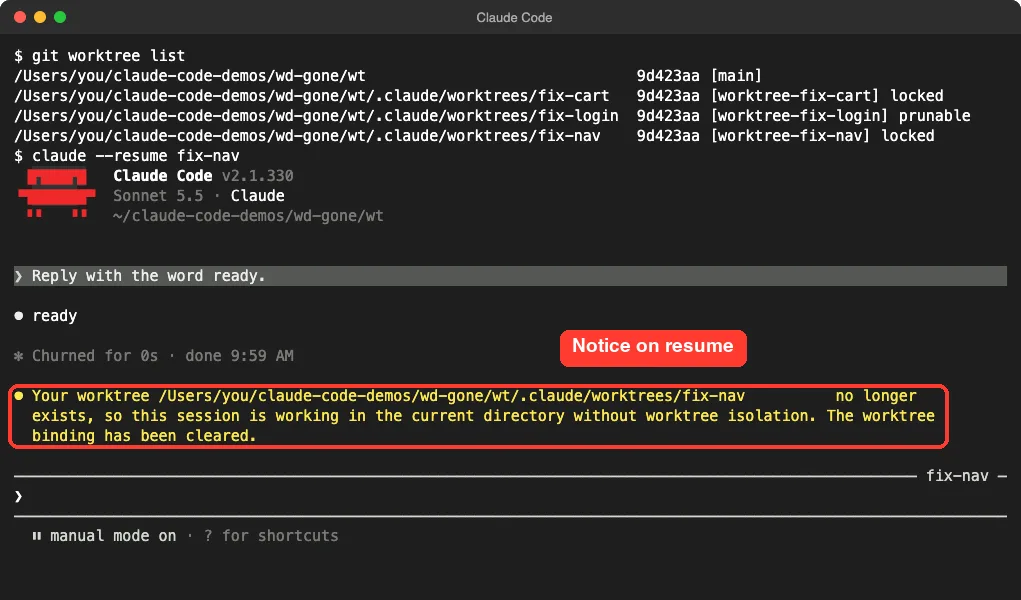
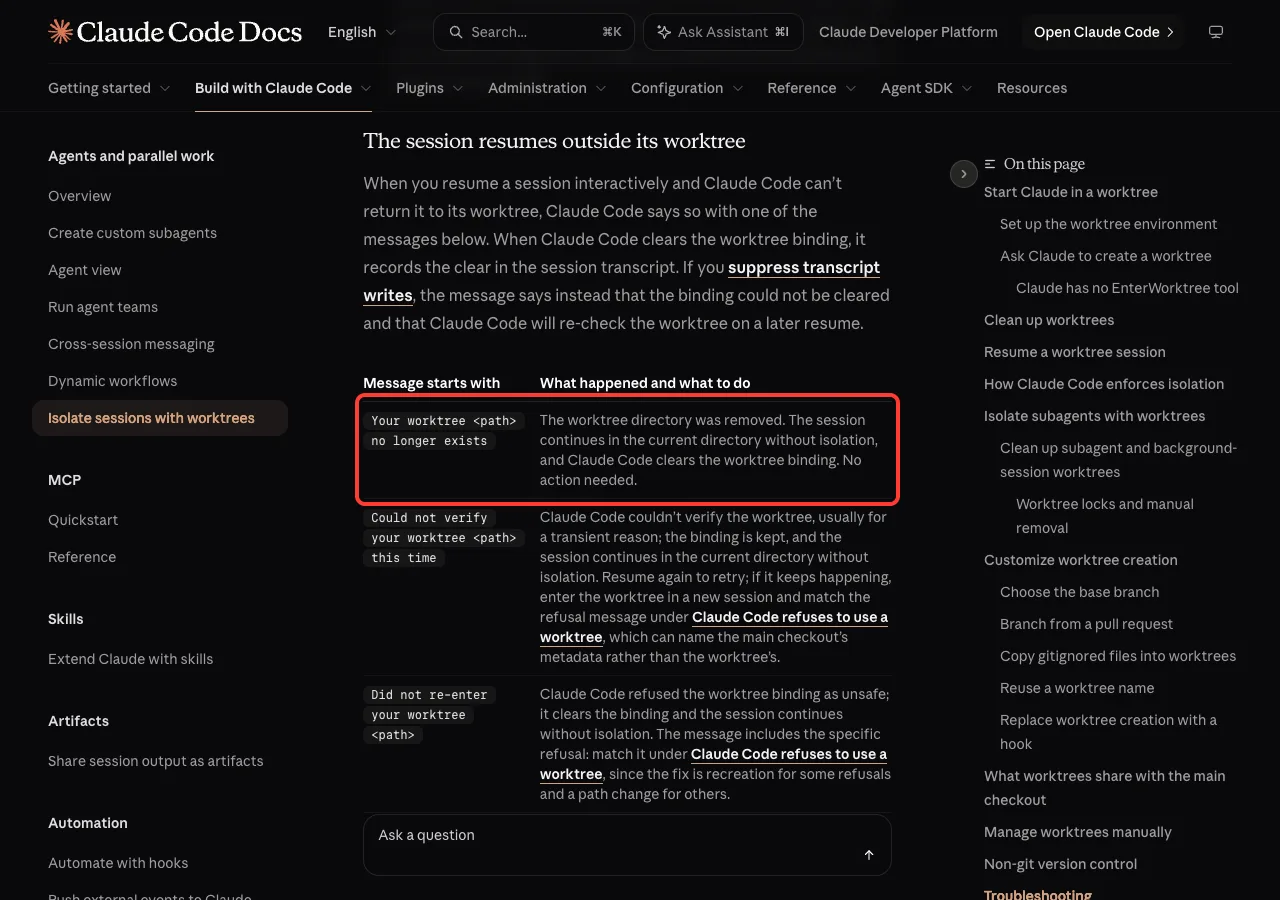
The worktree docs say no action is needed. Just remember that edits now land in your main checkout. If you want isolation back, start a new one with claude --worktree <name>.
Git still remembers the missing worktrees, so clean up its list:
git worktree list
git worktree prune -v
git worktree unlock .claude/worktrees/fix-nav
git worktree prune -v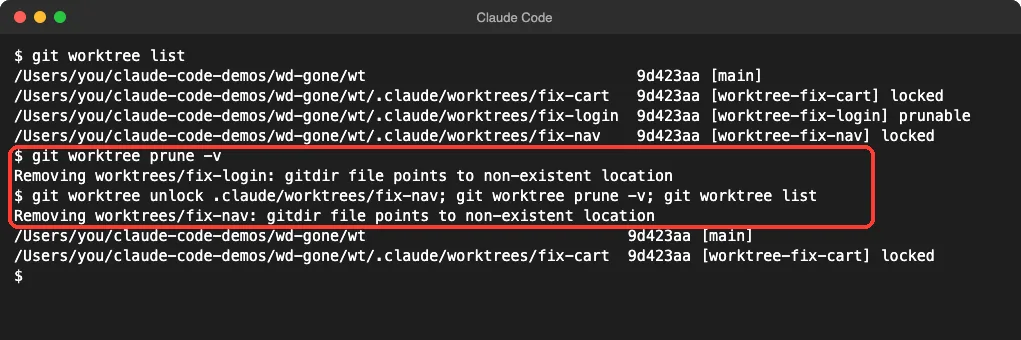
Prune skipped the locked entries until we unlocked one. Unlock only worktrees with no session running, because that lock protects live work. Your branch stays in git, but uncommitted files live only in the deleted folder.
Fix 6: Background sessions
The background version reads Couldn't start a background session (working directory no longer exists or is not accessible: /tmp/demo). Per the error reference, the folder was removed while the session was starting. Recreate it or start from a folder that exists.
If the folder was already gone, versions since 2.1.281 say could not be resolved on disk instead. The fix is the same.
Messages That Look Similar
These have different causes, so check the wording before you pick a fix.
| Message | Meaning |
|---|---|
Shell cwd was reset to ... | Usually harmless: Claude tried to cd outside the project and was brought back |
Can't read the current directory (EACCES) | The folder exists, but you don’t have permission |
Can't read the current directory (EPERM) on a Mac | macOS is blocking your terminal from Desktop, Documents, Downloads or iCloud Drive |
posix_spawn ENOENT from a hook | An old bug with deleted folders, fixed in 2.1.239 |
For the Mac EPERM case, the docs say to quit the terminal with Cmd+Q and reopen it. If ls still fails there, allow the folder for your terminal in System Settings under Privacy & Security, Files and Folders.
Hooks have their own fallback. The hooks docs say they run from the start folder, the project root, your home folder or the temp folder, whichever exists first. If yours still fail, see our guide to broken hooks.
Try It Yourself
You can practice in a minute with an empty folder. Never do this with a real project:
mkdir -p ~/wd-test/app && cd ~/wd-test/app
claude
In a second terminal, run mv ~/wd-test/app ~/wd-test/app2. Then give Claude this prompt:
Run pwd with Bash, once. If it fails, don't retry. Quote the error and tell me which folder the shell recovered to.Finish with /cd ~/wd-test/app2 and ask for pwd again. You should see the new folder.
Common Mistakes
- Saying “try again” without reading the recovered path. It may be your home folder.
- Recreating the folder and expecting the open terminal to notice. Run
cd "$PWD"first. - Assuming your conversation was deleted because
claude --continuefinds nothing after a rename. - Deleting a worktree folder by hand while its session is open.
- Forcing past a git lock. In our test,
git worktree remove --forcerefused while the session was running, and that refusal saved the folder.
Pro Tips
- Exit Claude Code before you rename a project, then start again in the new folder.
- Name long sessions with
/rename, so you don’t need the ID later. - Use Keep or Remove in the worktree exit prompt instead of deleting the folder. Our worktrees guide walks through it.
- In scripts, run
cd /your/project || exit 1beforeclaude -p, so a missing folder stops the job early. - Keep temporary clones out of cleanup paths such as
/tmpwhen a session will run for hours.
Cheat Sheet
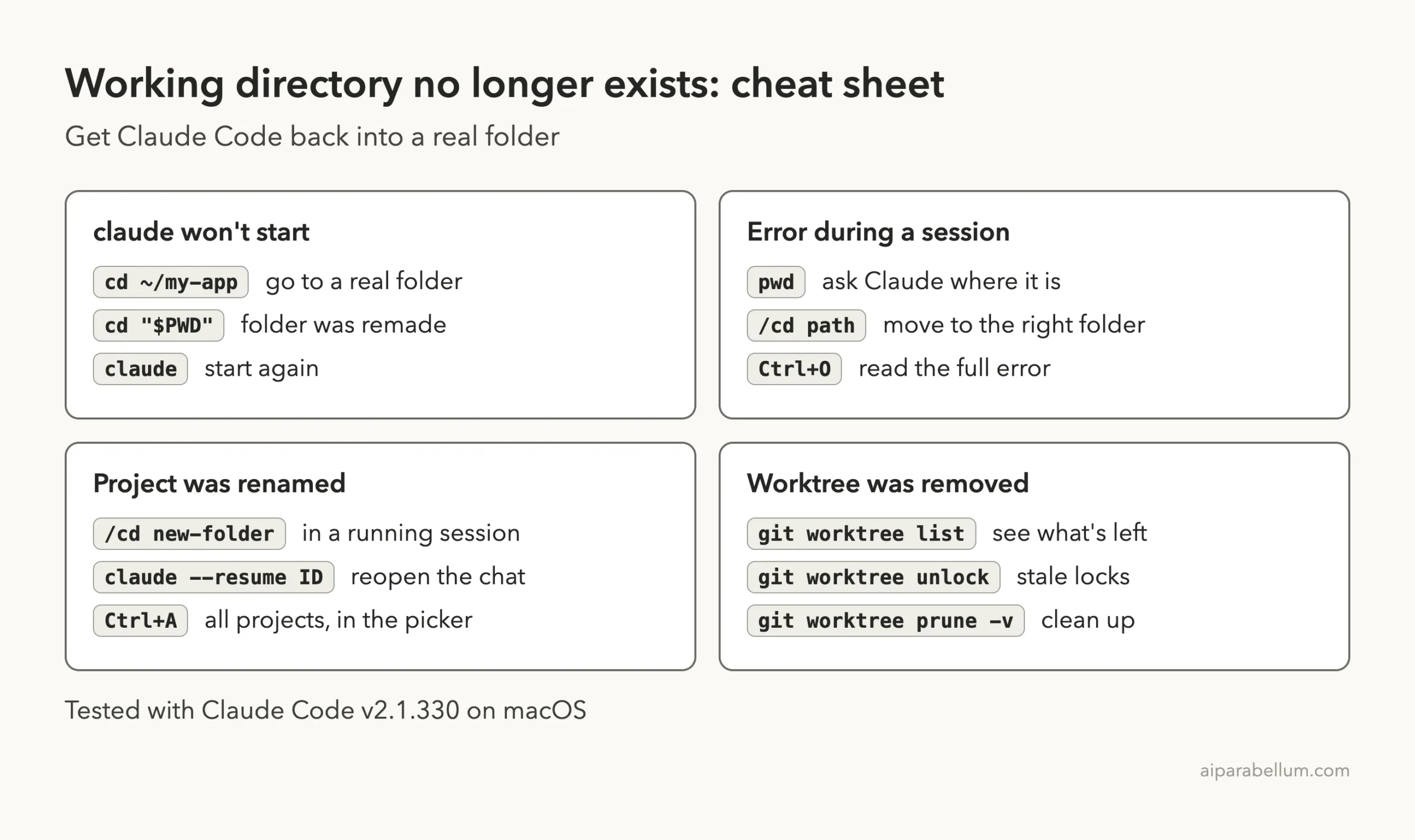
Frequently Asked Questions
Do I lose my conversation when the working directory is deleted?
No. Claude Code doesn’t store conversations in your project folder. You can keep using the open session, or reopen it later with claude --resume and its ID.
Can Claude Code restore the deleted folder?
Not by itself. Restore it from git, your Trash or a backup. Don’t rely on /rewind for this, because the docs say changes made outside the session aren’t tracked by default.
Why did the command work after one failure?
Because the shell had already moved to a folder that exists. That’s fine when it’s your project folder and risky when it’s your home folder.
Does this happen on Windows and Linux?
We tested on macOS, but the changelog also lists Windows fixes for the same problem. For example, 2.1.323 fixed commands failing with “Working directory was deleted” on drives where a folder’s real path couldn’t be resolved, so update first.
What if I still can’t start Claude Code?
Open a new terminal window, which starts in a fresh folder, and run claude there. If it fails with another message, look it up in our list of common errors or the guide to exit code 1.
Conclusion
The “working directory no longer exists” error is Claude Code refusing to run a command in the wrong place. Check the recovered path, use /cd to point the session at the right folder, and run cd "$PWD" when a terminal is stuck in a deleted one. Renamed projects and removed worktrees can both be resumed, so your conversation survives. If you’re new to the tool, our Claude overview is a good next stop.