The Claude Code no such tool available error means Claude tried to call a tool that isn’t in the current session’s tool list. When the missing tool is Bash, the usual cause is a deny rule: "deny": ["Bash"] in a settings file, or a session started with --disallowedTools Bash or a short --tools list.
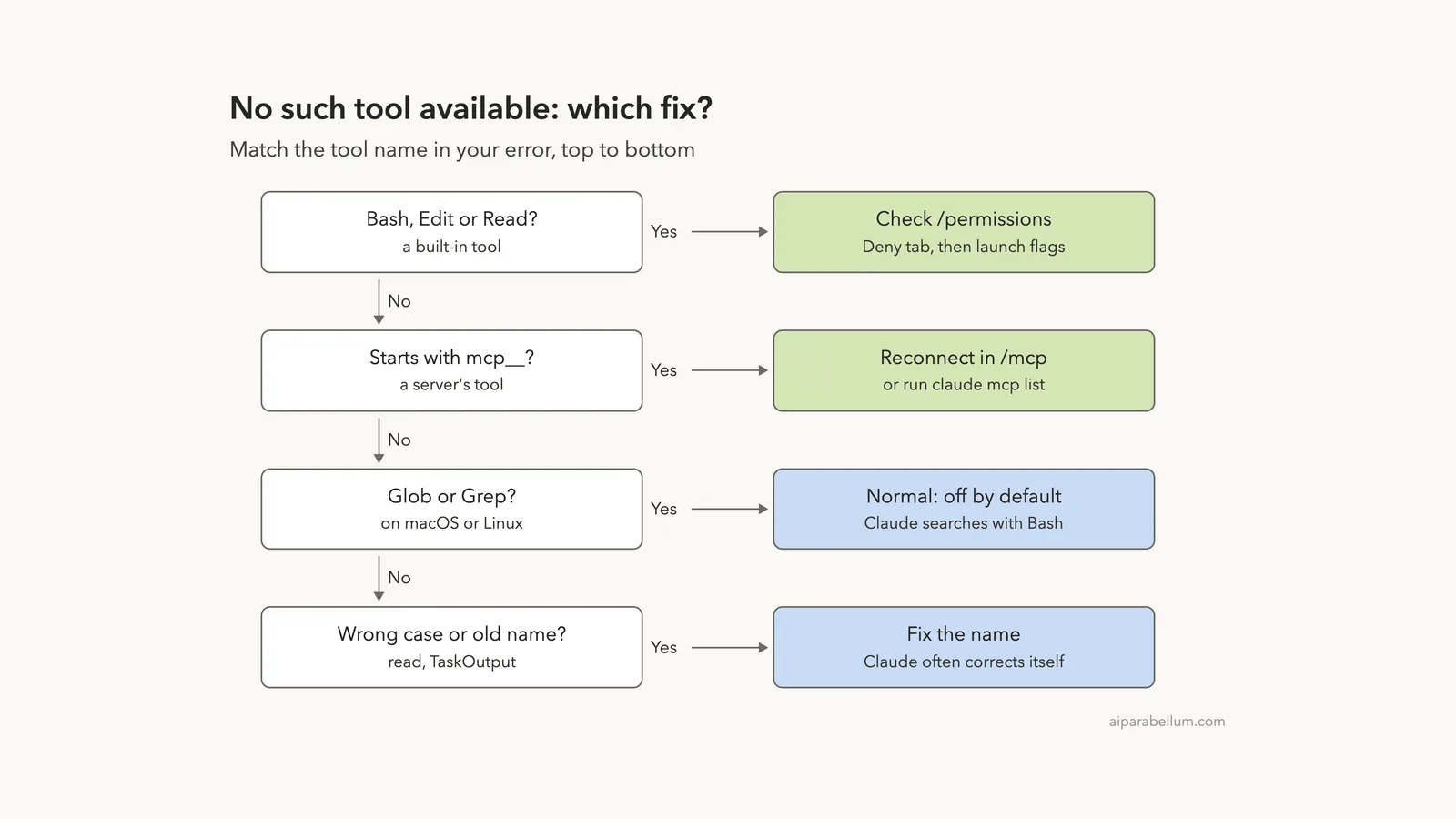
To fix it, type /permissions, open the Deny tab and select the Bash rule to see which file it comes from. Remove the rule, or narrow it to the commands you really want to block, such as Bash(rm *). If there is no rule, check the flags in the command, alias or script that starts Claude Code.
If the tool name starts with mcp__, the cause is different: its MCP server isn’t connected. Run /mcp and reconnect the failed server. If the error shows up only once and Claude carries on, you don’t need to do anything.
Browse all our Claude Code tutorials for more fixes and how-tos.
Tested with Claude Code v2.1.330 on macOS on November 22, 2026. We triggered the Bash error in a throwaway demo project, compared the tool list across five launch setups, and broke an MCP server on purpose. Points we didn’t run ourselves come from Anthropic’s docs and are marked that way.
Quick Summary
| Tool in the error | Likely cause | Fix |
|---|---|---|
Bash, Edit, Write | Bare deny rule in a settings file | Remove or narrow it in /permissions |
Bash, only in one script | --disallowedTools, --tools or --restricted | Edit the launch command |
mcp__server__tool | Server failed or still connecting | Reconnect in /mcp |
Glob or Grep | Off by default on macOS, Linux and WSL | Usually nothing; Claude uses Bash |
read, bash | Wrong case | Usually nothing; Claude retries |
| Any tool, inside a subagent | The agent’s tools list | Add the tool or delete the field |
What “No Such Tool Available” Means in Claude Code
Every session starts with a tool list. Claude Code takes the built-in tools, adds the tools from your MCP servers, and removes whatever your rules and flags rule out.
Claude can only call tools on that list. If it asks for a name that isn’t there, Claude Code never runs the call. It hands the error back to Claude as the result, and the turn continues.
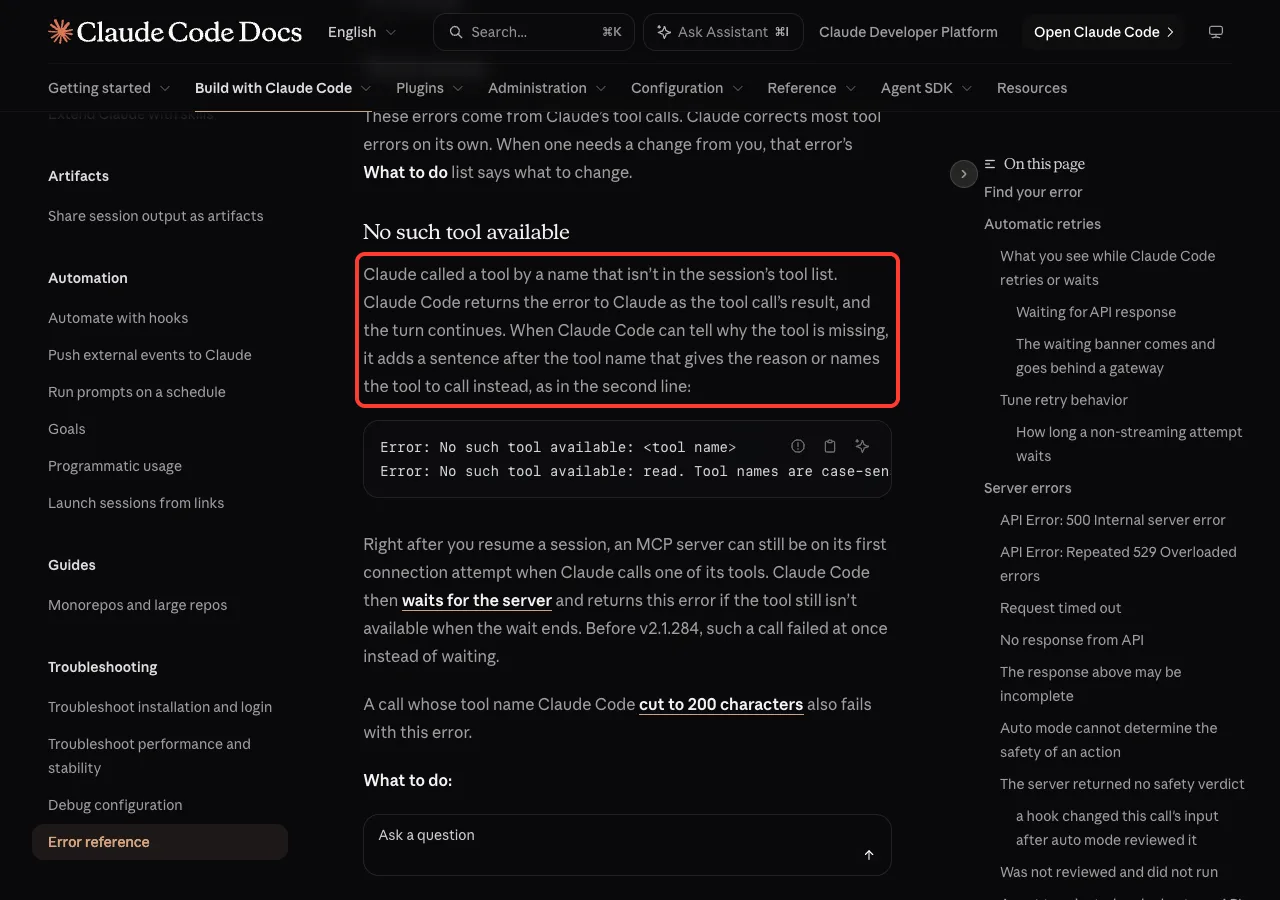
The error reference adds a helpful detail. When Claude Code can tell why the tool is missing, it puts a reason after the tool name, so always read the whole line.
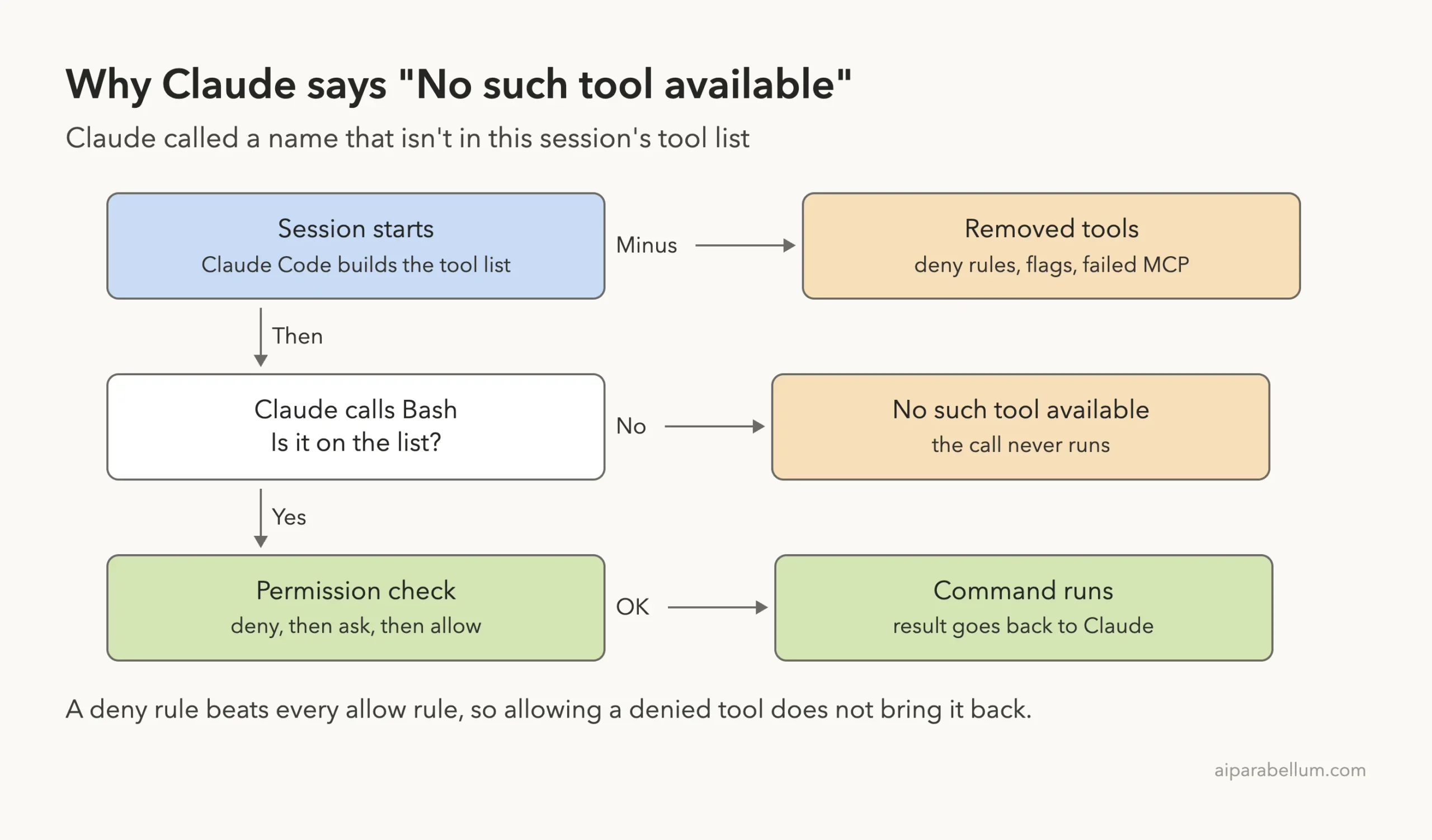
It is not the same as a permission denial
A permission denial means the tool exists but this one call was refused. A missing tool isn’t on the list at all. That difference decides the fix, so check which message you have:
| Message | What it tells you |
|---|---|
No such tool available: Bash | The whole tool is gone from this session |
Permission to use Bash ... has been denied | The tool is there; a rule refused the call |
MCP server "name" is disabled | You turned that server off in /mcp |
We Reproduced the Bash Error on v2.1.330
Our demo project had one tiny script, run-tests.sh. We first let Claude run it with Bash, and it worked. Then we resumed that same session with Bash disallowed and asked for it again:
claude -p --output-format stream-json --verbose --allowedTools "Bash(sh run-tests.sh)" "Run sh run-tests.sh with the Bash tool and report the result in one line." > normal.jsonl

claude -p --resume <session-id> --output-format stream-json --verbose --disallowedTools Bash "Run sh run-tests.sh again with the Bash tool." > disallowed.jsonl
We also passed --setting-sources project,local in most runs, so our own user settings stayed out of the test. Claude remembered using Bash, called it again, and got this result:
Error: No such tool available: Bash. Bash is disabled for this session, in subagents as well as here.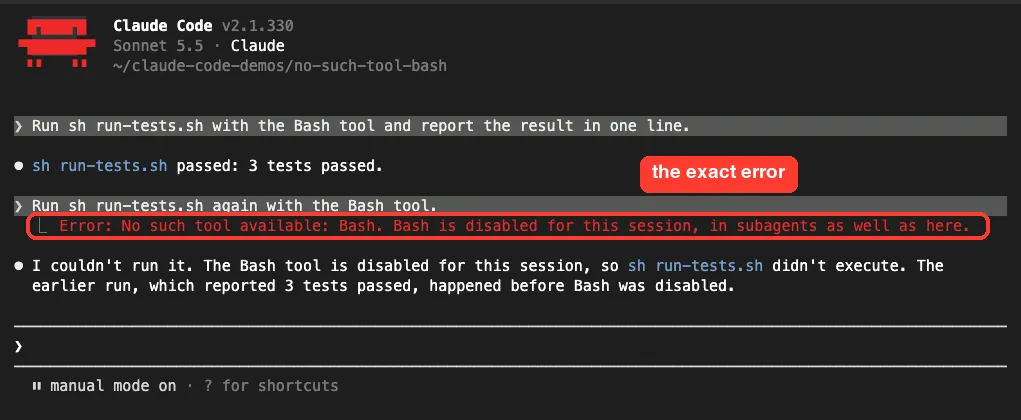
The second sentence is the useful part. It says Bash was switched off on purpose for the whole session, including subagents, so sending the work to a subagent won’t get around it.
The quiet version of the same problem
You won’t always see the red line. We repeated the steps in an interactive session, and that time Claude noticed Bash was missing and said so without trying the call.
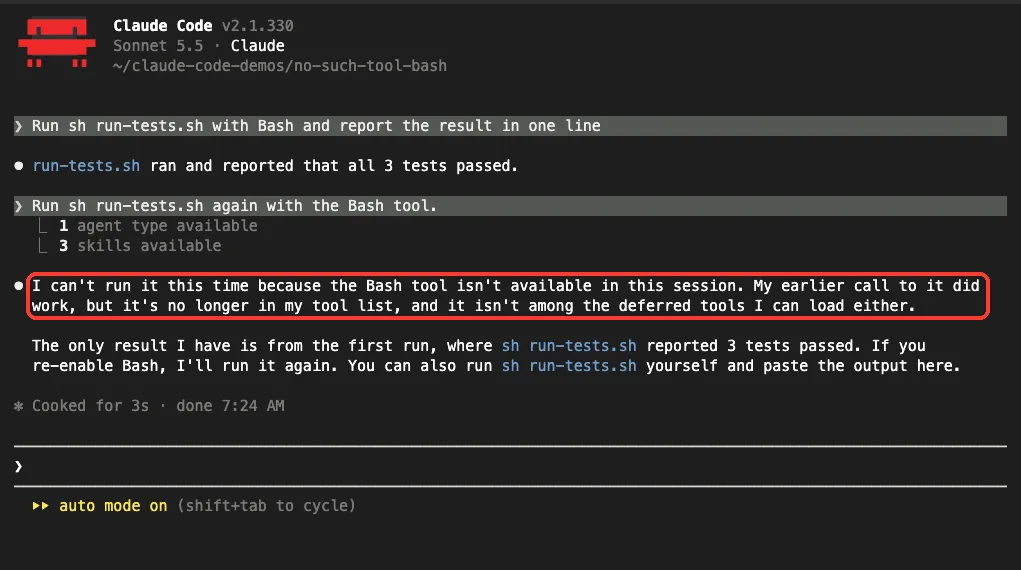
So treat “the Bash tool isn’t available in this session” as the same issue. The fixes below work for both.
A missing tool is a settings question, not a prompt question. Check the rules and flags before you ask again.
What Removes Bash From the Tool List
Runs with --output-format stream-json --verbose print the session’s tool list in their first event. We saved five runs and checked each list for Bash with jq:
jq 'select(.subtype=="init") | .tools | index("Bash") != null' run.jsonl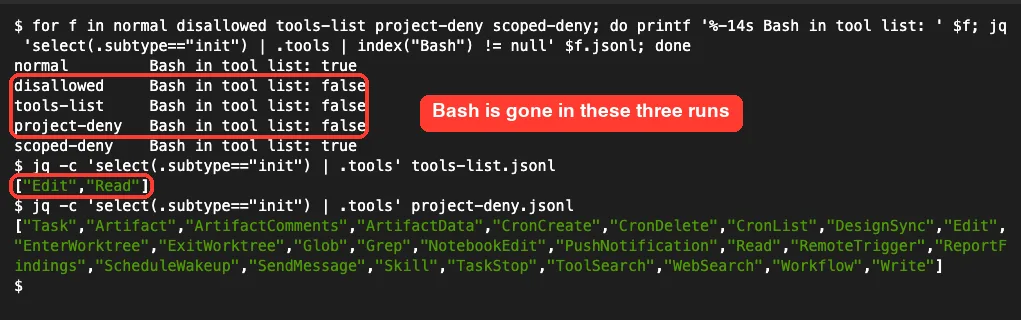
| Our run | Setup | Bash in the list? |
|---|---|---|
| normal | --allowedTools "Bash(sh run-tests.sh)" | Yes |
| disallowed | --disallowedTools Bash | No |
| tools-list | --tools "Read,Edit" | No, only Edit and Read |
| project-deny | Project "deny": ["Bash"] plus --allowedTools Bash | No |
| scoped-deny | Project "deny": ["Bash(rm *)"] | Yes |
The fourth row catches many people. We passed --allowedTools Bash on the command line, and the project’s deny rule still won.
The last row is the one to copy. A rule with a pattern in parentheses blocks only matching commands and leaves the tool in place, which matches the permissions docs.
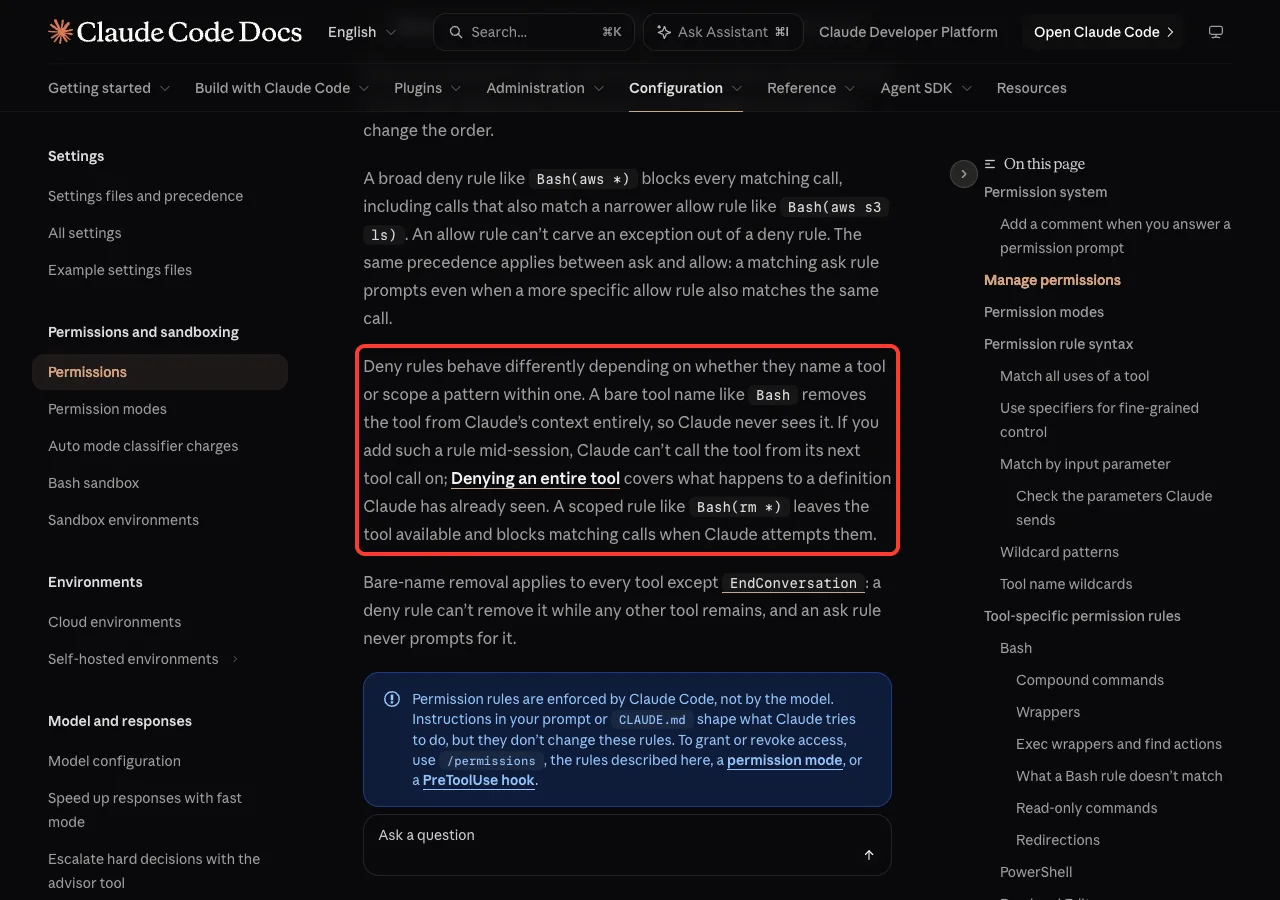
One more thing to know: Bash(*) counts as the bare form. The docs say it’s equivalent to Bash, so as a deny rule it removes the tool too.
How to Fix “No Such Tool Available” in Claude Code
Look at the tool name in your error and follow the first row that matches.
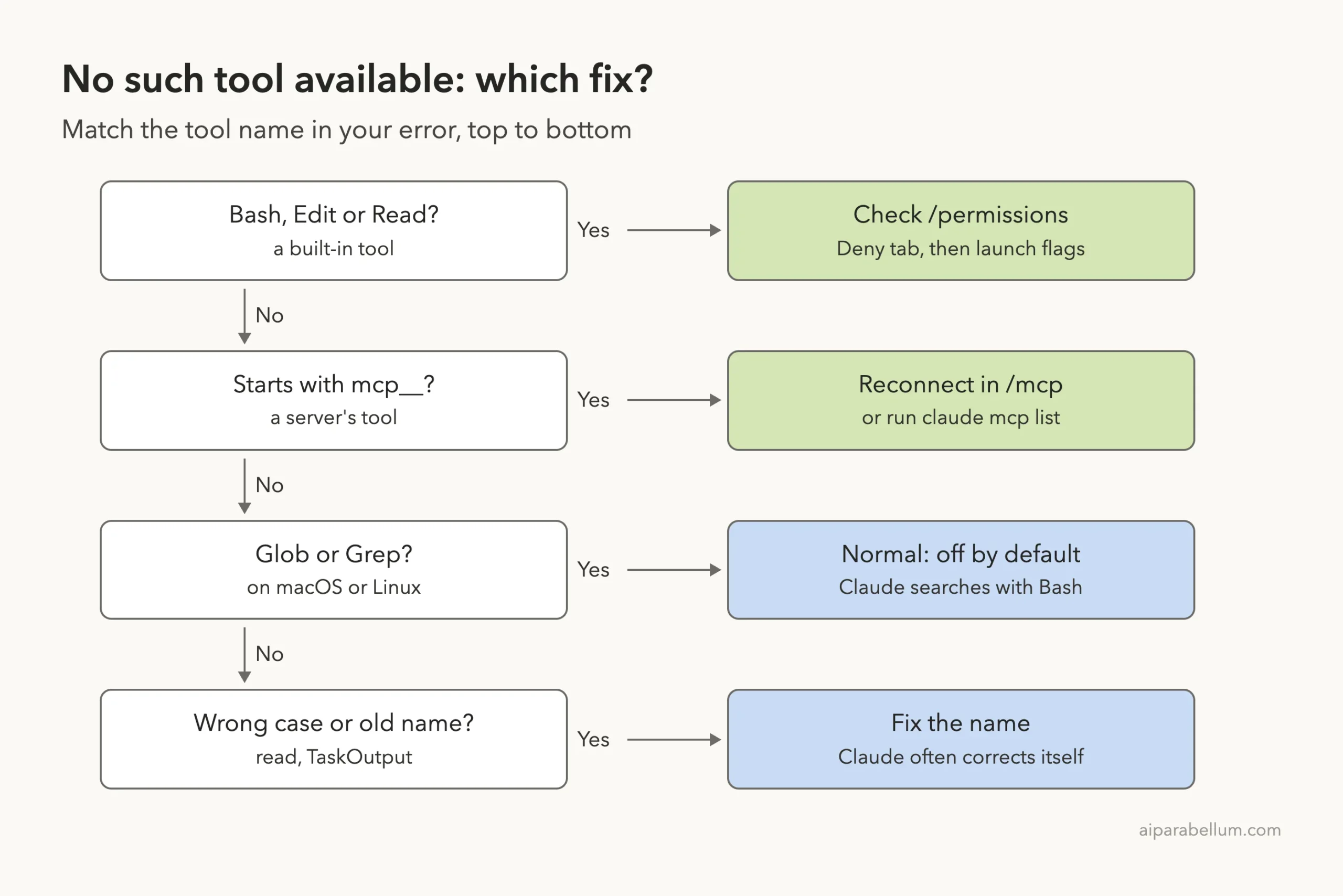
Fix 1: Find the deny rule in /permissions
Start Claude Code in the project and type /permissions. Press the right arrow key until you reach the Deny tab, which lists every deny rule that applies to this session.
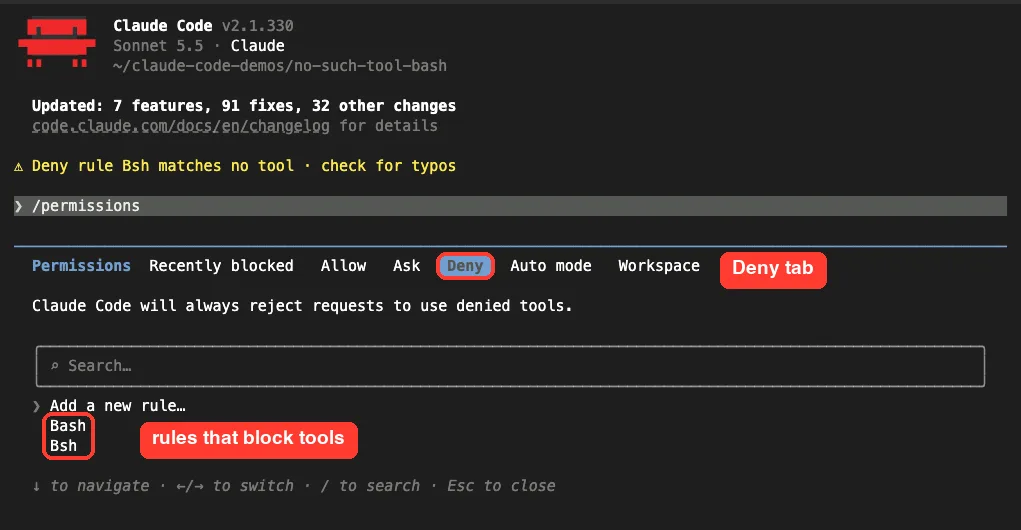
Move down to the rule and press Enter. Claude Code shows what it blocks and where it came from, then offers to delete it.
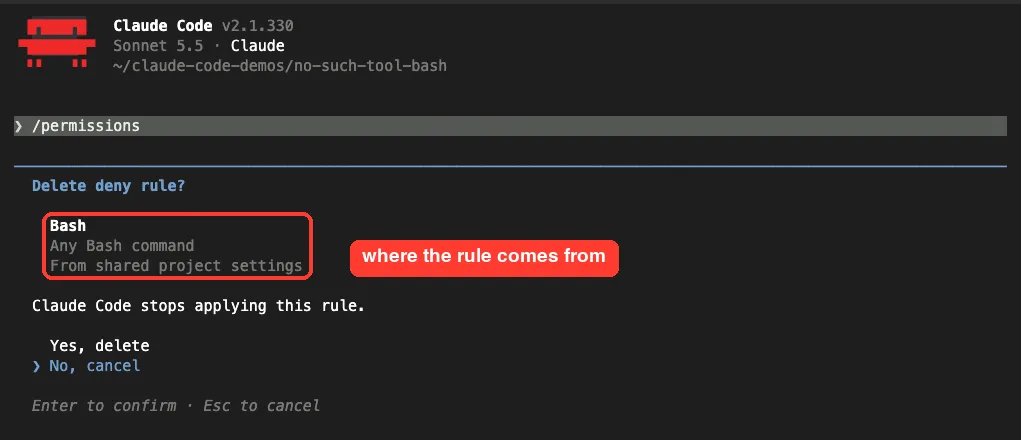
Think before you pick Yes. A rule from shared project settings may be there because your team wants it, so ask first. If the source is managed settings, only your administrator can change it.
Fix 2: Check every settings level
Rules add up across files, and one deny anywhere is enough. The docs put it plainly: if a tool is denied at any level, no other level can allow it.
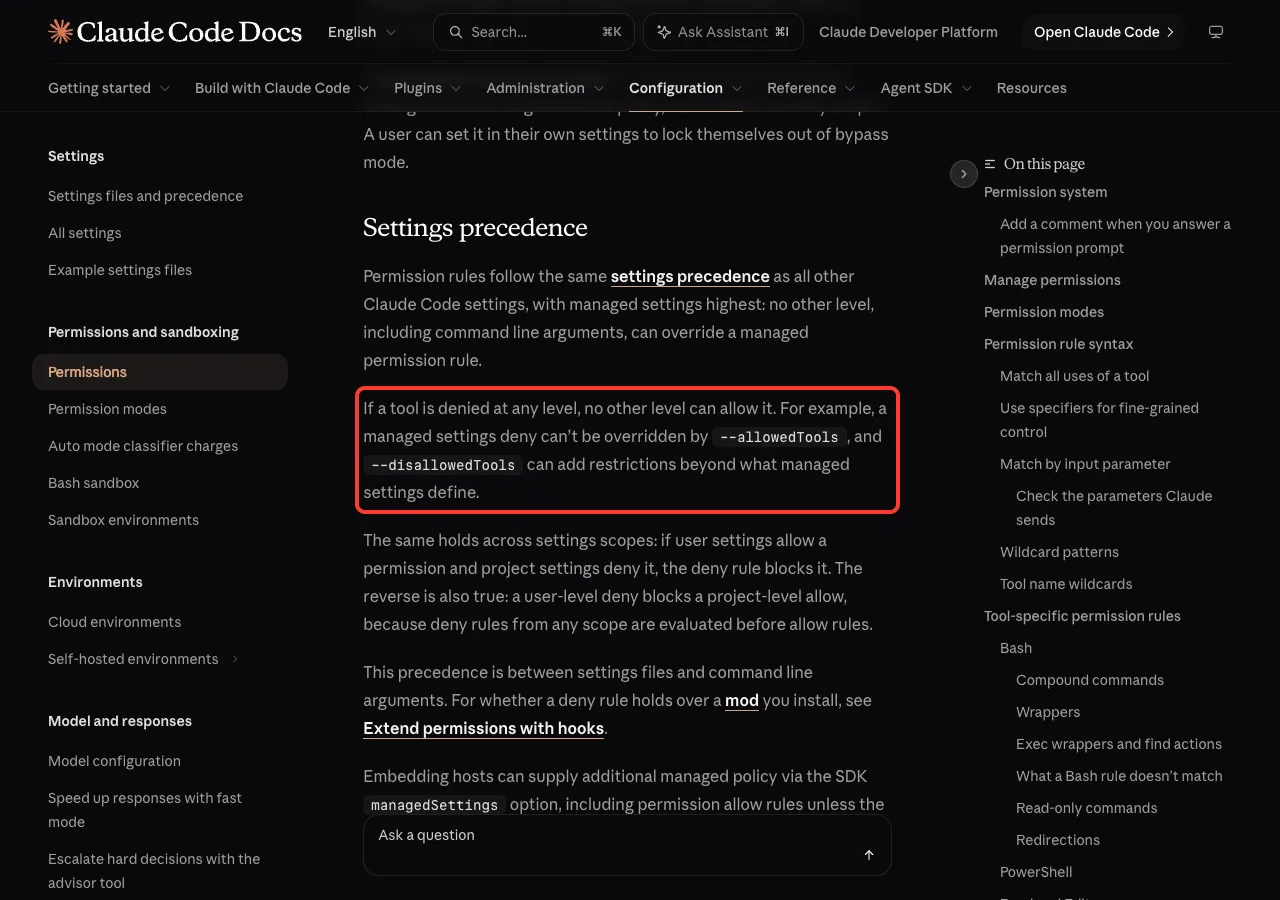
Look in these places, in this order:
.claude/settings.local.jsonin the project, your personal rules for it..claude/settings.jsonin the project, shared with your team.~/.claude/settings.json, your rules for every project.- Managed settings from your organization, if you have them.
/statusshows whether they’re active.
This one-line search finds a deny rule in the three files you can edit:
grep -n -A8 '"deny"' .claude/settings.local.json .claude/settings.json ~/.claude/settings.jsonIf you aren’t sure which file does what, our guide to settings.json locations maps them, and the settings guide explains which one wins.
Fix 3: Replace the bare rule with a scoped one
Many people deny Bash because one command worries them. Deny that command instead, and allow the safe ones you use often:
{
  "permissions": {
    "deny": ["Bash(rm *)"],
    "allow": ["Bash(sh run-tests.sh)"]
  }
}
We swapped the bare rule for this one, resumed a copy of the failed session with the same command allowed, and Claude ran the script.
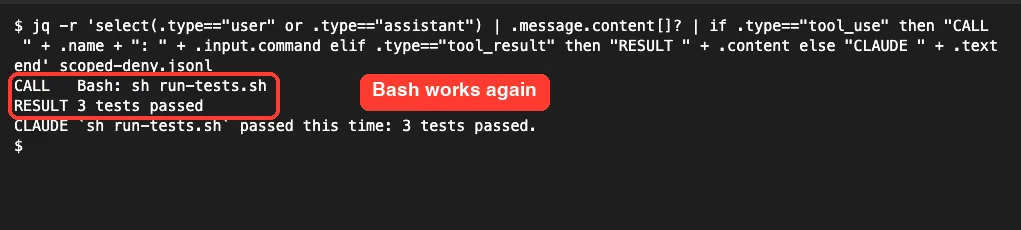
Note that a pattern like Bash(rm *) isn’t a hard wall. The docs warn that Bash rules match commands as written, so use sandboxing when a limit must hold. Our permissions guide covers rule patterns in depth.
Fix 4: Check your launch flags, aliases and scripts
If /permissions looks clean, the cause may be in how Claude Code was started. Check shell aliases, wrapper scripts and CI files for these flags:
--disallowedTools Bash(or--disallowed-tools) removes the tool for that session. A value of"*"removes every tool.--tools "Read,Edit"keeps only the built-in tools you name. AddBashto the list, or use"default"for the normal set.--restrictedremoves the built-in tools that run commands, plus WebFetch, unless you name them in--tools.
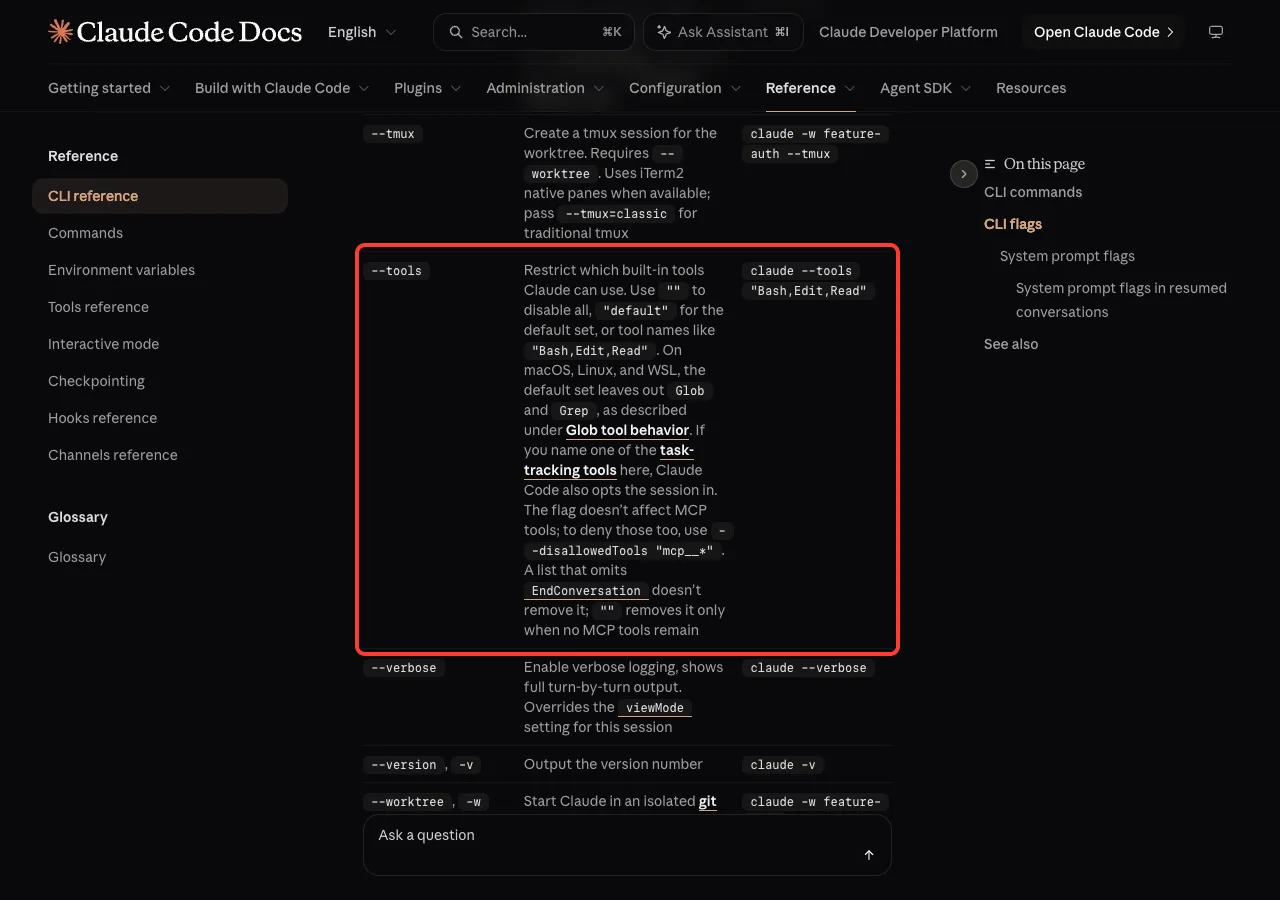
Don’t mix up --tools and --allowedTools. The CLI reference says --allowedTools only skips the permission prompt, while --tools decides which tools exist.
Fix 5: Reconnect the server for mcp__ tools
MCP tool names follow the pattern mcp__server__tool. If that server isn’t running, its tools aren’t on the list.
We built a tiny local server named stock with one tool, called it once, then resumed the session with the server’s script path broken. The server showed as failed, and Claude reported the closed connection without making the call.
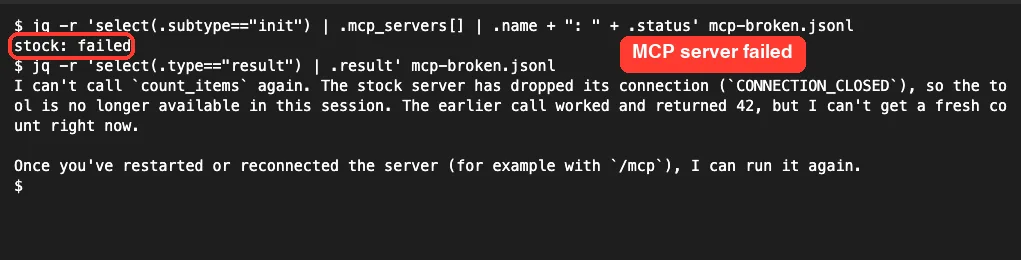
Run /mcp in the session or claude mcp list in your shell, then reconnect the server. If it was connecting when you resumed, the docs say Claude Code waits up to 10 seconds for it before this error appears.
Still failing? Our guide to reading MCP logs shows how to find out why a server won’t start.
Fix 6: Give the subagent the tool it needs
A custom subagent can have its own tool list. If its file says tools: Read, Grep, that agent has no Bash even when your main session does.
---
name: test-runner
description: Runs the test script and reports failures
tools: Read, Bash
---
You can also delete the tools line, and the agent inherits every tool available to subagents. According to the subagent docs, a few tools, such as AskUserQuestion, never reach subagents at all.
Missing Tools That Are Normal
Some tools are absent by design, and you don’t need to fix anything. These come from Anthropic’s tools reference:
GlobandGrepare left out by default on macOS, Linux and WSL. Claude searches through Bash instead.TaskOutputwas removed in v2.1.277, so old prompts and notes that name it are out of date.WebFetchcan be missing from the main session when Claude reads pages through a built-in web-fetch agent.- A lowercase name such as
readfails because tool names are case-sensitive. The error names the right one.
We saw the first point in our own runs. Our normal session had no Glob or Grep, but both showed up once Bash was denied. The Monitor tool went the other way and vanished along with Bash.
A note for Windows
We tested on macOS; the Windows details follow Anthropic’s official docs. With Git Bash installed, denying Bash also turns off the PowerShell tool, so a bare rule leaves Claude with no shell at all. Setting CLAUDE_CODE_USE_POWERSHELL_TOOL to 1 keeps PowerShell on.
Try It Yourself
You can watch Bash come and go in a minute. Make an empty folder, add the deny rule, and open the dialog:
mkdir tool-test && cd tool-test && mkdir .claude
echo '{"permissions":{"deny":["Bash"]}}' > .claude/settings.json
claude
Inside Claude Code, run /permissions, find the rule on the Deny tab and delete it. Then paste this prompt to confirm the fix:
List the tools you have in this session that can run shell commands.
Then run: echo "bash works"
If a tool is missing, tell me its name and do not work around it.
Common Mistakes
- Adding
"allow": ["Bash"]to beat a deny rule. Deny is always checked first. - Using
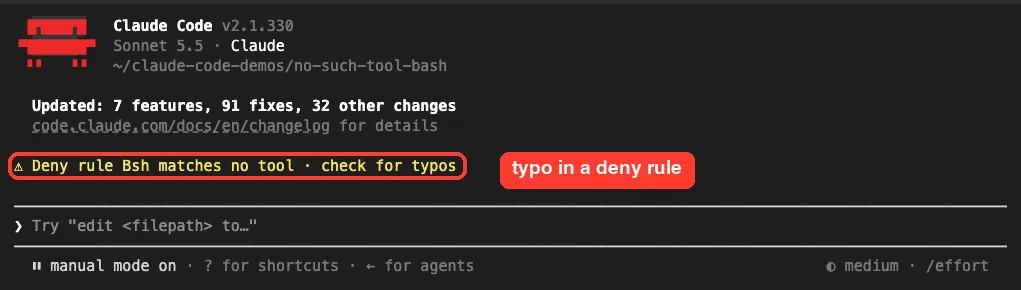
Bash(*)as a deny rule and expecting it to be softer thanBash. Both remove the tool. - Misspelling a rule. Our
Bshrule blocked nothing, and Claude Code warned about it at startup. - Reaching for
--safe-mode. The docs say permissions still work normally there, so the rule stays. - Putting
permissionsin~/.claude.json. The docs say they belong in~/.claude/settings.json.
Pro Tips
- Log the
initevent in CI runs. The tool list is right there, so you can fail early if Bash is missing. - Deny patterns, not tools, unless you truly want a read-only session.
- Want Claude to look but not touch? A permission mode such as plan mode may suit you better than deny rules.
- When you resume an old session, use the same flags you started it with. Claude may reach for tools it used before.
- If your message is a different one, our list of common Claude Code errors has the others.
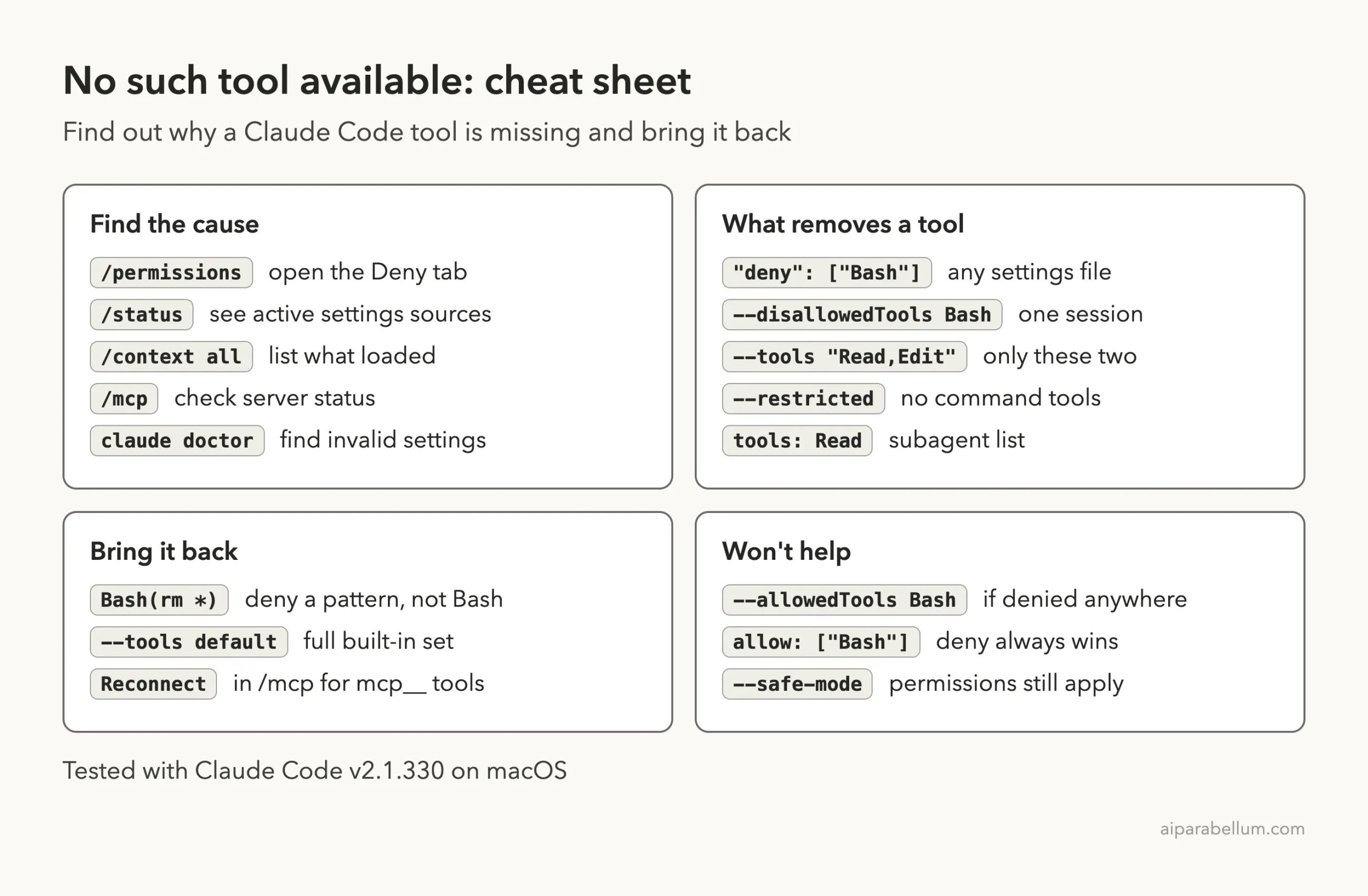
Cheat Sheet
Frequently Asked Questions
What does “No such tool available: Bash” mean in Claude Code?
It means Claude called Bash, but Bash isn’t in this session’s tool list. A bare deny rule, --disallowedTools, --tools or --restricted usually removed it.
How do I enable the Bash tool again?
Open /permissions, go to the Deny tab, and delete or narrow the Bash rule. If there’s no rule, remove the flag from the command that starts Claude Code and launch it again.
Does –allowedTools Bash fix the error?
Not if Bash is denied anywhere. In our test, a project deny rule removed Bash even with --allowedTools Bash on the command line.
Why do I see it for an MCP tool?
The server behind that tool isn’t connected, or it took too long to connect after you resumed. Check its status with /mcp and reconnect it.
Can I ignore the error?
Yes, if it happens once. The docs say Claude reads the error and the turn continues. Act only when the same tool keeps failing or Claude can’t finish the job.
Conclusion
The Claude Code no such tool available error is about the tool list, not a crash: something removed the tool before Claude asked for it. In our tests on v2.1.330, a bare Bash deny rule, --disallowedTools Bash and a short --tools list each made Bash vanish, while a scoped rule such as Bash(rm *) kept it working, and --allowedTools couldn’t undo a deny. Check the Deny tab first, then your launch flags, then /mcp for server tools. To learn more about the model behind the tool, see our overview of Claude AI.