Conductor, the Mac app many developers used to run several Claude Code agents at once, is winding down. Its team is joining Meta, new sign-ups are closed, and Conductor Cloud shuts down on November 20.
If you’re looking for a Conductor alternative, you may not need a new app at all. Claude Code now has its own version of the same idea built in: background agents, each in its own git worktree, watched from one screen.
We rebuilt a typical Conductor workflow with Claude Code alone and ran three real tasks through it. Here’s what maps across, what doesn’t, and what happened when two agents changed the same function.
What’s Happening to Conductor
Conductor’s local Mac app keeps working for now, but the dates below matter if you used Conductor Cloud or plan to stay long term.
| Date | What changes |
|---|---|
| November 4, 2026 | No new sign-ups or downloads. Existing users keep access, and Pro users pay nothing |
| November 13, 2026 | Conductor Cloud workspaces become read-only |
| November 20, 2026 | Conductor Cloud shuts down and user data starts being deleted |
| Early 2027 | The local app stops getting new models and critical fixes and starts winding down |
Before November 20, save anything that lives in the cloud. Conductor lets you right-click a cloud workspace and choose Transfer to local, or download everything from Settings, then Account, then Export data.
Your branches and commits are plain git, so any work you already pushed is safe on your remote. What you lose is the app around it.
The Conductor Alternative Built Into Claude Code
Conductor’s core trick was simple: give every task its own workspace on its own branch, run an agent in each, then review and merge. Claude Code’s agent view does the same in the terminal.
It has two parts. claude --bg starts a session in the background, and claude agents opens one screen that lists every session with its state. Each background session moves into its own git worktree before it edits a file.
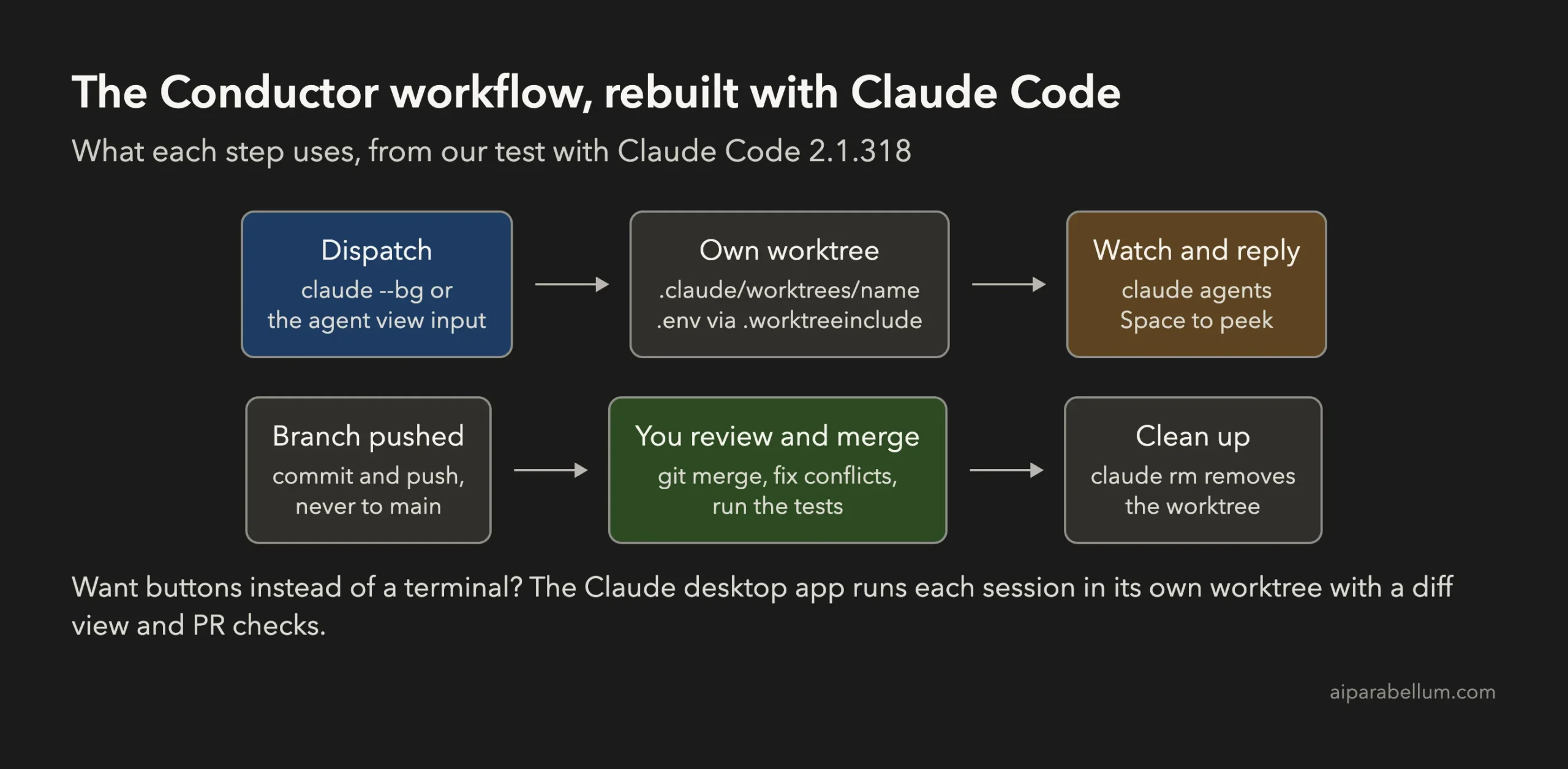
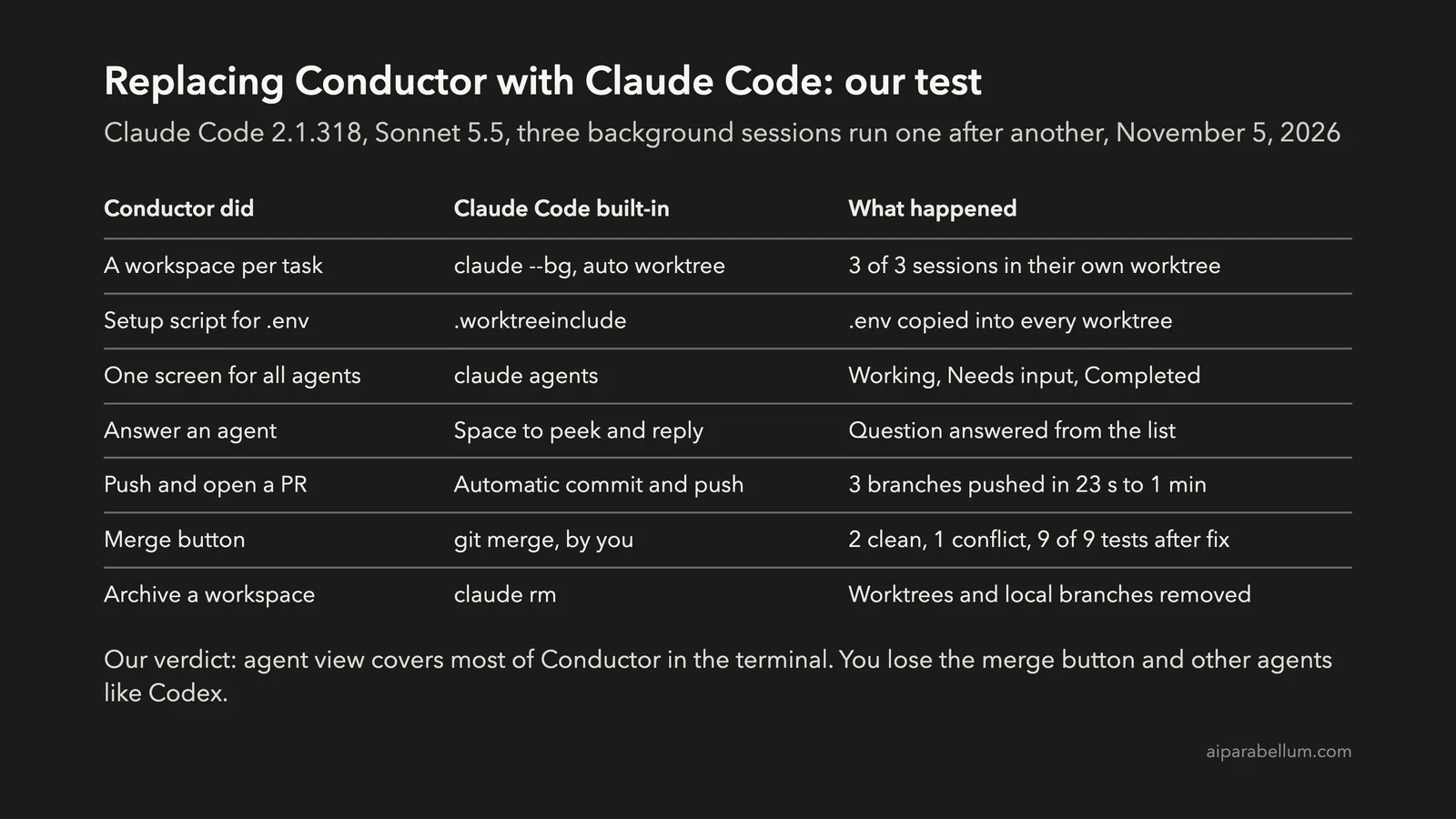
Here’s how the Conductor features line up with what Claude Code has today:
| Conductor feature | Claude Code replacement |
|---|---|
| A workspace and branch per task | Automatic worktree under .claude/worktrees/ for every background session |
Setup script that copies .env | A .worktreeinclude file, or a WorktreeCreate hook for more |
| One window with all your agents | claude agents, grouped into Needs input, Working and Completed |
| Chat with an agent | Space to peek and reply, or Enter to open the full session |
| Open a pull request | Sessions commit, push their branch and can open a draft PR |
| Diff viewer and merge | git diff and git merge, or the diff view in the Claude desktop app |
| Archive a workspace | claude rm, which also removes the worktree when that’s safe |
| Codex, Cursor and OpenCode too | Not covered, since agent view runs Claude Code only |
Agent view is still a research preview, so its keys and screens can change. You need a recent Claude Code; we used version 2.1.318, and our guide on how to install Claude Code covers updating.
Our Test: A Conductor Workflow With Claude Code Agent View
We made a small Node.js task list with two tests, a local .env file and a git remote. Then we gave Claude Code three jobs, one per background session, using Sonnet 5.5.
To keep the test light, we ran the sessions one after another rather than all at once. Nothing in the setup needs that, though, and each one only ever touched its own folder.
Step 1: Copy .env Into Every Worktree
A worktree is a fresh checkout, so files git ignores, like .env, aren’t there. In Conductor you’d copy them with a setup script.
In Claude Code, list them in a .worktreeinclude file at the project root. It uses the same syntax as .gitignore, and only files that git ignores get copied:
.env
.env.local
Also add .claude/worktrees/ to your .gitignore, so the worktree folders don’t show up as untracked files in your main checkout.
Step 2: Hand Off Tasks With claude –bg
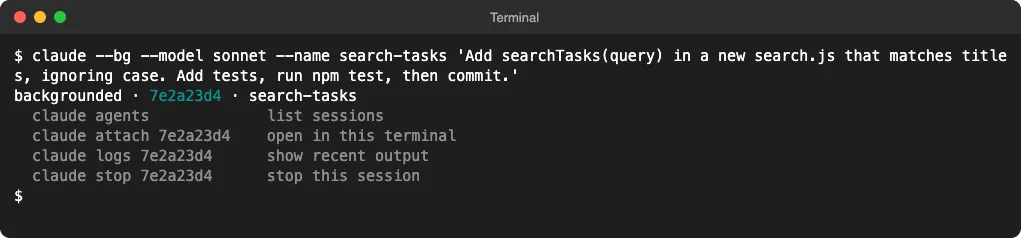
From inside the project, one command starts a background session. The prompt goes in as a normal argument, and --name sets the label you’ll see later:
claude --bg --name search-tasks 'Add searchTasks(query) in a new search.js that matches titles, ignoring case. Add tests, run npm test, then commit.'It returned at once with a short ID and the commands to manage the session. Don’t add -p, because Claude Code rejects --bg combined with print mode.
You can also type a task straight into the box at the bottom of agent view. Each Enter starts a new session; it never adds a message to an existing one.
Step 3: Watch and Answer Agents in One Screen
Run claude agents in the project to open the dashboard. Our third task told Claude to ask us which date format to use before it wrote any code.
About 40 seconds later, that row sat under Needs input. Selecting it and pressing Space opened the peek panel with the exact question and four choices, and we typed our answer right there.
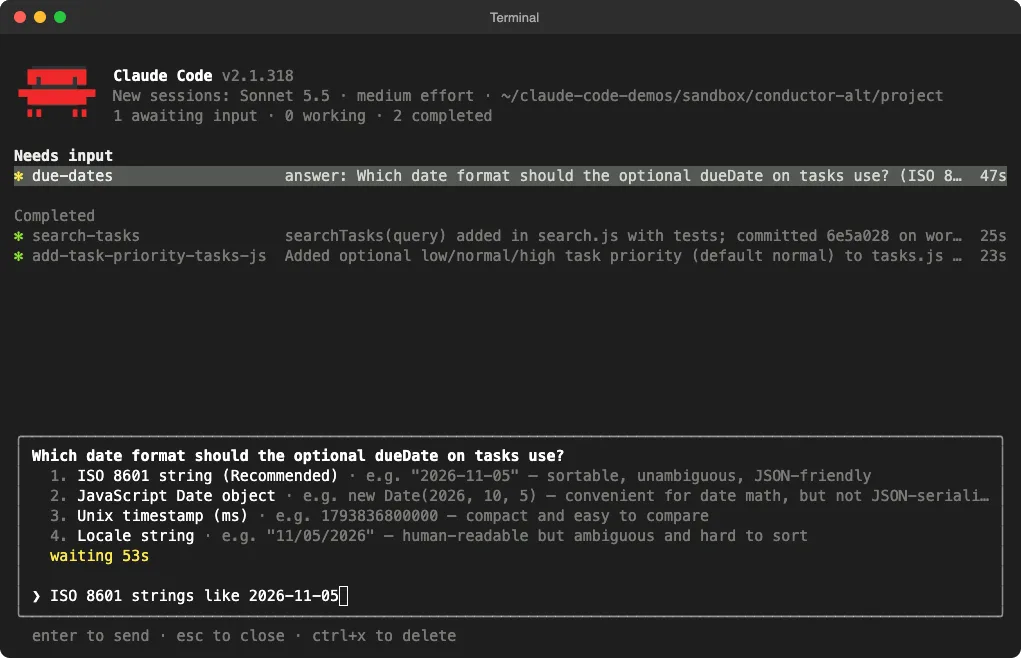
That’s the closest thing to Conductor’s chat list. As the docs put it, “Detaching never stops a session,” so you can close the screen or the terminal and the agents keep going.
All three sessions finished on their own. The first two took 23 and 25 seconds, and the one that asked a question took about a minute, including the time it waited for us.
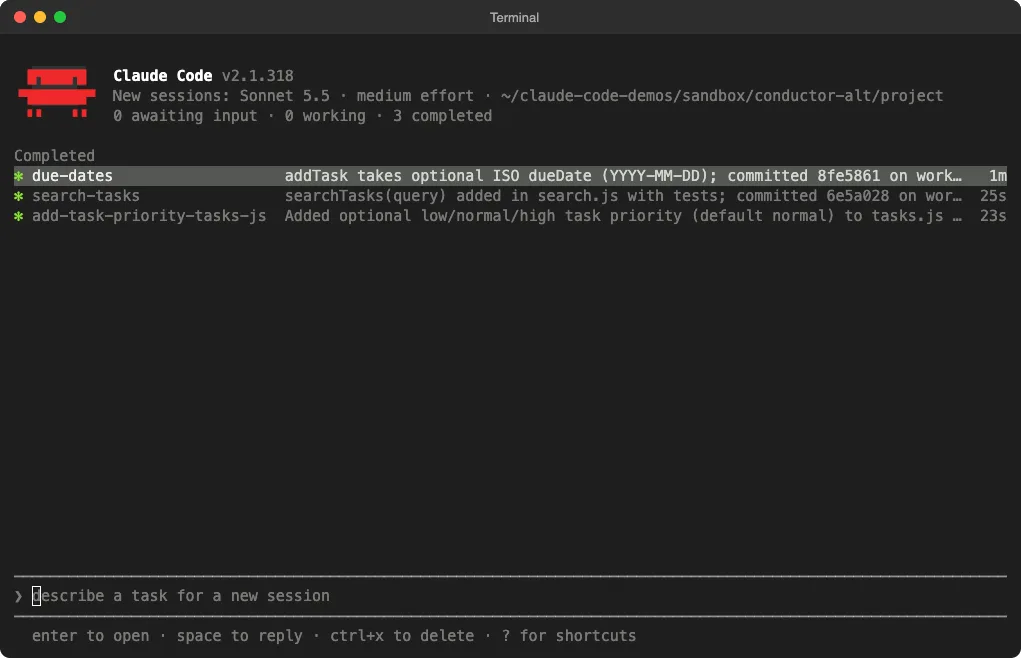
A short summary on each row tells you what the agent did. For a longer look, press Enter to open the whole conversation, and press the left arrow to go back.
Step 4: Check the Worktrees and Branches
Each session had moved into its own worktree under .claude/worktrees/, on a branch named after it. The .env file was there in every one of them, copied by .worktreeinclude.
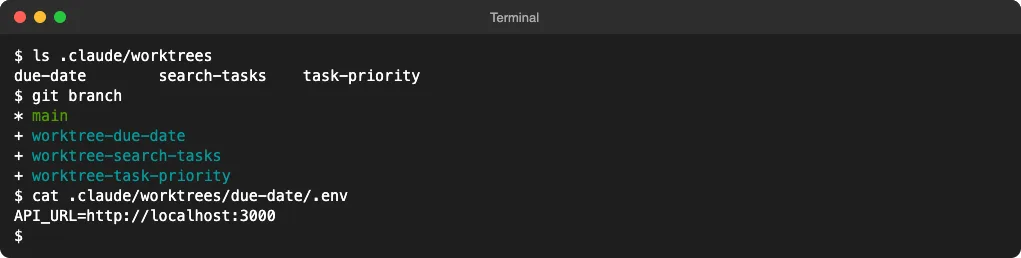
Every session also committed its work and pushed its branch to our remote without asking. The docs say background sessions never push to main or master, never force-push and never merge.
No pull requests were opened, because our test remote wasn’t on GitHub. On a GitHub repo with the gh tool signed in, sessions can open a draft PR, and agent view shows its status on the row.
Step 5: Merge the Work Yourself
This is where you’ll miss Conductor’s merge button. Claude Code leaves merging to you, so we merged the branches into main with plain git.
The first two merged cleanly and all 7 tests passed. The third one didn’t, because the priority task and the due date task had both changed the same addTask function.
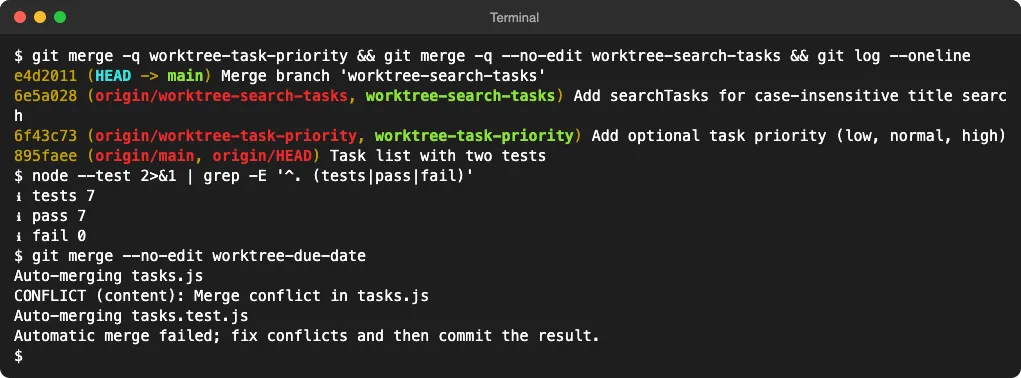
Separate worktrees stop agents from overwriting each other’s files while they work. They can’t stop two agents from making different choices about the same lines of code.
We asked Claude Code to fix the conflict with a one-off command like this. It kept both fields, and all 9 tests passed:
claude -p 'Fix the merge conflict in tasks.js so tasks keep both priority and dueDate. Run node --test.' --permission-mode acceptEdits --allowedTools 'Bash(node --test*)'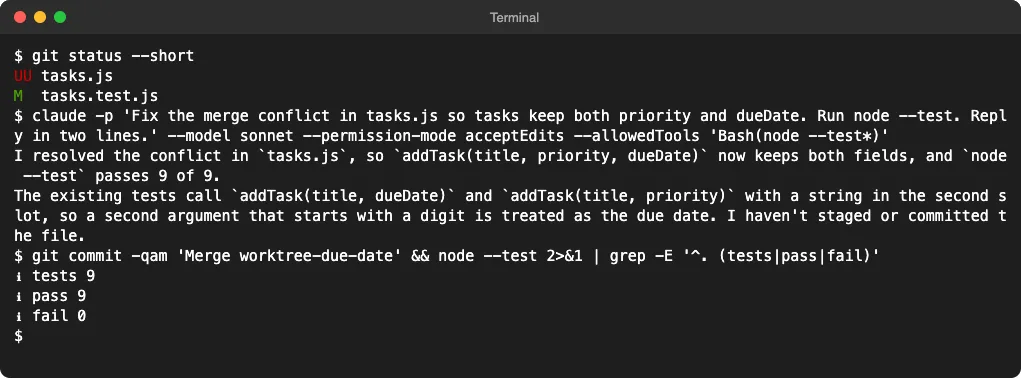
Read Claude’s note, though. The two agents had each used the second argument of addTask for something different, so the fix treats a value that starts with a digit as a date. It works, but it’s the kind of choice you’d want to review before shipping.
One tip: put the prompt before --allowedTools. That flag takes a list, so on our first try it swallowed the prompt and Claude Code exited with an error.
Step 6: Clean Up With claude rm
claude rm with a session’s ID removes it from the list. Since our branches were already pushed, it also removed each worktree and its local branch, leaving only main.
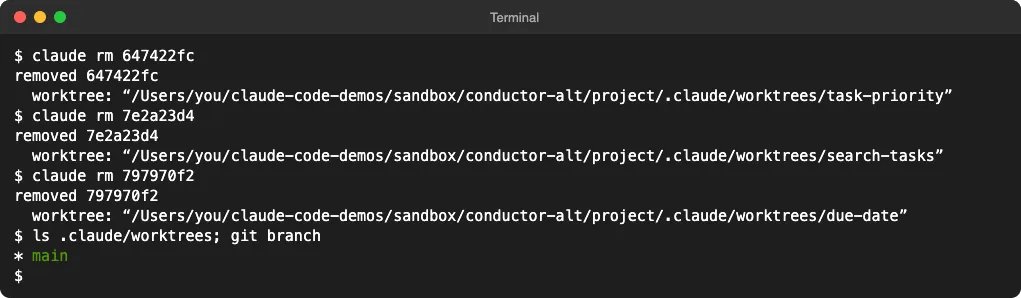
It’s careful about unsaved work. It keeps a worktree that has uncommitted changes, and it refuses to throw away commits it can’t find on a remote, as our step-by-step guide to Claude Code parallel agents shows.
Deleting a row inside agent view with Ctrl+X twice is less forgiving. It removes the worktree Claude created, uncommitted changes included, so commit first.
Prefer a GUI? Use the Claude Desktop App
If you liked Conductor because it wasn’t a terminal, the Code tab in the Claude desktop app is the closer match. We ran our test in the terminal; the desktop features below come from Anthropic’s documentation.
- Each new session can run in its own worktree. Turn on Worktree before you start it, and it lands in
.claude/worktrees/like the CLI’s. - You can open two sessions side by side in a split view.
- A diff view shows each session’s changes, and you can comment on single lines.
- After you open a pull request, the app shows its CI checks and can turn on auto-merge, with
ghinstalled.
The same .worktreeinclude file works there too, so your .env setup carries over.
Running Codex or Cursor Too?
Agent view only runs Claude Code. If your Conductor setup mixed Claude Code with Codex or other agents, you need something that works with any command.
Worktrunk is the tool we’d try first. It creates a worktree per task, starts any agent in it, and merges back with one command, which is the button agent view lacks.
For the plain git version, our guide to Claude Code worktrees covers claude -w and manual worktrees.
Our Verdict: Is Agent View a Good Conductor Replacement?
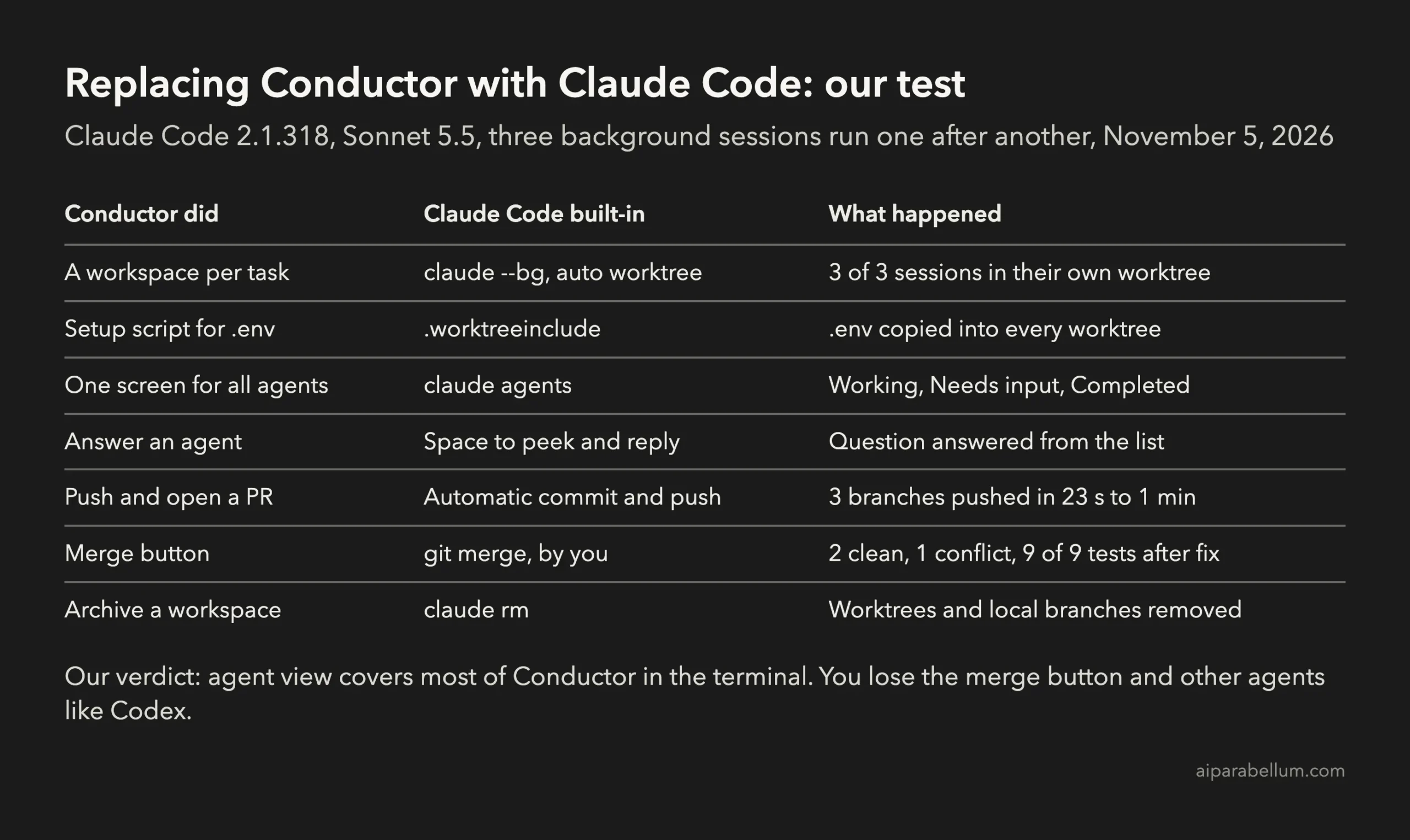
For Claude Code users, yes. Agent view did everything we relied on Conductor for: isolated worktrees, .env copied in, one screen for every agent, answers from the list and branches pushed when done.
The gaps are real, though. There’s no merge button or built-in diff viewer in the terminal, it runs only Claude Code, and it’s still a research preview.
Watch your usage too. Every background session uses your plan’s quota on its own, so ten agents use it about ten times as fast; our guide to Claude Code costs and usage shows how to keep an eye on it.
FAQ
Can I still use Conductor?
Yes, if you already have it. The local Mac app keeps working and gets new models and critical fixes until early 2027, but new users can’t sign up or download it.
Do background sessions ask before they edit or run commands?
They start in the default permission mode from your settings. To pick one for every task you dispatch, open agent view with a flag like claude agents --permission-mode plan. Our guide to Claude Code permission modes explains each one.
Do agents keep running if I close the terminal?
Yes. A supervisor process keeps them going and they survive sleep, but they stop if you shut down or restart your computer. Open the row again to resume one.
Where do Claude Code worktrees go?
Into .claude/worktrees/ inside your project, on branches named worktree- plus the session’s name. New worktrees start from your remote’s default branch unless you set worktree.baseRef to "head".
Conclusion
With Conductor winding down, the simplest Conductor alternative for Claude Code users is the one already installed: start tasks with claude --bg, watch and answer them in claude agents, copy .env with .worktreeinclude, then merge the pushed branches yourself and clean up with claude rm. In our test, three agents finished in their own worktrees, two branches merged cleanly, one conflict needed a review, and all 9 tests passed in the end. Anthropic’s agent view documentation and its guide to parallel sessions with worktrees cover every shortcut and setting, and for more tested guides, see our Claude Code tutorials, or search 500+ add-ons in the Claude Code Skills Directory.