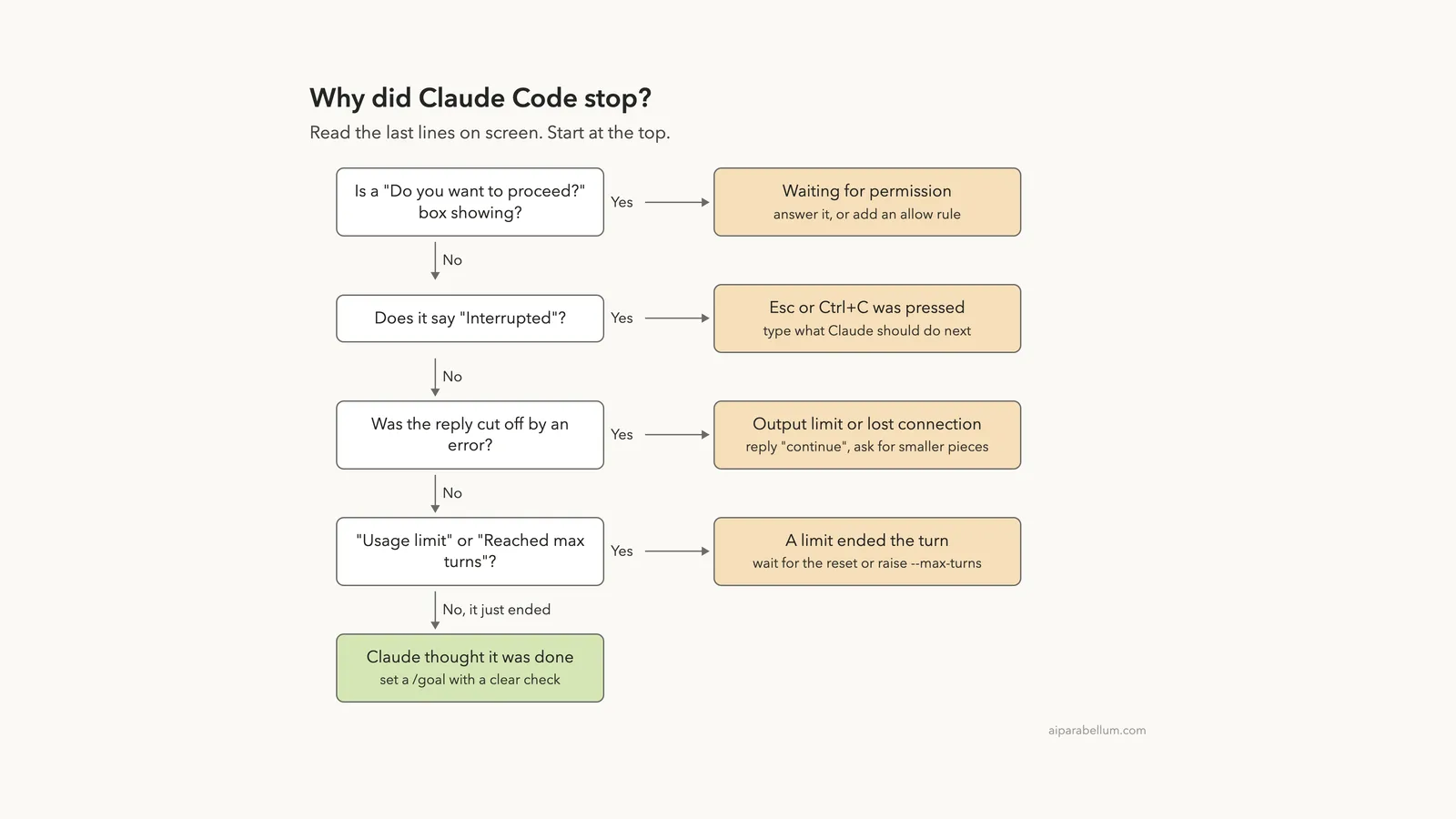
If Claude Code keeps stopping in the middle of a task, it is almost always waiting for you, not broken. The most common reason is a permission prompt: in the default Manual mode, Claude pauses at every command or edit your settings don’t already allow, and the session sits there until you answer “Do you want to proceed?”
The other usual causes are an interruption (you pressed Esc or Ctrl+C), a reply cut off by the output token limit or a dropped connection, a usage limit, a turn cap like --max-turns in print mode, or Claude simply deciding the job is done. The fixes are just as short: answer or pre-approve the prompt, reply continue after a cut-off, keep the session open through a usage-limit reset, and use /goal when you want Claude to keep going until a clear condition is met.
Below, we reproduce three of these stops for real in a small demo project, show the exact text Claude Code prints for each one, and walk through every fix step by step.
Browse all our Claude Code tutorials for more fixes and how-tos.
Tested with Claude Code v2.1.332 on macOS on November 27, 2026. Every test ran in a throwaway demo folder called notes-tidy, with three short text files and a tiny Python script.
Quick Summary
| What you see | Why Claude stopped | Quick fix |
|---|---|---|
Do you want to proceed? | It needs your permission | Answer it, add an allow rule, or use auto mode |
Interrupted · What should Claude do instead? | Esc or Ctrl+C was pressed | Type your next instruction |
Response exceeded the output token maximum | One reply got too long | Reply continue, ask for smaller pieces |
Connection lost mid-response or a sleep notice | The stream broke | Reply continue |
Usage limit reached · limit resets ... | Your plan’s limit ran out | Keep the session open; it continues after the reset |
Error: Reached max turns (1) | A turn cap in claude -p | Raise --max-turns |
Autocompact is thrashing | Context keeps refilling | Read files in smaller chunks, /compact |
| A normal reply, then nothing | Claude judged the work done | Set a /goal with a clear check |
Why Claude Code Keeps Stopping: How a Turn Ends
Claude Code works in turns. You send a prompt, Claude reads files, runs commands and edits code, and then the turn ends and control comes back to you.
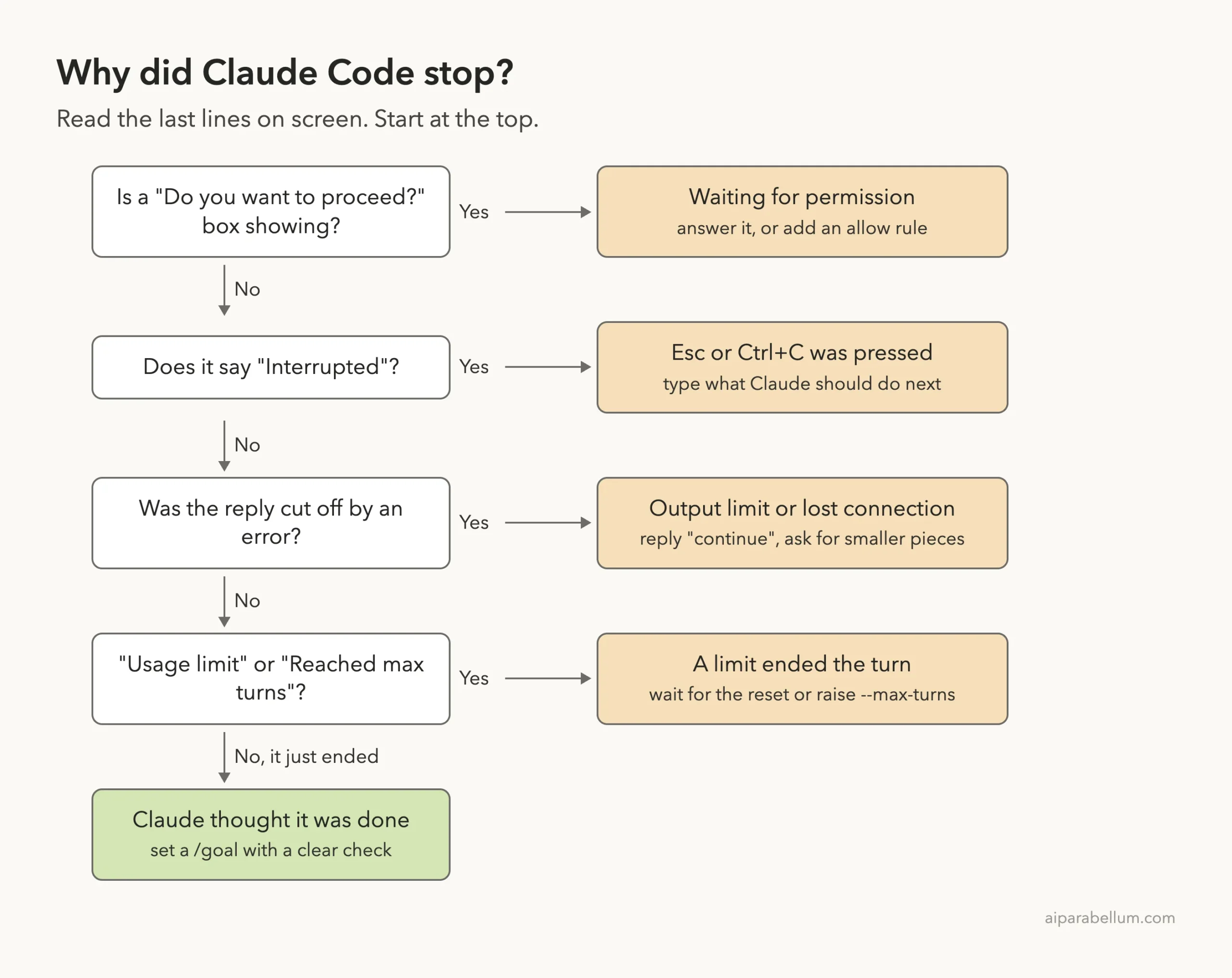
A turn can end for only a handful of reasons. Claude finished, Claude needs something from you, you interrupted it, an error or limit cut it short, or a setting capped it. So the fastest way to fix a stop is to read the last few lines on screen, because Claude Code nearly always tells you which one it was.
A stopped session is usually a waiting session. Look at the bottom of the screen before you retype anything.
Here is the decision ladder we use. Start at the top and stop at the first “yes.”
Cause 1: Claude Is Waiting for Permission
This is the big one. In the default mode, which the footer labels “manual mode on,” Claude Code asks before it runs a shell command or edits a file that your settings don’t already allow.
To see it, we started a fresh session in our demo folder and sent one prompt:
Run python3 count.py and tell me the total number of words in one line.Claude picked the right command, then stopped dead with a “This command requires approval” box. Nothing else happens until you choose an option. If you walked away for coffee, you come back to the same screen.
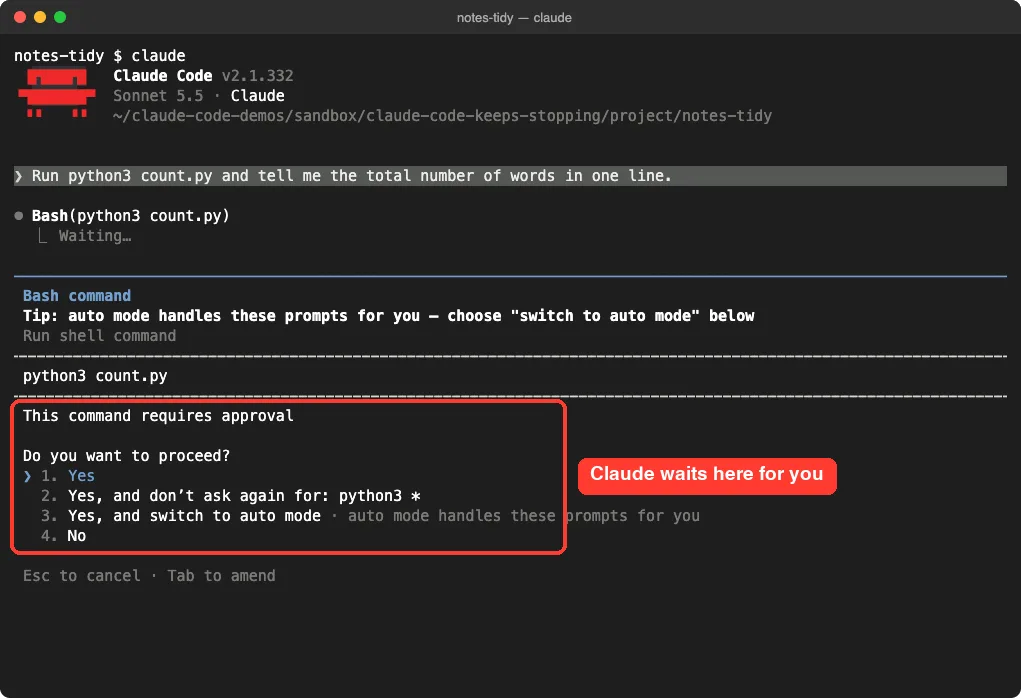
Notice the four choices: “Yes” approves this one call. “Yes, and don’t ask again for: python3 *” saves a rule so the same kind of command goes through next time. The third choice switches the session to auto mode, and “No” declines.
What happens if you press Esc instead
We pressed Esc on that prompt to show the other side. The tool call was cancelled and the turn ended with “Interrupted · What should Claude do instead?”
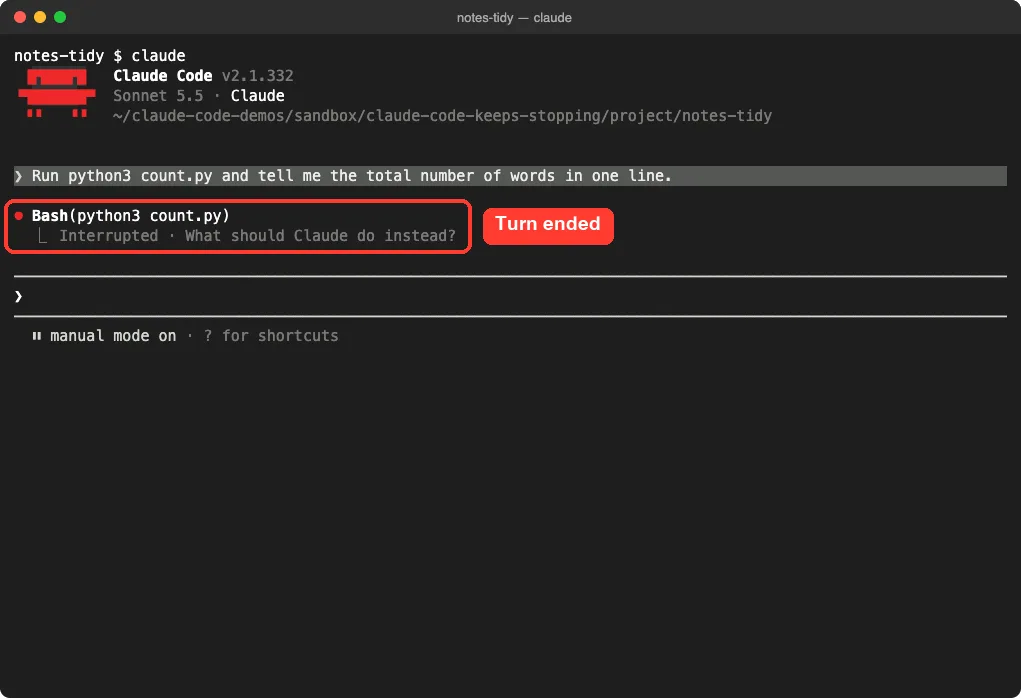
If you see this line and don’t remember pressing anything, check your terminal. Some setups send Esc by accident, and our guide on when Esc doesn’t behave covers tmux, VS Code and SSH quirks.
Fix: pre-approve the tools your task needs
The lasting fix is an allow rule. We added a project settings file at .claude/settings.json in the demo folder:
{
  "permissions": {
    "allow": [
      "Bash(python3 count.py)",
      "Bash(grep *)",
      "Edit(notes/**)"
    ]
  }
}
Then we started a new session and sent the exact same prompt. This time Claude ran the script and answered in about a second, with no prompt at all.
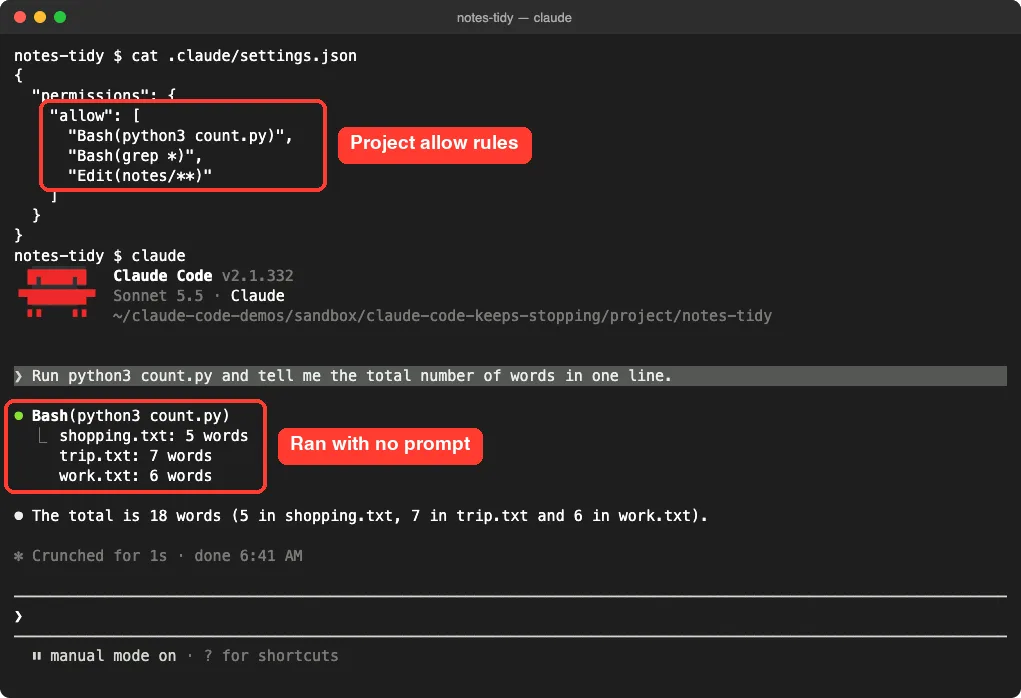
A few notes from Anthropic’s permissions docs that save headaches:
Edit(notes/**)is relative to your working folder, so it matches onlynotes/and the files under it.- An Edit rule also covers Write, so you don’t need a separate
Write(...)rule. - You can view and change rules inside a session with
/permissions. - Keep allow rules narrow. A rule like
Bash(python3 count.py)is much safer than allowing every command.
For the bigger picture on rules and scopes, see our guide to Claude Code permissions.
Fix: switch permission modes for long tasks
Press Shift+Tab to cycle modes, or start with a flag such as claude --permission-mode auto. Accept-edits mode lets file edits through but still asks about other actions. Auto mode approves tool calls with background safety checks, which is what you want for a long unattended task.
Our permission modes guide explains which one fits which job. Only use bypass mode inside an isolated container or virtual machine.
Cause 2: The Reply Was Cut Off
Sometimes Claude stops in the middle of a sentence or right before a tool call. That usually means the response itself was cut short, not that Claude gave up.
The output token limit
If one reply grows too long, you see “Response exceeded the output token maximum.” Anthropic’s error reference gives three fixes:
- Reply
continuein an interactive session. Any text Claude already wrote stays in the conversation. - Ask for the work in smaller pieces, such as one file or one section per reply.
- If the message tells you to, raise
CLAUDE_CODE_MAX_OUTPUT_TOKENS. Claude Code lowers any value above a model’s cap to that cap.
We cover this one in depth in our post on the 32000 output token error.
A dropped connection or a sleeping laptop
Mid-response notices such as “Connection lost mid-response” or “Your computer went to sleep mid-response” also end the turn early. Claude Code keeps every block that finished before the break but drops an unfinished last block.
The fix is the same: read what’s on screen, then reply continue so Claude picks up from its last completed block. The docs add that in non-interactive runs (-p, the Agent SDK, cloud sessions), Claude Code continues text-only cut-offs on its own up to three times in a row. See our guide to the connection lost error if it keeps happening.
Cause 3: A Usage Limit Paused the Task
On a claude.ai subscription, a usage limit can stop Claude mid-task. The bottom of the session then shows two lines like these, according to the interactive mode docs:
Usage limit reached · limit resets 3:45pm
Continuing automatically at 3:45pm · Esc to cancel
The key is to keep the session open. In interactive sessions on v2.1.234 or later, Claude Code waits and then prompts Claude to pick the task up where it stopped after the reset. If you exit, the wait does not restart when you resume.
Some details worth knowing:
- After three automatic continuations, it stops and shows “Automatic continue stopped after repeated usage-limit hits.” Run
/rate-limit-optionsto choose what to do next. - If your computer slept for more than about 30 minutes and the limit reset meanwhile, you’ll see “Press enter to continue.”
- Continued tasks still ask for permissions, so a task can stop on a prompt again while you’re away.
- API keys and usage-based billing have no reset to wait for, so this wait isn’t offered there.
To turn the behavior off, set autoContinueAtUsageLimit to false in your user settings or flip it in /config. For reset timing and plan details, read our usage limit guide.
Cause 4: A Turn Cap in Print Mode
If you run Claude Code from scripts with claude -p, a turn cap can end the job early. The --max-turns flag limits agentic turns in print mode only, and there is no limit by default.
We tested it with a task that needs at least two steps: run the script, then write a file. With --max-turns 1, Claude Code printed “Error: Reached max turns (1),” exited with code 1, and wrote nothing. With --max-turns 5, the same task finished and total.txt held the answer.
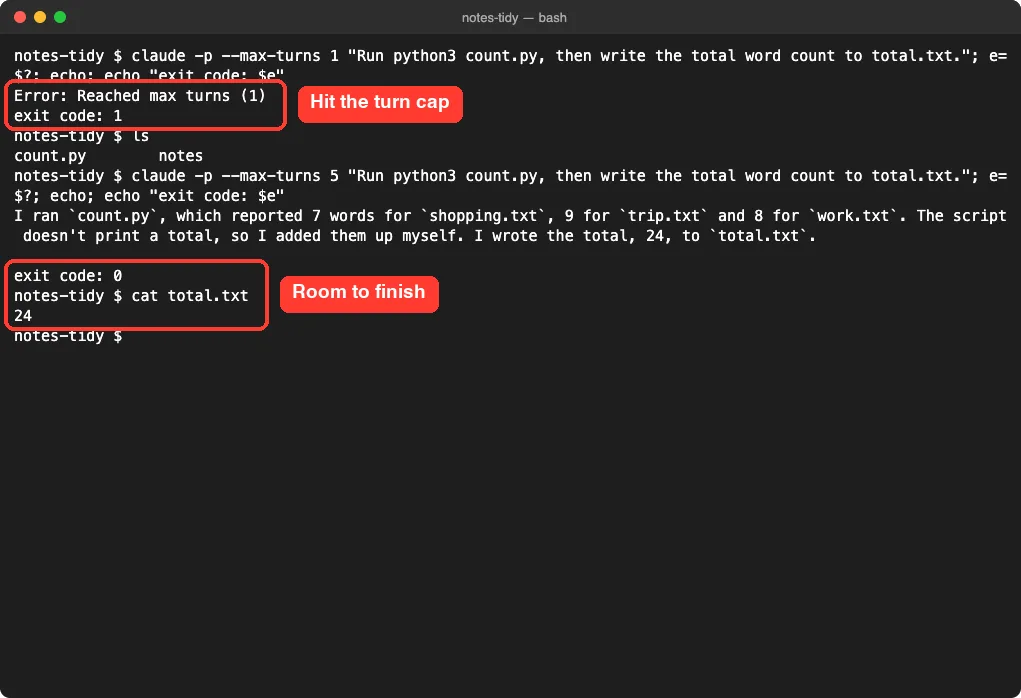
Also check for the CLAUDE_CODE_MAX_TURNS environment variable. It sets the same cap when no flag is passed, and a flag wins when both are set. The CLI reference lists the flag, and our claude -p fixes cover other print-mode surprises.
Cause 5: Claude Decided It Was Done
Sometimes there is no error at all. Claude does part of a big job, writes a summary, and hands control back because it believes the task is complete or wants you to check before going on.
That is normal behavior, not a bug. Claude ends a turn when it judges the work done. When you want it to keep going until something specific is true, the documented tool is /goal.
How /goal keeps Claude Code going
Run /goal followed by a condition, and Claude starts working right away. After every turn, a smaller, faster model reads the conversation and decides whether your condition is met. If not, Claude starts another turn on its own.
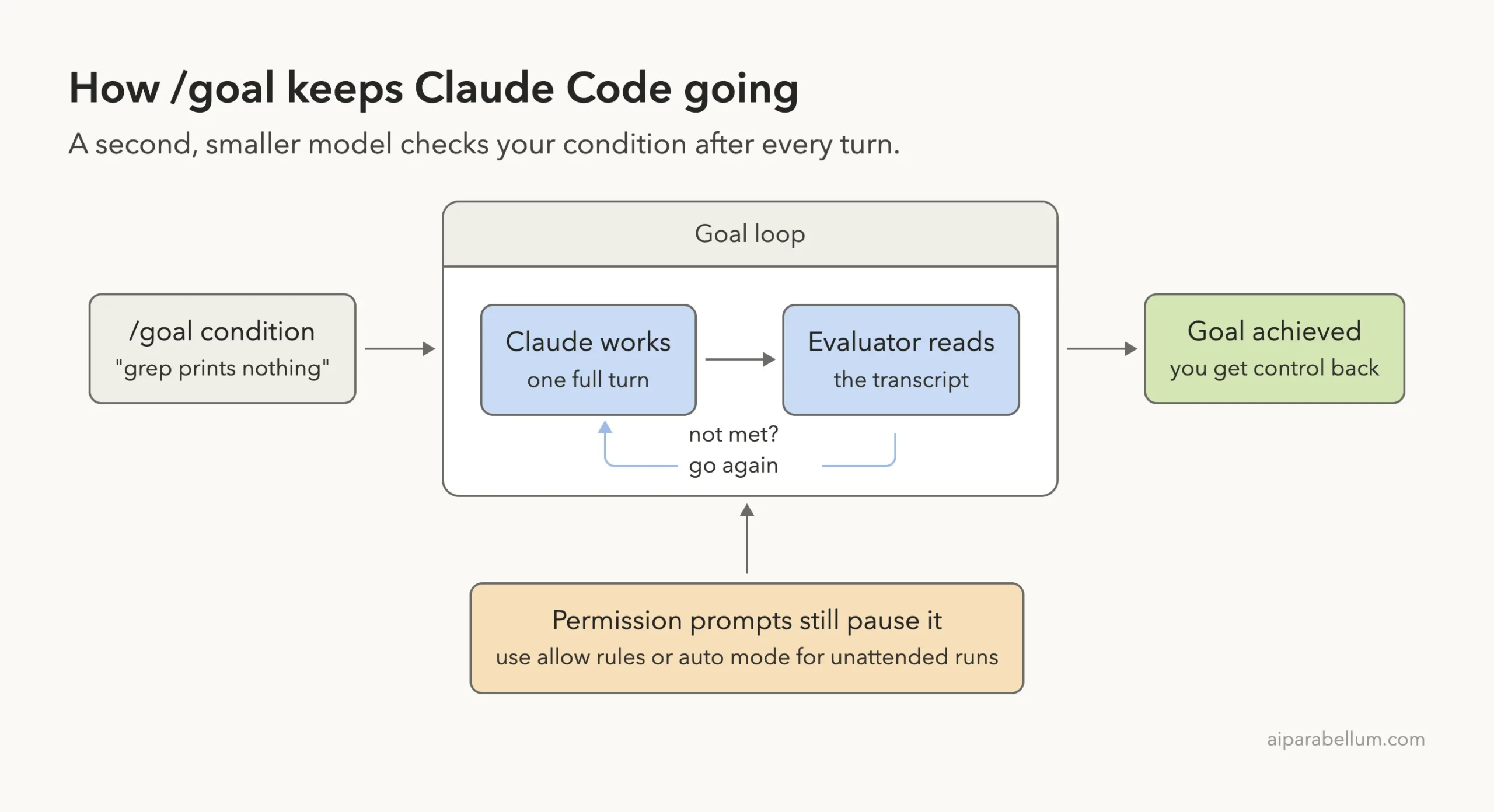
According to the /goal docs, the goal clears when the condition is met, when the evaluator judges it impossible, or when a turn fails on an error you have to fix, such as an exhausted credit balance. You can also stop it any time with /goal clear.
We tried it: /goal in Manual mode still stops
We gave the demo project a small goal: every note file should start with a # title line. Here is the exact condition we used:
/goal every .txt file in notes/ starts with a first line beginning with '# ' that names the note. Prove it by running grep -L '^# ' notes/*.txt, which must print nothing. Don't change any other line. Or stop after 4 turns.In Manual mode, the goal started fine, but Claude chose a shell loop with a variable in it. Our Bash(grep *) rule didn’t cover that command, so Claude Code asked for permission and the goal sat waiting.
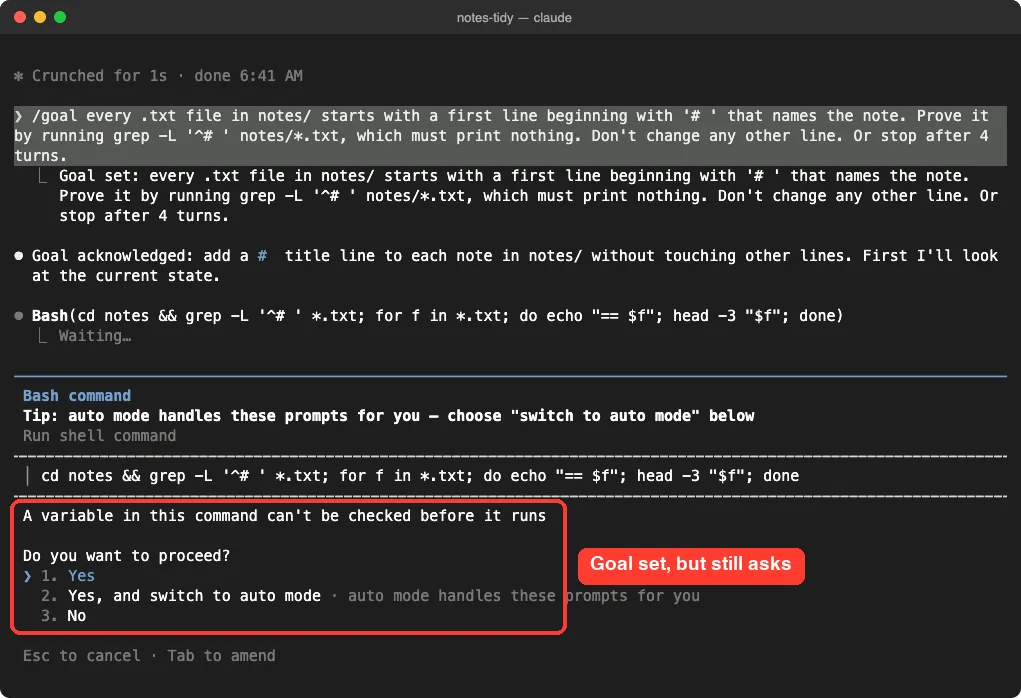
This matches the docs: a goal doesn’t change your permission mode, and in Manual mode Claude still asks before tool calls your settings don’t allow. It is the most common reason a “keep going” setup still stops.
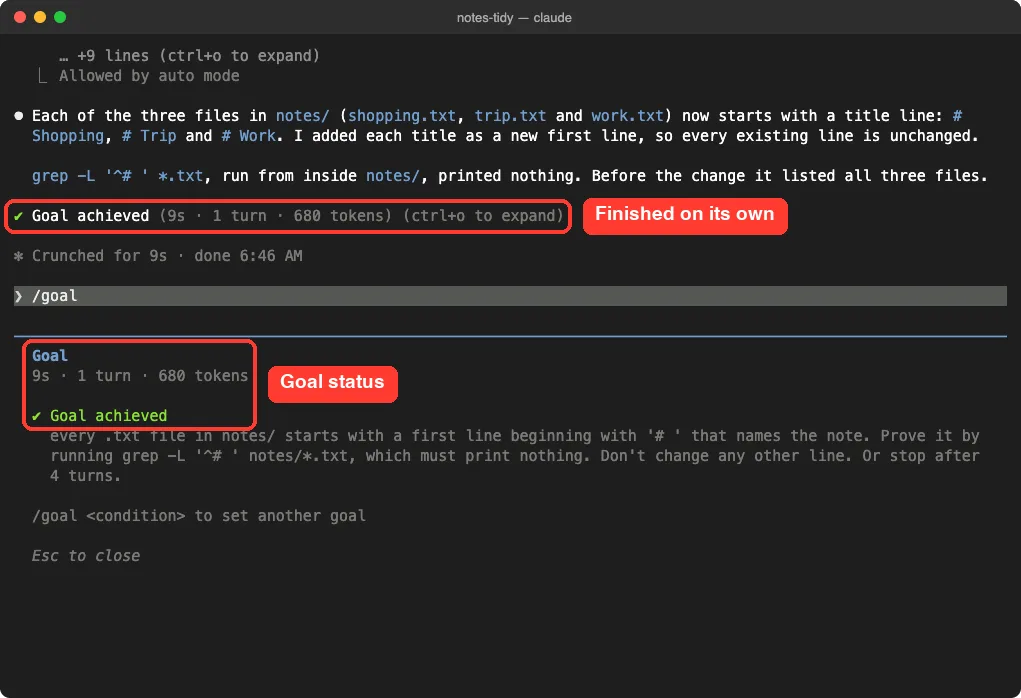
The same goal in auto mode finished on its own
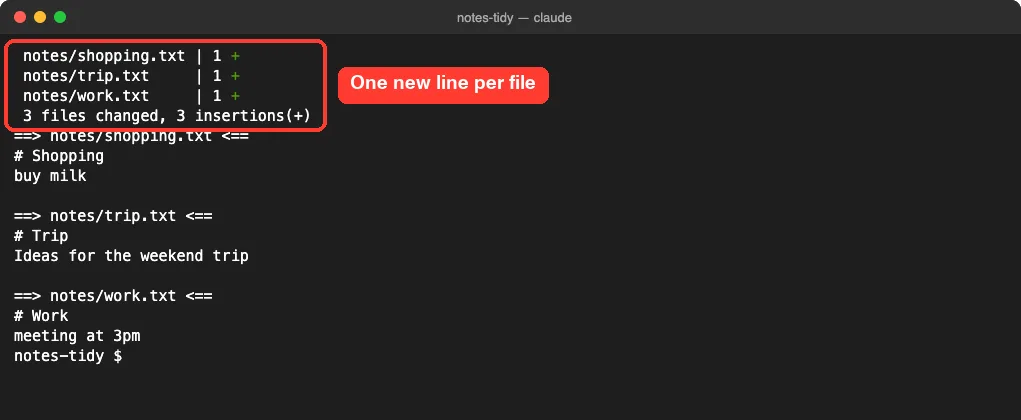
We reset the files and ran the same condition in a session started with --permission-mode auto. Claude checked the files, added the three title lines, ran the grep check, and the evaluator marked it done. The status read “Goal achieved,” with 9 seconds, 1 turn and 680 tokens.
A quick git diff --stat confirmed the change: one new line per file and nothing else touched.
Our small task needed only one turn, so this test proves the setup, not a long run. For bigger jobs, the docs suggest one measurable end state, a stated check, and a turn or time clause such as “or stop after 20 turns.” Our full /goal guide goes deeper.
/goal vs /loop vs a Stop hook
| Option | Next turn starts when | Best for |
|---|---|---|
/goal | The previous turn finishes | Work with a checkable end state |
/loop | A time interval passes | Repeating checks, like polling a build |
| Stop hook | The previous turn finishes | Custom rules in every session |
If you need repetition on a timer instead, see our /loop tutorial.
Other Reasons Claude Code Stops
Context fills up and compaction can’t keep up
If a huge file or tool output keeps refilling the context window, Claude Code stops with “Autocompact is thrashing” rather than looping forever. The troubleshooting docs suggest reading the file in smaller chunks, running /compact with a focus, moving the work to a subagent, or running /clear. Our autocompact fix guide walks through each.
The session looks frozen
If nothing moves at all, press Ctrl+C to cancel the current operation. If that fails, close the terminal and run claude --resume in the same folder to pick the session back up. Our post on Claude Code stuck on thinking covers slow or silent turns.
Background work is still running
With a goal active, if a subagent or background command is still running when a turn ends, Claude Code skips that turn’s check and waits. When the work finishes, the result comes back as a new turn, so it may look paused while it is really waiting.
How to Keep Claude Code Going: Step-by-Step
- Read the last lines on screen and match them to the table at the top.
- If a permission box is showing, answer it, then add a narrow allow rule for that command.
- For long tasks, switch to accept-edits or auto mode with
Shift+Tab. - If a reply was cut off, type
continueand ask for smaller pieces next time. - On a usage limit, leave the session open and let it continue after the reset.
- In scripts, raise
--max-turnsor unsetCLAUDE_CODE_MAX_TURNS. - When Claude stops because it thinks it’s done, set a
/goalwith a clear, checkable condition.
Try It Yourself
Make a throwaway folder with a few small text files, run git init and commit them, then start claude --permission-mode auto. Paste this goal and watch it finish without a prompt:
/goal every .txt file in this folder starts with a first line beginning with '# ' that names the file. Prove it by running grep -L '^# ' *.txt, which must print nothing. Don't change any other line. Or stop after 4 turns.Then run it again in Manual mode and notice where it pauses. Seeing both side by side makes the permission cause easy to spot later.
Common Mistakes
- Retyping the whole prompt when Claude was just waiting on a permission box.
- Closing the terminal during a usage-limit wait, which cancels the automatic continue.
- Expecting
/goalto skip permission prompts. It doesn’t change your mode. - Writing a goal the evaluator can’t check, like “make it better.” It only reads the conversation and doesn’t run commands itself.
- Adding a very broad allow rule, such as every Bash command, just to stop the prompts.
- Leaving
--max-turns 1in a script copied from an example.
Pro Tips
- Pick “Yes, and don’t ask again” on prompts you trust. It saves a rule for you.
- Put a turn clause in every goal, like “or stop after 20 turns,” so it can’t run forever.
- Run
/goalwith no arguments to see the condition, turn count, tokens spent and the evaluator’s latest reason. - Commit before long unattended runs, so you can review or undo everything with Git.
- For print mode goals, add
--output-format stream-json --verboseso a long run doesn’t look stuck.
Claude Code Keeps Stopping Cheat Sheet
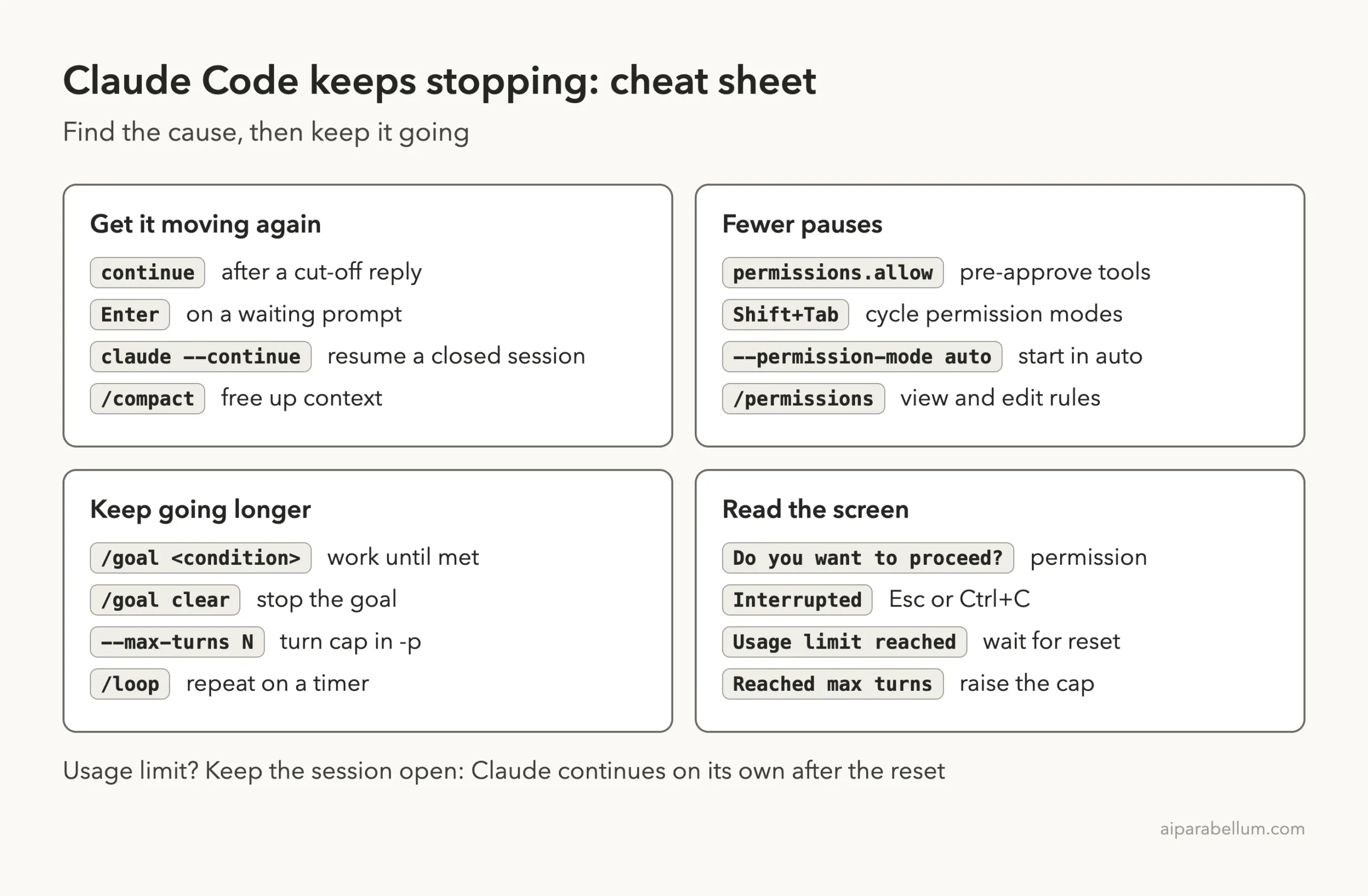
For other messages you might hit along the way, see our list of common Claude Code errors.
Frequently Asked Questions
Why does Claude Code keep stopping and asking for permission?
Because the default Manual mode asks before any command or edit your settings don’t allow. Add narrow allow rules in .claude/settings.json, choose “Yes, and don’t ask again,” or switch to accept-edits or auto mode.
How do I make Claude Code continue where it stopped?
If the reply was cut off, type continue. If you closed the session, run claude --continue or claude --resume in the same folder and send continue.
Can Claude Code keep working until a task is finished?
Yes, with /goal. It checks your condition after every turn and keeps going until it’s met, judged impossible, or cleared. Run it in auto mode if you want it to run without prompts.
Does Claude Code continue after a usage limit resets?
On a claude.ai subscription in an interactive session on v2.1.234 or later, yes, as long as the session stays open. It stops auto-continuing after three hits in a row.
Is there a maximum number of turns in Claude Code?
Not by default. A cap applies only if you pass --max-turns in print mode or set CLAUDE_CODE_MAX_TURNS.
Conclusion
When Claude Code keeps stopping mid-task, the screen almost always tells you why: a permission box waiting for an answer, an “Interrupted” line, a cut-off reply, a usage limit, a turn cap, or a turn Claude simply considered finished. Answer or pre-approve prompts with narrow allow rules, reply continue after cut-offs, keep the session open through a limit reset, and use /goal in auto mode when you want Claude to keep going until a clear check passes. For the full list of commands, see Anthropic’s commands reference, and visit our Claude AI page for more on Claude.